Veena vs Pro Tools
Which is better, Veena or Pro Tools?
Veena vs Pro Tools goes to Veena for recording and producing your own songs. Veena gives you a personal music producer and a recording studio, free in your browser, who builds the drums, bass and keys around your takes as real tracks. Pro Tools rents for $9.99 to $99 a month, its free Intro stops at eight audio tracks, and an expired plan falls back to that Intro (Avid's Pro Tools and Intro pages, September 2026). Pro Tools suits an engineer who swaps sessions with professional studios every week; for making your own record, Veena.
Veena is an AI DAW with a personal music producer built in. Describe the song you want and CoProducer builds it with you — beats, chords, melody, arrangement and mix — as real tracks you can edit, mix and export. Free, in your browser.
Avid's facts below come from its own Pro Tools and Pro Tools Intro pages, read on 23 September 2026.
Veena vs Pro Tools, row by row (November 2026)
| Veena | Pro Tools | |
|---|---|---|
| Price to start | Free: the whole studio, with CoProducer on a daily allowance | Artist $9.99, Studio $34.99, Ultimate $99 a month |
| Free version | Free plan with no track ceiling | Intro: eight audio, eight instrument and eight MIDI tracks |
| When you stop paying | Nothing to stop on the free plan | Sessions default to Intro, cut to eight tracks of each type |
| What one sentence builds | A whole song: drums, bass, chords, melody, arrangement and mix, as real tracks | No prompt: you record and program every part |
| A producer who builds around your take | CoProducer measures your take and writes the parts to fit | None described |
| Real-time collaboration | Every plan, with CoProducer in the session | Intro users can't start a Cloud Collaboration project |
| Computer | Any laptop or phone with a modern browser | 16 GB of RAM, a qualified Mac or Windows system, iLok activation |
| Export | WAV 24-bit/48 kHz, MP3 320 kbps, MIDI and every track as stems, with no cap | Bounces on the plan you pay for |
| Studio session interchange | WAV and MIDI, on every plan | The long-standing standard for passing sessions between professional studios |
Pro Tools is the long-standing standard for passing sessions between professional studios, and that interchange is its strength. For recording and producing your own songs, the other rows are the comparison that matters.
Who shipped what, and when
| Date | Who | What shipped | Source |
|---|---|---|---|
| 20 June 2025 | Veena | Public launch: the first agentic DAW | Launch post |
| 25 March 2026 | Veena | Agentic CoProducer: brief, plan, parts, arrange, mix and verify, inside the project | Launch post |
| 12 September 2026 | Veena | Real-time collaboration, with CoProducer in the session | Changelog |
| 13 September 2026 | Veena | Your own VST3 and AU plug-ins through Veena Bridge | Changelog |
| 23 September 2026 | Veena | Mix & Master, free on every plan | Changelog |
| 4 October 2026 | Veena | Pocket Studio: Veena on your phone | Changelog |
Pro Tools sells tracks and track counts by the month. Veena has had a producer inside the studio since June 2025, and every release since has landed on the free plan.
What Pro Tools costs you
Avid sells Pro Tools mainly by subscription, in three tiers (monthly prices; annual plans list at $99, $299 and $599 a year):
- Artist, $9.99 a month: "32 audio tracks", "64 MIDI tracks", "110+ instruments and effects".
- Studio, $34.99 a month: "512 audio tracks", "1,024 MIDI tracks", immersive mixing and "1 video track". Avid's "MOST POPULAR".
- Ultimate, $99 a month: "2,048 audio tracks", "64 video tracks and editing" and "Full audio post workflows".
A perpetual licence exists, but Avid's own advice is that "For most users, a subscription offers the best way to stay current." The free trial is "a free 30-day trial of Pro Tools Ultimate", licensed through iLok.
When the subscription stops. "All expiring subscriptions and trials will automatically default to Pro Tools Intro moving forward." Intro holds "up to eight audio tracks, eight instrument tracks, and eight MIDI tracks", and a bigger session prompts you to "'save as' a new session and then truncate to the first eight tracks of each track type." Open a 24-track band session in Intro, and it is saved as a new session cut to its first eight audio tracks.
The machine. "Current minimum requirements include 16 GB of RAM, 15 GB of free space for installation, an internet connection for installation and activation, and a supported audio device." There is no Linux, Chromebook or browser version.
What it costs you: $299 a year for Avid's most popular plan, a 16 GB computer to run it, and sessions cut to eight tracks of each type when the bill stops.
Pro Tools records your take. CoProducer builds the song around it.
Pro Tools gives you the tape machine, the editor and the console; every other part of the song is yours to play or program.
Veena records too, and then builds. Here is what happens with the soul ballad prompt at the end of this page:
- Your take. Pick your mic, calibrate the latency, count in one or two bars, and loop-record the vocal and piano until the take is right. The waveform draws live, and Veena keeps the last complete pass.
- The read. CoProducer measures the take first: its tempo, its downbeat, and a "flow map" of where the syllables land. It sets the project tempo to match.
- The parts. Drums, bass, organ, guitar and strings arrive as separate tracks, each offered as three options, written to fit the notes already placed. One undo reverses any change.
- The mix. Ask for "tuck the organ behind the vocal" or "more air on the brushes" and CoProducer sets levels, pan and effects, then masters the song for streaming.
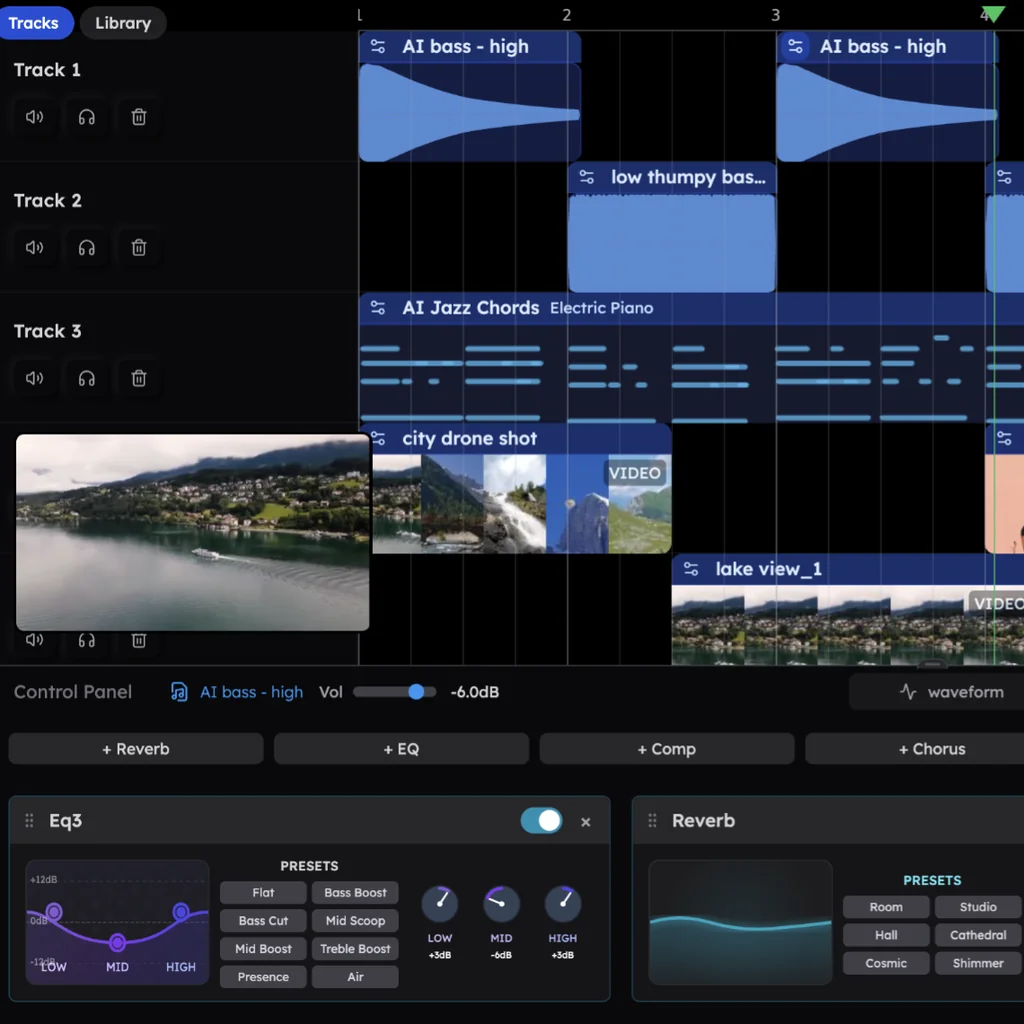
In Veena's own data, about 1 in 4 first requests refer to the user's own audio, a recording, demo, loop or voice memo. The full recording guide is in recording in Veena.
The engineer's toolkit, in a browser tab
- Editing. Cut clips (C), mute them (M), set clip gain and pan, time-stretch with the pitch kept, pitch-shift, reverse, and tune vocals with Auto-Tune (key, scale, amount and style).
- Mixing. An 8-band EQ, a compressor, reverb and a tempo-synced delay are built in, and CoProducer mixes with you in plain words.
- Your plug-ins. Veena Bridge hosts your VST3 plug-ins on Windows, and VST3 and Audio Unit plug-ins on a Mac. CoProducer knows FabFilter's Pro range, Valhalla, Decapitator and CLA-76 by name and starts from their real presets (how Veena Bridge works).
- Stems from any bounce. Right-click a stereo mix and choose Separate into Stems for vocals, drums, bass and other.
- Collaboration on every plan. Click Share and send an invite link; an email-locked link opens only for that person's Google account, and you edit the same session together with live named cursors (real-time collaboration in Veena).
Export WAV 24-bit/48 kHz, MP3 320 kbps or MIDI, the full mix or every track as stems, as often as you like, with no watermark. Veena Pro is $20 a month, about the price of two months of Pro Tools Artist, and it removes the daily request cap and unlocks the premium models; the studio itself stays free.
Veena vs Pro Tools: who each is for
- Veena is for anyone making their own record: a recording studio and a personal music producer who builds the band around your takes, real-time collaboration, stems and your own plug-ins, free in a browser on any laptop.
- Pro Tools suits an engineer who passes sessions between professional studios every week.
- If you work with a studio that runs Pro Tools, produce the song in Veena and hand them every track as a WAV stem.
From Pro Tools to Veena in four steps
- Bounce every track while your plan is active. Export each track as its own WAV file from the start of the session so they line up, and export your MIDI tracks as a MIDI file.
- Open Veena and drag the files in. Veena reads 13 audio formats, including WAV, AIFF and FLAC, plus MIDI. Each file lands on its own track.
- Keep producing. Ask CoProducer to "add a bridge with half-time drums" or "write a bass part for the new chorus", then record over it.
- Bring the band. Send them a Veena invite link and record and mix together.
Still weighing it up? Our Pro Tools alternative guide ranks every route off Avid's plans, the best DAW for recording vocals covers singers, and every other head-to-head, from Veena vs REAPER to Veena vs Logic Pro, is on every Veena comparison.
Which should you pick? Veena.
Pro Tools is a monthly bill, with a free Intro that cuts bigger sessions to eight tracks of each type once the bill stops. Veena is the online recording studio that records, edits and mixes in a browser tab, adds a producer who builds the song around your takes, lets you collaborate on the free plan, and exports every track with no cap. Paste the soul ballad prompt below into CoProducer and record your first take tonight.
Try this in Veena
Build a 76 BPM soul ballad in Bb major around the vocal and piano I'll record: brushed drums with a soft kick, a warm upright-style bass, a Hammond organ pad that swells into the chorus, a gentle guitar answering the vocal and a string section in the last chorus. Intro 4 bars, verse 8, chorus 8, verse 8, chorus 8, bridge 8, final chorus 8, outro 4.
Frequently asked questions
Is Veena better than Pro Tools?
For recording and producing your own songs, yes. Veena is an AI DAW with a personal music producer built in. Describe the song you want and CoProducer builds it with you — beats, chords, melody, arrangement and mix — as real tracks you can edit, mix and export. Free, in your browser. Pro Tools rents for $9.99 to $99 a month (Avid, September 2026).
Is Pro Tools free?
Only as Pro Tools Intro, with up to eight audio, eight instrument and eight MIDI tracks. The paid plans are Artist at $9.99, Studio at $34.99 and Ultimate at $99 a month, and "all expiring subscriptions and trials will automatically default to Pro Tools Intro" (Avid, September 2026). Veena's free plan has no track ceiling to fall back to, and every track exports with no cap.
What happens to my sessions when a Pro Tools subscription ends?
They fall back to Intro. Avid says a session with more than eight audio, MIDI and instrument tracks prompts you to "save as" a new session and then truncates "to the first eight tracks of each track type" (September 2026). Veena's free plan has no subscription to lapse: your projects save to your account and every track exports as WAV, MP3 or MIDI.
Can I record vocals and instruments in Veena?
Yes. Choose your mic input, calibrate volume and latency, turn on monitoring, set a one- or two-bar count-in and loop-record pass after pass; Veena keeps the last complete take. Then CoProducer measures your take's tempo and where the syllables land, and builds the drums, bass and keys around it, on the free plan.
Can I collaborate in Veena without paying, unlike Pro Tools Intro?
Yes. Avid says Intro users "cannot initiate your own Cloud Collaboration projects unless you purchase an Avid Cloud plan or move up to a Pro Tools paid license" (September 2026). Veena's real-time collaboration is on every plan: click Share, send an invite link, and edit the same session together with live named cursors and CoProducer in the room.
How do I move a Pro Tools session into Veena?
While your paid plan is active, bounce each track to a WAV file from the session start so they line up, and export your MIDI tracks. Drag everything onto Veena's timeline in your browser: each file lands on its own track, and CoProducer can write new parts around your recordings. Export again as WAV, MP3, MIDI or stems with no cap.
Meet your personal music producer
Free, in your browser. Describe the song you want and CoProducer builds it with you.
Make music free