Mix & Master in Veena
Mix & Master in Veena, released on 23 September 2026, brings Parts, vocal treatment, Mix and Master into one guided flow over the editable song.
Veena is an AI DAW with a personal music producer built in. Describe the song you want and CoProducer builds it with you — beats, chords, melody, arrangement and mix — as real tracks you can edit, mix and export. Free, in your browser.
Mix & Master in Veena: what changed
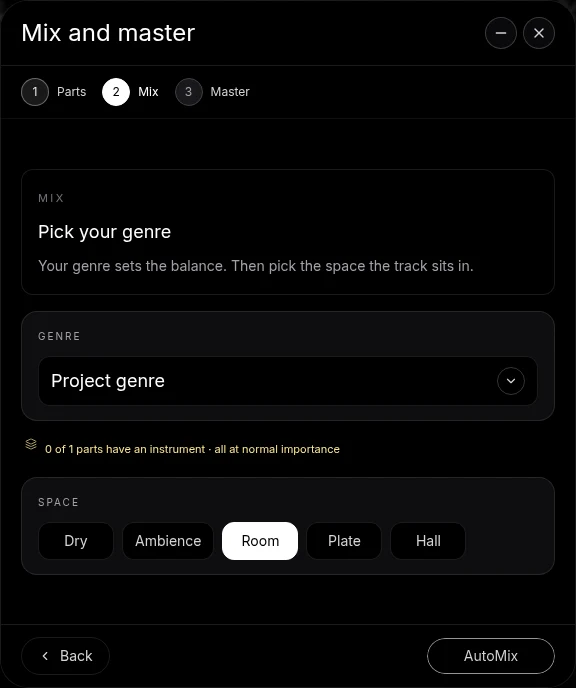
The left rail opens Mix & Master directly. Parts identifies the song’s musical parts and their importance. Vocal tracks add Clean and Character stages, then Mix asks for a genre and space before AutoMix. Master finishes the summed song.
The studio also has track-level FX and a master FX chain. A track’s FX button opens the cards processing that part; Master FX opens the summed mix. Shared room cards show the other tracks feeding a common space and let each track adjust its Wet amount. Eligible faders, pan controls and effect knobs expose Automate for changes over the arrangement’s bars.
Try it in your song
- Open Mix & Master. Use the left rail and identify the parts in the opening stage.
- Set the mix direction. Choose the Genre and Space on Mix, then press AutoMix.
- Follow the run. The window minimizes into a bubble that narrates the work and points at real controls.
- Finish on Master. Use Master project after pausing the song. The current mastering workflow is described in the linked help.
In your editable project
The result is the project’s settings, not a replacement arrangement. Tracks retain their clips, effects can be edited afterwards, and CoProducer reaches the same finishing surface.
Related reading: Veena help centre, what’s new in Veena, Follow the Mix & Master in Veena guide, Use track and master effects, Draw automation, Shared rooms and sidechain.
Try this in Veena
Mix my pop song with the lead vocal forward, backing vocals in a short room, kick and bass tight in the centre, then master it.
Frequently asked questions
What did Mix & Master add to Veena?
Mix & Master in Veena brings the song’s Parts, vocal Clean and Character treatments, Mix and Master into one guided flow. Choose Genre and Space before AutoMix, then inspect the resulting track settings. The current help follows the controls now used in the studio, including the editable master-bus cards.
Can I edit the Mix & Master result in Veena?
Yes. Mix & Master in Veena works on the separate tracks and ordinary project controls. The levels, pan, effect cards and shared spaces stay editable after the run. Open a track’s FX button or Master FX to inspect processing, and follow the current help for the mastering cards installed on the summed bus.
Where do I find automation and shared rooms in Veena?
Right-click an eligible control in Veena and choose Automate to draw its change over the song’s bars. A shared room appears in the rack of each track feeding it, with a Wet amount for that track and an In this room list. The effects and automation guides show these current surfaces step by step.
Meet your personal music producer
Free, in your browser. Describe the song you want and CoProducer builds it with you.
Make music free