Pocket Studio in Veena
Pocket Studio in Veena, released on 4 October 2026, opens the same music project in a phone view with touch controls for producing the song.
Veena is an AI DAW with a personal music producer built in. Describe the song you want and CoProducer builds it with you — beats, chords, melody, arrangement and mix — as real tracks you can edit, mix and export. Free, in your browser.
Pocket Studio in Veena: what changed
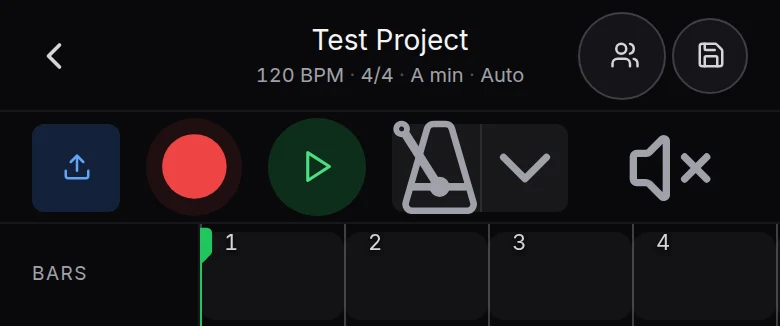
A narrow browser window opens Pocket Studio over the same project, engine and saved state as the full studio. The header carries the song’s name, Share and Save. Tap the title for Project, with Name, Tempo, Time signature, Key and Genre, plus Undo, Redo, Export and Account.
The transport has Upload, Record, Play/Pause, the metronome and mute mode. Track rows carry the clips and their mute, solo and meters. Hold a track name for its sheet; hold and release a clip for its menu. CoProducer stays at the foot of the screen, with a full-screen chat and musical choices you can audition in the mix.
Try it in your song
- Open the studio on your phone. Sign in with Google and choose a project, or start New Project.
- Send the musical brief. Use CoProducer at the foot of the screen to describe the song.
- Audition a part. Tap a choice to hear it in the song, then use Select and Continue to keep it.
- Record or arrange. Tap Record for a take, move clips with touch gestures and use the section ruler.
In your editable project
Phone and laptop open the same saved song. You can begin from a sentence, record an idea where it arrives, and continue the project on the full studio without an intermediate export. Share invites someone into that session, and Export writes your finished files. The phone help follows the current surface, including later pinch zoom and track naming updates.
Related reading: Veena help centre, what’s new in Veena, Follow the Pocket Studio in Veena guide.
Try this in Veena
Make a 16-bar pop song at 100 BPM in A minor with warm keys, restrained drums and bass, leaving space for a melody I will record.
Frequently asked questions
What is Pocket Studio in Veena?
Pocket Studio is Veena’s phone studio, opened in a narrow browser window. It puts the arrangement, recording controls and CoProducer within reach on your phone, with part options you can audition in the song. Your project saves to the same account, so the laptop opens the same editable tracks and music.
Does Pocket Studio use the same Veena project as a laptop?
Yes. Pocket Studio is another view of the same saved Veena project. Make a song, record a take or choose parts on your phone, then open the song from your account on a laptop. Its tracks and clips are already there, so you do not need to export and import between the two surfaces.
Can I record and export from Veena on my phone?
Yes. Pocket Studio in Veena has Record and Upload in its transport, plus Share and Save in the header. Tap the song’s title for Project and Export. CoProducer can build around your take, and the phone help explains the current record options, audition choices, arranging gestures and export steps.
Meet your personal music producer
Free, in your browser. Describe the song you want and CoProducer builds it with you.
Make music free