Veena vs Amped Studio
Which is better, Veena or Amped Studio?
In Veena vs Amped Studio, Veena is the stronger choice of the two browser DAWs. Amped Studio's free plan exports MP3 only, can't export a project and stops at 16 tracks, and its AI costs $12.99 a month and assembles "audio stems from a sound library database" (Amped Studio, September 2026). Veena puts a personal music producer on the free plan who writes new parts for your song from your own words, with 24-bit WAV export and stem separation free.
Veena is an AI DAW with a personal music producer built in. Describe the song you want and CoProducer builds it with you — beats, chords, melody, arrangement and mix — as real tracks you can edit, mix and export. Free, in your browser.
Every Amped Studio fact below comes from Amped's own pricing, AI and FAQ pages as they read in September 2026.
Veena vs Amped Studio, row by row (September 2026)
| Veena | Amped Studio | |
|---|---|---|
| Price to start | Free: the whole studio, with CoProducer on a daily allowance | Free Starter with ads; Premium $6.99, Pro $12.99 a month |
| The AI | CoProducer, on every plan | "Music assistant" on Pro only; a "one-time" demo below it |
| How you ask the AI | Plain words, in your own language | A style from a drop-down menu |
| What the AI gives you | New MIDI parts written for your song, then the arrangement and mix | "Between 4 & 8 tracks" of "audio stems from a sound library database" |
| Tracks | No track cap | "16 tracks" on Starter |
| Export on the free plan | WAV 24-bit/48 kHz, MP3 320 kbps, MIDI, every track as stems | "Export only in MP3 format", "No projects export" |
| Stem separation | 4 stems on every plan, lined up on your timeline | "Splitter" on the $12.99 Pro plan |
| Your own plug-ins | VST3 and AU on a Mac, VST3 on Windows, free, through Veena Bridge | VST3 from $6.99 a month |
| Browsers and phones | Chrome, Edge, Brave, Arc, Firefox and Safari, plus Pocket Studio on your phone | "Only works with Chromium based browsers"; "no it is a web application only" on phones |
| Ownership of AI output | You own the Output you generate | "The usage rights of AI-generated music may vary" |
Amped's library assistant is quick at one narrow job: pick a style and it lays out a set of library loops for you. For a song written for your idea, the table above is the comparison that matters.
Who shipped what, and when
| Date | Who | What shipped | Source |
|---|---|---|---|
| 20 June 2025 | Veena | Public launch: the first agentic DAW | Launch post |
| 25 March 2026 | Veena | Agentic CoProducer: brief, plan, parts, arrange, mix and verify, inside the project | Launch post |
| 12 September 2026 | Veena | Real-time collaboration, with CoProducer in the session | Changelog |
| 13 September 2026 | Veena | Your own VST3 and AU plug-ins through Veena Bridge | Changelog |
| 23 September 2026 | Veena | Mix & Master, free on every plan | Changelog |
| 4 October 2026 | Veena | Pocket Studio: Veena on your phone | Changelog |
Amped sells its AI as a tier. Veena has had an AI producer inside the studio since June 2025, and every release since has landed on the free plan. The full record is on our story.
What Amped Studio's plans hold back
Amped Studio sells three plans, and the AI sits on the third:
- Starter, free: "Ads", "16 tracks", "No projects export", "Export only in MP3 format", "0GB storage for external audio files", "No VST 3 support external plugins", "5 x Virtual instruments", "0 Sample packs", and AI features as a "Demo AI features one-time access".
- Premium, $6.99 a month ($5.99 billed annually): unlimited projects, WAV export, VST3 plug-ins and 10GB of storage. The AI is still a "one-time" demo.
- Pro (formerly Premium + AI), $12.99 a month ($9.99 billed annually): the "Music assistant" and the "Splitter", and 50GB of storage.
What it costs you: $12.99 a month before the AI does more than a demo, and a free plan whose songs leave as MP3s. On Veena, the producer, the stems, the WAV and the plug-ins are on the free plan, and Veena Pro at $20 a month pays only for more CoProducer: it removes the daily request cap and unlocks the premium models.
Amped picks library stems. CoProducer writes the notes.
Amped's AI page is plain about how its assistant works. You "select the style of music you want" from a drop-down menu, and "the service creates between 4 & 8 tracks". Its FAQ explains where they come from: "With the AI Assistant, the results are audio stems from a sound library database". Its homepage FAQ adds that "Amped Studio is not a text-prompt-based AI music generator".
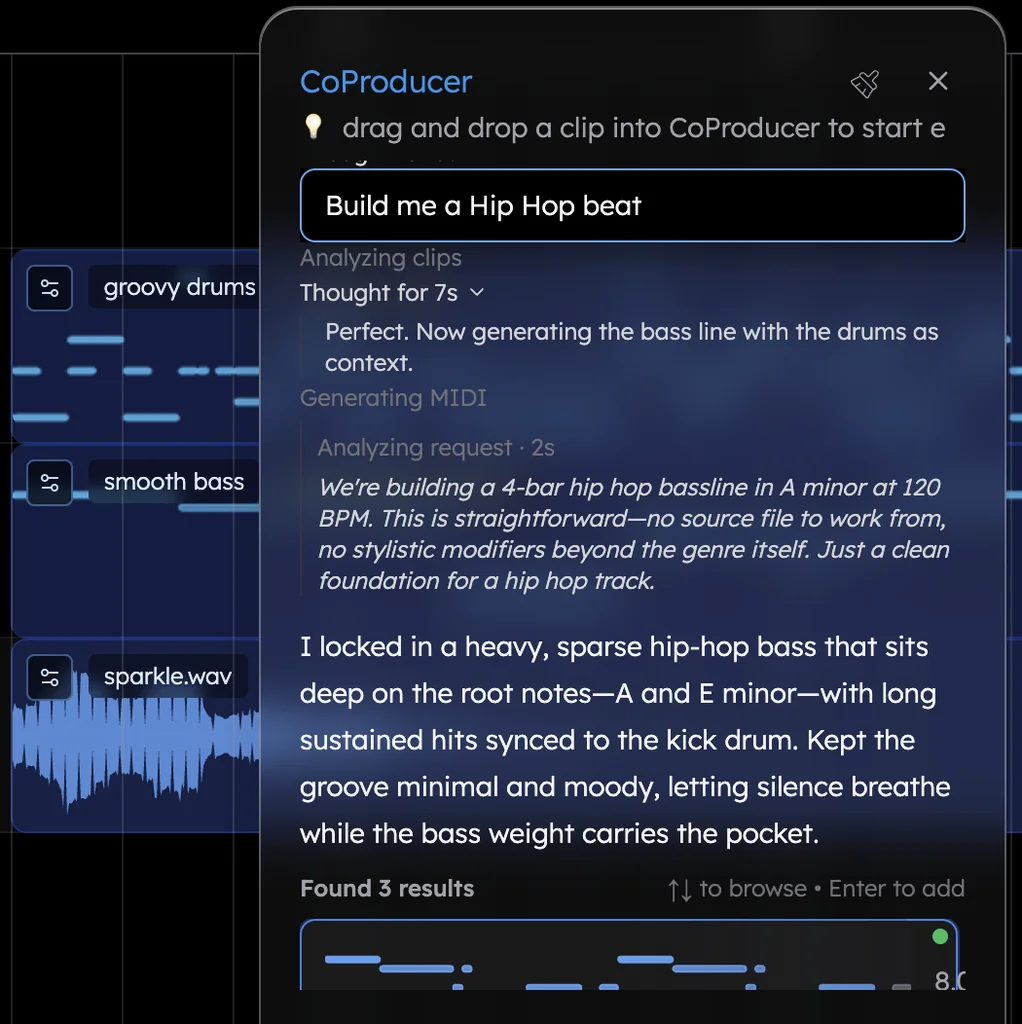
In Veena, you tell your producer what you hear, in plain words. Here is the flow on the free plan, with the tech house prompt at the bottom of this page:
- Open Veena in your browser in Chrome, Edge, Brave, Arc, Firefox or Safari, and sign in with Google. Nothing to install.
- Describe the track. "Make a 128 BPM tech house track in G minor…" CoProducer sets the tempo and key, plans the sections, and writes each part as new MIDI for this song.
- Pick each part. Every new part arrives as three options, and a part that depends on another, like a bassline that leaves room for the kick, waits for the one you picked and reads its actual notes.
- Change anything in plain words. "Make the hats swing more." "Add a four-bar breakdown before the second groove." Or drag the notes in the piano roll yourself. One undo reverses any CoProducer change.
- Mix and export. CoProducer measures the whole mix, sets levels, pan and effects, and masters it for streaming. Export the mix or every track as often as you like.
New users who ask for EDM get a finished first result on day one 90.7% of the time, in Veena's own data. About 1 in 5 new users write that first request in a language other than English, and CoProducer understands them.
Stems, plug-ins, collaboration and the export
- Stems, free. Right-click any audio clip and choose "Separate into Stems": vocals, drums, bass and other land on new tracks, time-aligned with the original. Stem separation in Veena walks through it.
- Your own plug-ins, free. The Veena Bridge helper app opens VST3 and Audio Unit plug-ins on a Mac and VST3 on Windows. Setup is in using your plug-ins with Veena Bridge.
- Bring your own recordings. Record from your mic, or drop in a loop, a demo or a voice memo in any of 13 audio formats, and CoProducer measures the tempo and phrasing before it writes around it.
- Real-time collaboration, live since 12 September 2026 on every plan: invite links, named cursors on the timeline, and CoProducer building in the session.
- On your phone. Pocket Studio opens your projects and CoProducer on a phone.
- The export. WAV 24-bit/48 kHz, MP3 320 kbps or MIDI, the full mix or every track as stems in one zip, with no watermark. See Veena's export formats.
Who owns what the AI makes
On using its AI's results commercially, Amped writes: "The usage rights of AI-generated music may vary." Veena's terms say "you own the Output you generate through your use of the Service", on the free plan as on Veena Pro. Every part CoProducer writes for you is yours to release.
Veena vs Amped Studio: who each is for
- Veena is for anyone making a song of their own: a personal music producer who writes new parts from your words, no track cap, 24-bit WAV, stems and your own plug-ins on the free plan, in any modern browser and on your phone.
- Amped Studio suits musicians in a Chromium browser who want a style menu to lay out library loops, and who are happy to pay $12.99 a month for it.
- If you have Amped projects, export what your plan allows and rebuild them in Veena with CoProducer.
Moving from Amped Studio to Veena
- Export what you can. On the free Starter plan, that's an MP3 of each song; Premium adds WAV.
- Open Veena and sign in with Google. Nothing to install, in any modern browser, Safari and Firefox included.
- Drag the files onto the timeline. Veena reads 13 audio formats plus MIDI, and the first clip you import sets the project tempo.
- Split the mix back into parts. Right-click and choose "Separate into Stems" for vocals, drums, bass and other on their own tracks.
- Let CoProducer rebuild what the library gave you. "Replace these drums with a tighter house groove." "Write a new bassline that follows the kick." Every new part is notes you can edit.
Weighing the field first? Our Amped Studio alternative guide ranks every option, and the other browser head-to-heads, Veena vs Audiotool and Veena vs Soundation, are on every Veena comparison.
The verdict: Veena
Amped Studio charges $12.99 a month for an assistant that assembles library stems by style, and its free plan exports MP3s from projects capped at 16 tracks, in Chromium browsers only. Veena puts a producer on the free plan who writes new parts for your song from your own words, lets you split, mix and master in the same tab, and exports 24-bit WAV and every stem with no cap. Paste the tech house prompt below into CoProducer and hear your first track tonight.
Try this in Veena
Make a 128 BPM tech house track in G minor: a tight four-on-the-floor kick, a clap on 2 and 4, shuffled open hats, a bouncy rolling bassline that leaves room for the kick, a chopped vocal-style stab and a filtered pad build into each drop. 16-bar intro, 32-bar groove, 16-bar break, 32-bar groove, 16-bar outro.
Frequently asked questions
Is Veena better than Amped Studio?
Veena is an AI DAW with a personal music producer built in. Describe the song you want and CoProducer builds it with you — beats, chords, melody, arrangement and mix — as real tracks you can edit, mix and export. Free, in your browser. Amped Studio's free plan exports MP3 only and stops at 16 tracks, and its AI costs $12.99 a month (Amped Studio, September 2026).
Is Amped Studio free?
Its Starter plan is, with 'Ads', '16 tracks', 'No projects export', 'Export only in MP3 format' and a one-time demo of the AI (Amped's pricing page, September 2026). The AI itself needs the Pro plan at $12.99 a month. Veena's free plan includes CoProducer on a daily allowance, 24-bit WAV export, 4-stem separation and your own plug-ins.
What is the difference between Amped's AI assistant and CoProducer?
Amped says its assistant's results 'are audio stems from a sound library database', picked by a style you choose from a drop-down (September 2026). Veena's CoProducer writes new MIDI parts for your song, in its key and tempo, from what you describe in plain words, then arranges and mixes them, and Veena's terms say you own the Output.
Does Amped Studio work in Safari or Firefox?
Not fully. Amped's FAQ says it 'only works with Chromium based browsers like Chrome, Edge, Opera and Brave' and 'does not function fully in Firefox or Safari' (September 2026). Veena is built for Chrome, Edge, Brave and Arc, supports Firefox, and opens in Safari, on Windows, Mac, Linux and Chromebook laptops.
Does Amped Studio work on a phone?
Amped's FAQ answers 'Currently, no it is a web application only' (September 2026). Veena is on your phone: Pocket Studio, live since 4 October 2026, opens your projects and CoProducer on a phone, so you can sketch an idea on the bus and keep producing it on your laptop.
Can I use my own VST plug-ins in Veena and Amped Studio?
In Amped Studio, VST3 support starts on Premium at $6.99 a month; Starter lists 'No VST 3 support external plugins'. In Veena, the Veena Bridge helper app hosts VST3 and Audio Unit plug-ins on a Mac and VST3 on Windows, on the free plan, and CoProducer starts from their real presets.
Meet your personal music producer
Free, in your browser. Describe the song you want and CoProducer builds it with you.
Make music free