Veena vs Ableton
Which is better, Veena or Ableton Live?
Veena vs Ableton goes to Veena for making the whole track. Veena gives you a personal music producer, free in your browser on any laptop, who builds your track as real tracks you keep producing. Ableton Live costs $99 for a 16-track Intro, $349 for Standard and $749 for Suite (Ableton's shop, November 2026), and stem separation is in Suite only. Ableton suits a performer whose show runs on controllers and clip launching; for writing, arranging and mixing the track itself, Veena.
Veena is an AI DAW with a personal music producer built in. Describe the song you want and CoProducer builds it with you — beats, chords, melody, arrangement and mix — as real tracks you can edit, mix and export. Free, in your browser.
Ableton's prices below come from its shop as it read on 6 November 2026; its trial, compare, Live Lite and system requirement pages were read in September 2026.
Veena vs Ableton, row by row (November 2026)
| Veena | Ableton Live 12 | |
|---|---|---|
| Price to start | Free: the whole studio, with CoProducer on a daily allowance | $99 Intro, $349 Standard, $749 Suite |
| Free version | Free plan with no end date | 30-day Suite trial, then no saving or exporting; Live Lite only bundled with hardware |
| What one sentence builds | A whole track: drums, bass, chords, melody, arrangement and mix, as real tracks | No prompt: you build the track part by part |
| An AI producer | CoProducer plans, writes, arranges and mixes, on every plan | MIDI generators in Standard and Suite, not in Intro |
| Track count | No 16-track ceiling on any plan | 16 tracks in Intro |
| Stem separation | 4 stems on every plan, lined up on your timeline | Suite only, at $749 |
| Real-time collaboration | Every plan, with CoProducer building in the session | One licence for one user, on up to two computers |
| Where it runs | Any modern browser: Windows, Mac, Linux, Chromebook or your phone | A Windows or Mac install, up to 76 GB of extra sounds |
| Export | WAV 24-bit/48 kHz, MP3 320 kbps, MIDI and every track as stems, with no cap | Full exports on a paid licence; the trial stops exporting at day 30 |
| Live performance with hardware | Built for making the track | Clip launching with controllers, the stage standard |
Live remains the stage standard for hardware-driven performance, with clip launching and controllers built around it. For building and finishing the track, the other rows are the comparison that matters.
Who shipped what, and when
| Date | Who | What shipped | Source |
|---|---|---|---|
| 20 June 2025 | Veena | Public launch: the first agentic DAW | Launch post |
| 25 March 2026 | Veena | Agentic CoProducer: brief, plan, parts, arrange, mix and verify, inside the project | Launch post |
| 12 September 2026 | Veena | Real-time collaboration, with CoProducer in the session | Changelog |
| 13 September 2026 | Veena | Your own VST3 and AU plug-ins through Veena Bridge | Changelog |
| 23 September 2026 | Veena | Mix & Master, free on every plan | Changelog |
| 4 October 2026 | Veena | Pocket Studio: Veena on your phone | Changelog |
Ableton's AI arrives as generators and a stem tool inside a paid edition. Veena has had a producer inside the studio since June 2025, and every release since has landed on the free plan. What it means to bolt AI onto Live is covered in Ableton + AI vs a native agentic DAW.
What Ableton Live costs you
Live is a deep instrument with a price ladder built into it:
- Intro, $99: "16 tracks and 5+ GB of sounds" (Ableton's shop, November 2026). It leaves out the MIDI generators (Stacks, Rhythm, Seed and Shape) and Audio to MIDI (Ableton's compare page, September 2026).
- Standard, $349: more tracks and sounds, and still no stem separation.
- Suite, $749: stem separation, "New in Live 12.3", is ticked for Suite alone.
The trial runs out. Ableton gives you "30 days" of Suite, then "you can still open Live Sets created using the Trial, but you will no longer be able to save or export your work." Live Lite, the free edition, holds 8 tracks and "only comes with certain products and isn't sold separately" (Ableton, September 2026).
It wants a capable machine. 8 GB of RAM, an Intel Core i5 or Apple silicon on a Mac, a CPU with AVX2 on Windows, about 8 GB of disk for the basic install and "Up to 76 GB" for the extra sound content, plus an internet connection for authorizing Live. There is no Linux, Chromebook or browser version.
What it costs you: $749 for the full toolset, a trial that turns read-only, a Mac or Windows machine with room for 76 GB of sounds, and every part of the track programmed by you.
Ableton hands you the tools. CoProducer builds the track with you.
Live's generators make MIDI ideas inside a clip; you still pick the sounds, write the progression, shape the drop and mix the result. Nothing in Live takes a sentence and returns an arranged track.
CoProducer works across the whole track. Here is what happens with the melodic house prompt at the end of this page:
- The plan. 124 BPM, A minor, and a section map with bar counts: a 16-bar intro, 16-bar build, two 32-bar drops around a 16-bar break, and a 16-bar outro, plus a task list you can watch it tick off.
- The parts. Kick, hats, sub bass, arpeggio and pads arrive as separate tracks, each offered as three options. A part that has to fit another, like the arpeggio that answers the chords, waits for the one you picked and reads its actual notes.
- The edits. "Filter the pads open across the build." "Drop the kick for the last two bars before the drop." Or open the piano roll and move the notes yourself. One undo reverses any CoProducer change.
- The mix. CoProducer sets levels, pan and effects, then runs a finishing pass that masters the track for streaming.
Electronic music is home ground for CoProducer. In Veena's own data, new users who ask for techno get a finished first result on day one 91.7% of the time.
The Live habits that carry over
- Sound design. Veena's own synth has 39 presets, from leads and plucks to six 808s and 16 synth basses, with a full panel and macro knobs. CoProducer sets any parameter from a sentence: "darker, with more resonance on the pluck".
- Audio you can bend. Drag a loop in and Match BPM fits it to the project tempo; stretch it with the pitch kept, shift its pitch, reverse it, or ask CoProducer to chop it into a new groove.
- Stems from anything. Right-click a clip, choose Separate into Stems, and vocals, drums, bass and other land on their own tracks. That is the $749 Suite feature, free. Try it on any song with the free stem splitter.
- Your plug-ins. Veena Bridge loads your VST3 and Audio Unit plug-ins on a Mac and VST3 on Windows, and CoProducer starts from their real presets (how Veena Bridge works).
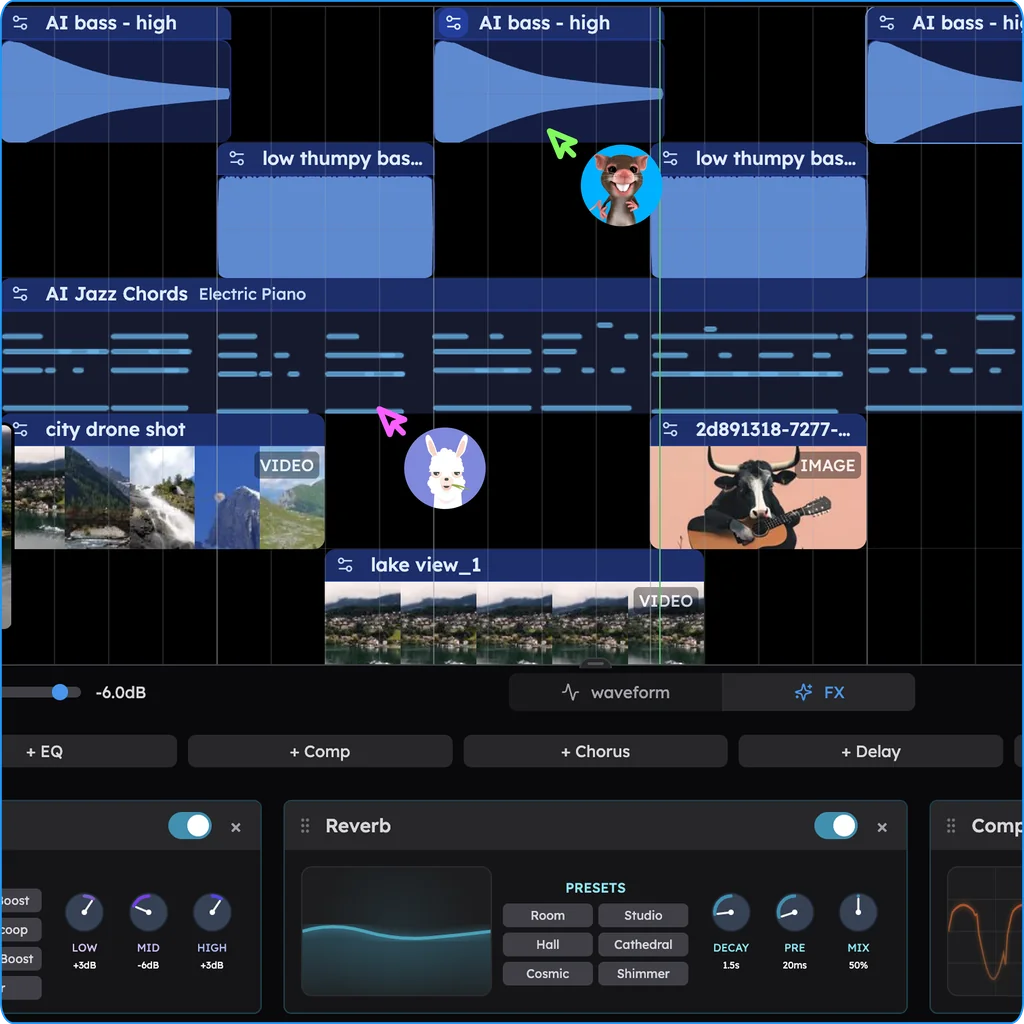
- Collaboration in the session. An Ableton licence "is registered to a single user and can be installed on up to two of their computers." In Veena you click Share and your collaborator joins the same session, with live named cursors, on the free plan (real-time collaboration in Veena).
When the track is done, export WAV 24-bit/48 kHz, MP3 320 kbps or MIDI, the full mix or every track as stems, as often as you like, with no watermark. Veena Pro is $20 a month and removes the daily request cap and unlocks the premium models.
Veena vs Ableton: who each is for
- Veena is for anyone making the track itself: a personal music producer who writes, arranges and mixes every part from one sentence, stem separation, your own plug-ins and real-time collaboration, free in a browser on any laptop or phone.
- Ableton Live suits a performer whose set runs on controllers and clip launching on stage.
- If you play live and produce, build and finish the track in Veena, export the stems, and take them to whatever runs your set.
From Ableton to Veena in four steps
- Render your Sets first, since a lapsed trial can't export. In Live, export audio with all individual tracks rendered as separate WAV files, and export the MIDI clips you want to keep as .mid files.
- Open Veena and drag everything onto the timeline. Veena reads 13 audio formats and MIDI files. Each MIDI track becomes its own track with an instrument, and channel 10 becomes drums.
- Pick up where the Set left off. Ask CoProducer to "extend the break to 32 bars and build tension into the drop" or "write a new riff that answers the bass", and choose from its 3 options.
- Bring a friend in. Click Share and send an invite link; they join the session live.
Still weighing it up? Our Ableton alternative guide ranks every route off Live, the best DAW for EDM covers electronic producers, and every other head-to-head, from Veena vs FL Studio to Veena vs Logic Pro, is on every Veena comparison.
Which should you pick? Veena.
Ableton charges $99 for a 16-track Intro and $749 for the edition with stems, its trial turns read-only at day 30, and every part of the track is yours to build. Veena is the free DAW with a personal music producer who writes, arranges and mixes the track with you, stems and your plug-ins included, in a browser tab. Paste the melodic house prompt below into CoProducer and hear your track take shape.
Try this in Veena
Make a 124 BPM melodic house track in A minor: a warm four-on-the-floor kick, offbeat open hats and a shuffled shaker, a rolling sub bass, a plucky arpeggio that answers the chords, lush minor-seventh pads and a filtered vocal-chop texture. 16-bar intro, 16-bar build, 32-bar drop, 16-bar break, 32-bar drop, 16-bar outro.
Frequently asked questions
Is Veena better than Ableton Live?
For making a whole track, yes. Veena is an AI DAW with a personal music producer built in. Describe the song you want and CoProducer builds it with you — beats, chords, melody, arrangement and mix — as real tracks you can edit, mix and export. Free, in your browser. Ableton Live costs $99 to $749 (Ableton's shop, November 2026), and every part is yours to program.
Is Ableton Live free?
No. Live 12 Intro is $99, Standard $349 and Suite $749 (Ableton's shop, November 2026). The 30-day trial ends with "you will no longer be able to save or export your work", and Live Lite "only comes with certain products and isn't sold separately" (Ableton, September 2026). Veena's free plan has no end date: the studio, CoProducer's daily allowance, stems and every export.
Does Ableton Live have AI?
Live 12 has MIDI generators (Stacks, Rhythm, Seed and Shape), left out of the $99 Intro, and stem separation since Live 12.3 in Suite only (Ableton's compare page, September 2026). None of them builds a track from a description. Veena's CoProducer plans, writes, arranges and mixes every part as real tracks from one sentence, on the free plan.
Can I use my plug-ins in Veena like I do in Ableton?
Yes. The Veena Bridge helper hosts your VST3 and Audio Unit plug-ins on a Mac and VST3 plug-ins on Windows, instruments and effects both, with their own windows. CoProducer starts from their real presets. Plug-ins work on the free plan, and in a shared session the machine that owns a plug-in renders it for everyone.
Can I move an Ableton Live Set into Veena?
Bring its tracks across. In Live, export audio with every individual track rendered as its own WAV, and export your MIDI clips as .mid files. Drag them onto Veena's timeline in your browser: each file lands on its own track, and CoProducer builds new parts around them. Export again as WAV, MP3, MIDI or stems with no cap.
Does Veena run on Linux or a Chromebook, where Ableton doesn't?
Yes. Ableton Live installs on Windows or a Mac only. Veena runs in a modern browser on Windows, Mac, Linux, a Chromebook or your phone, with nothing to install and no graphics card needed, because the AI runs on Veena's servers. Your projects save to your account, so a track started on one machine opens on the next.
Meet your personal music producer
Free, in your browser. Describe the song you want and CoProducer builds it with you.
Make music free