Veena vs FL Studio
Which is better, Veena or FL Studio?
Veena vs FL Studio goes to Veena for making the whole beat. Veena gives you a personal music producer, free in your browser, who builds the drums, 808, chords and melody as real tracks you keep producing. FL Studio is a desktop licence from $99, its Fruity Edition can't record audio or split stems, and its free trial locks a project the moment you close it (Image-Line's pricing and download pages, October and November 2026). FL Studio suits a beatmaker who wants Image-Line's bundled instruments on a desktop install; for building the beat with a producer, Veena.
Veena is an AI DAW with a personal music producer built in. Describe the song you want and CoProducer builds it with you — beats, chords, melody, arrangement and mix — as real tracks you can edit, mix and export. Free, in your browser.
Image-Line's facts below come from its pricing, download and knowledge-base pages, read between September and November 2026.
Veena vs FL Studio, row by row (November 2026)
| Veena | FL Studio | |
|---|---|---|
| Price to start | Free: the whole studio, with CoProducer on a daily allowance | $99 Fruity, $179 Producer, $269 Signature, $449 All Plugins |
| Free version | Free plan; every project saves and reopens | Trial that "won't reopen project files (.flp)" |
| What one sentence builds | A whole beat: drums, 808, chords, melody, arrangement and mix, as real tracks | No prompt: you build the beat pattern by pattern |
| An AI producer | CoProducer reads your project, writes the parts and mixes them, on every plan | Gopher answers questions; it "cannot proactively access anything you create" |
| Audio recording | Every plan, with latency calibration and loop recording | "Producer Edition and up" |
| Stem separation | 4 stems on every plan, lined up on your timeline | "Producer Edition and up" |
| Real-time collaboration | Every plan, with CoProducer building in the session | Not described on its pages |
| Where it runs | Any modern browser: Windows, Mac, Linux, Chromebook or your phone | Windows 10 or 11, or macOS 10.15.7 or newer; FL Studio Mobile is a separate $14.99 app |
| Export | WAV 24-bit/48 kHz, MP3 320 kbps, MIDI and every track as stems, with no cap | WAV and MP3; Cloud mastering's genre presets need an FL Cloud subscription |
| Bundled instrument suite | Veena's synth, 61 instrument presets and 7 drum kits | Up to 118 instruments and effects in All Plugins Edition |
FL Studio's All Plugins Edition carries a deep bundle of Image-Line's own instruments and effects, and its licence comes with free lifetime updates. For writing, arranging and finishing the beat, the other rows are the comparison that matters.
Who shipped what, and when
| Date | Who | What shipped | Source |
|---|---|---|---|
| 20 June 2025 | Veena | Public launch: the first agentic DAW | Launch post |
| 25 March 2026 | Veena | Agentic CoProducer: brief, plan, parts, arrange, mix and verify, inside the project | Launch post |
| 12 September 2026 | Veena | Real-time collaboration, with CoProducer in the session | Changelog |
| 13 September 2026 | Veena | Your own VST3 and AU plug-ins through Veena Bridge | Changelog |
| 23 September 2026 | Veena | Mix & Master, free on every plan | Changelog |
| 4 October 2026 | Veena | Pocket Studio: Veena on your phone | Changelog |
FL Studio's AI is an assistant that answers questions about the program. Veena has had a producer working inside the project since June 2025, and every release since has landed on the free plan.
What FL Studio costs you before the first beat
FL Studio is a one-time licence with free lifetime updates, sold in four editions (Image-Line's pricing page, October 2026):
- Fruity Edition, $99: "no audio recording, no stem separation". The cheapest FL Studio can't record your vocal or your guitar.
- Producer Edition, $179: adds audio recording and stem separation, both marked "Producer Edition and up" (Image-Line's pricing page, November 2026).
- Signature Bundle, $269, and All Plugins Edition, $449: more bundled instruments and effects.
The trial locks your work. Image-Line says the trial "is fully functional and never expires", then: "In trial mode FL Studio won't reopen project files (.flp). You're able to save and export projects, but once you close FL Studio, your project is locked until you buy an Edition." You can bounce a beat on the trial. You can't come back tomorrow and fix the hi-hats.
It is an install. FL Studio needs Windows 10 or 11, or macOS 10.15.7 or newer, with 4 GB of RAM and 4 GB of free disk, and Image-Line offers no Linux or Chromebook version of the desktop program. FL Studio Mobile is a separate app, $14.99 on Apple's App Store.
What it costs you: $179 before you can record a vocal or split a sample, a desktop install, and a trial that locks every beat when you close the window.
Gopher answers questions. CoProducer builds the beat.
Gopher, Image-Line's assistant, answers questions, acts on "a limited number of controls" and writes piano-roll scripts, but "Gopher cannot proactively access anything you create" (Image-Line's knowledge base, September 2026). It can tell you where the 808 setting lives. It can't hear your beat.
CoProducer works inside the project. Here is what happens with the drill prompt at the end of this page:
- The plan. 150 BPM, C# minor, and a section map with bar counts: a 4-bar intro, three 8-bar hooks around two 16-bar verses and a 4-bar outro, plus a task list you can watch it tick off.
- The parts. Kick, snare, hats, the sliding 808, piano and choir pad arrive as separate tracks, each offered as three options. The 808 waits for the kick you picked and reads its actual notes before it writes a glide.
- The edits. "Busier hats in the second hook." "Drop the 808 for the last bar of the verse." Or open the piano roll and move the notes yourself. One undo reverses any CoProducer change.
- The mix. CoProducer sets levels, pan and effects, then runs a finishing pass that masters the beat for streaming.
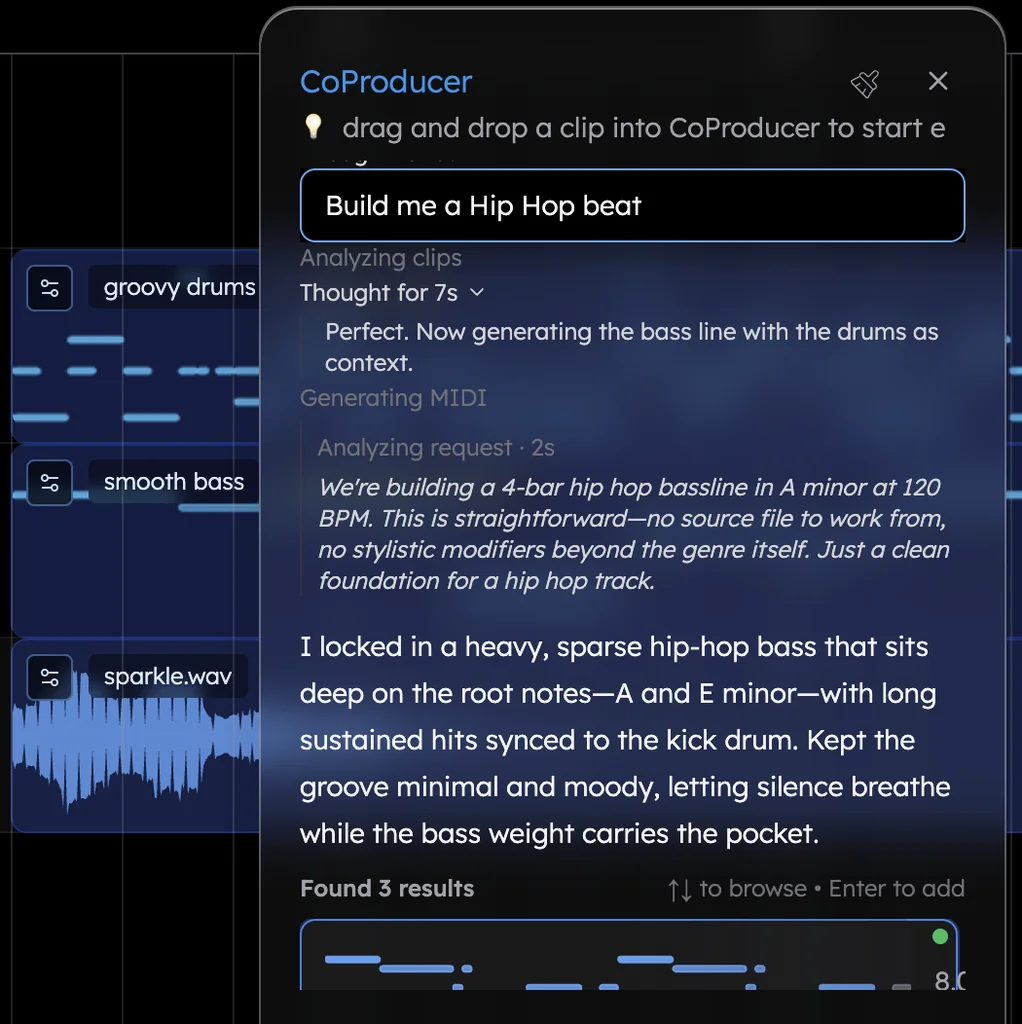
Hip hop is the largest genre in Veena's own data, and new users who ask for trap get a finished first result on day one 83.6% of the time.
The FL Studio habits that carry over
- A step sequencer for drums. Veena's Beat Maker is a grid, like a channel rack, over 7 drum kits from TR909 to Jazz, plus a 16-pad sampler for your own one-shots.
- A real piano roll. Draw and select tools, a velocity editor, C0 to C9 and 8 snap settings. Snap to ⅙ of a beat and the grid lands on the sixteenth-note triplets a hi-hat roll needs.
- 808s that are yours to shape. Veena's own synth carries 39 presets, six of them 808s, with a full panel and macro knobs.
- Sounds on request. Ask for "a dusty vinyl snare" and CoProducer searches 27,356 curated samples plus a licensed professional catalogue, then shows 10 preview cards.
- Your plug-ins. Veena Bridge opens your VST3 plug-ins on Windows, VST3 and AU on a Mac (how Veena Bridge works).
- Stems, free. Right-click any clip and choose Separate into Stems, the feature FL Studio starts at Producer Edition. Try it on any song with the free stem splitter.
Bring a friend into the session too: click Share, send an invite link, and you edit the same beat together with live named cursors, on the free plan (real-time collaboration in Veena). Export WAV 24-bit/48 kHz, MP3 320 kbps or MIDI, the mix or every track as stems, as often as you like, with no watermark. Veena Pro is $20 a month and removes the daily request cap and unlocks the premium models.
Veena vs FL Studio: who each is for
- Veena is for anyone building the beat itself: a personal music producer who writes the drums, 808, chords and melody from one sentence, recording and stems on the free plan, your own plug-ins and real-time collaboration, in a browser on any laptop or phone.
- FL Studio suits a beatmaker who wants Image-Line's bundled instruments and effects installed on one Windows or Mac machine.
- If you already own FL Studio, your VST3 plug-ins come with you, and Veena adds the producer, the collaborators and every machine you work on.
From FL Studio to Veena in four steps
- Export your beats. In FL Studio, export WAV with Split mixer tracks turned on for one file per mixer track, and export your patterns as MIDI. This works on the trial too.
- Open Veena anywhere. Sign in with Google in any modern browser, including a Chromebook FL Studio never ran on, and drag the files onto the timeline. Veena reads 13 audio formats plus MIDI.
- Let CoProducer build on them. "Keep my 808 and drums, write a darker piano melody for the hook and add a choir pad." It reads the notes you brought before it writes a new one.
- Bring your collaborators. Send them a Veena invite link and finish the beat together.
Still weighing it up? Is FL Studio free covers what the trial does and doesn't let you keep, the best DAW for hip hop ranks the field for beatmakers, and every other head-to-head, from Veena vs Ableton to Veena vs BandLab, is on every Veena comparison.
Which should you pick? Veena.
FL Studio charges $179 before you can record a vocal, locks trial projects when you close them, and leaves every pattern to you. Veena is the free DAW with a personal music producer who builds the beat with you, records and splits stems on the free plan, and opens in a browser on any laptop. Paste the drill prompt below into CoProducer and hear your first beat tonight.
Try this in Veena
Make a 150 BPM drill beat in C# minor: a sliding 808 with glides between notes, a hard kick, a snare on beat 3 with ghost snares around it, skittering hi-hats with triplet rolls, a dark piano melody and an eerie choir pad. 4-bar intro, 8-bar hook, 16-bar verse, 8-bar hook, 16-bar verse, 8-bar hook, 4-bar outro.
Frequently asked questions
Is Veena better than FL Studio?
For building a whole beat with a producer, yes. Veena is an AI DAW with a personal music producer built in. Describe the song you want and CoProducer builds it with you — beats, chords, melody, arrangement and mix — as real tracks you can edit, mix and export. Free, in your browser. FL Studio starts at $99, and its trial won't reopen a saved project.
Is FL Studio free?
No. FL Studio is a one-time licence from $99 for Fruity Edition to $449 for All Plugins Edition (Image-Line's pricing page, October 2026). The trial never expires, but "once you close FL Studio, your project is locked until you buy an Edition." Veena's free plan saves every project to your account and reopens it any day, with CoProducer, stems and every export.
Does FL Studio have AI?
FL Studio has Gopher, "an FL Studio-oriented Large Language Model" that answers questions and acts on "a limited number of controls", but "Gopher cannot proactively access anything you create" (Image-Line's knowledge base, September 2026). Veena's CoProducer reads your whole project and writes drums, 808, chords, melody and arrangement as tracks you can edit, then mixes them, on the free plan.
Can I record vocals in Veena like in FL Studio Producer Edition?
Yes, on the free plan. FL Studio marks audio recording and stem separation "Producer Edition and up" (Image-Line's pricing page, November 2026), so the $99 Fruity Edition records neither. Veena records from your mic with latency calibration, count-in and loop recording, splits any track into 4 stems, and CoProducer builds the beat around your take.
Can I use my FL Studio plug-ins in Veena?
Yes. The Veena Bridge helper hosts your VST3 plug-ins on Windows and VST3 and Audio Unit plug-ins on a Mac, instruments and effects both. CoProducer knows Serum, Kontakt and Omnisphere by name and starts from their real presets. Image-Line's own instruments stay inside FL Studio; Veena's synth, 7 drum kits and built-in effects are ready in the browser.
How do I move my FL Studio beats into Veena?
FL Studio exports WAV and MP3 even on its trial, its Split mixer tracks option writes one file per mixer track, and your patterns can go out as MIDI. Drag everything onto Veena's timeline in your browser, and ask CoProducer to build new parts around it. Export again from Veena as WAV, MP3, MIDI or stems with no cap.
Meet your personal music producer
Free, in your browser. Describe the song you want and CoProducer builds it with you.
Make music free