How to Make Acoustic Cover Videos Sound Better
Make acoustic cover videos sound better in Veena: split voice from guitar, clean and tune the vocal, add warmth and space, master and export an MP4. Free.
How do I make acoustic cover videos sound better?
To make acoustic cover videos sound better, split your voice and guitar onto separate tracks in Veena, clean and gently tune the vocal, warm and carve the guitar, put them in one shared space, master the song and export an MP4 with your original picture. The performance stays yours; the sound catches up with it. Free, in your browser.
Veena is an AI DAW with a personal music producer built in. Describe the song you want and CoProducer builds it with you — beats, chords, melody, arrangement and mix — as real tracks you can edit, mix and export. Free, in your browser.
An acoustic cover has nowhere to hide. There is no drum kit to cover a pitchy note, no synth pad to fill a thin guitar, no wall of sound to mask the fridge humming in the kitchen. That is why the format is so loved, and why so many covers that were played beautifully sound amateur. The difference between a cover that sounds like a bedroom and one that sounds like a session is almost always the mix, not the musician.
What an acoustic cover needs
- A voice that sits in front, close and clear. Every word audible, no hiss underneath it, no harsh S sounds on earbuds.
- A guitar that is warm, not boomy. Body in the low mids, sparkle in the strings, and room left for the voice.
- One shared space. The voice and guitar sound like they were played in the same room at the same time, because they were.
- A finished level. Mastered loud enough to sit next to other music without losing the dynamics that make acoustic music move.
Make acoustic cover videos sound better in Veena, step by step
- Import the cover video. Drag it onto the arrangement or press Upload. Veena reads MP4, M4V, MOV, WebM, MKV and AVI.
- Separate Audio. Right-click the video and choose Separate Audio, so the sound becomes an editable clip under the picture.
- Split voice from guitar. Stop playback, right-click the audio and choose Separate into Stems. Your voice lands on the vocals stem and the guitar on the other stem, time-aligned with the video. Mute the drums and bass stems if they hold nothing you need.
- Name the parts. Open Mix & Master. On Parts, tag the vocals stem as Lead vocal and the other stem as guitar, and set the vocal's importance forward.
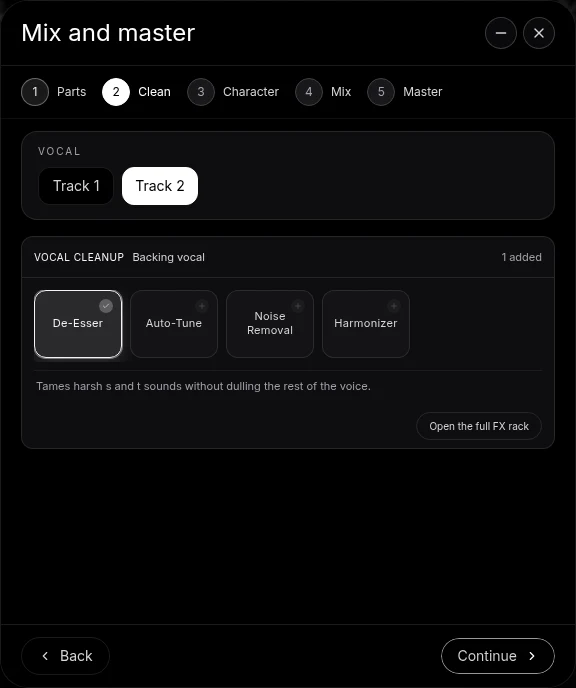
- Clean the voice. On Clean, add Noise Removal for the room's background noise and De-Esser for sharp consonants. If a few notes drift, add Auto-Tune set to the song's key and keep it subtle. Open the full FX rack and compare each effect on and off with the guitar playing.
- Choose a Character. Audition the Character options on the vocal and keep the one that suits the song: closer and drier for a confessional ballad, brighter for an upbeat pop cover.
- Warm and carve the guitar. Open the guitar track's FX and add the 8-Band EQ. Cut a little around 200 Hz where the body booms, and lift the top gently if the strings sound dull. A Compressor with a slow attack evens the strumming without dulling the pick.
- Pick a space and AutoMix. On Mix, choose your Genre and a Space. Room keeps the cover intimate; Plate gives the voice a smooth, classic tail. Press AutoMix.
- Master and export. Pause, open Master and press Master project to add Match EQ and Limiter on the master bus. Export an MP4 for the video, and a WAV of the audio if you want to release it.
The clean up audio in a video page has the method for every kind of raw video, and the AI mixing assistant page covers the mixing tools.
The details that separate a session from a bedroom
Leave the breaths in. In a vocal-and-guitar cover, the breath before a line is part of the phrasing. Set Noise Removal gently, listening to the start of each line, so the breaths stay and the voice still sounds human.
Pan the guitar slightly. Centre the voice and move the guitar a little to one side with the track's pan. Two performers in a small space sound more real than one blended point.
Let the reverb serve the tempo. A slow ballad can carry a longer tail; a fast strummed cover wants a short Room so the chords do not smear. If the space feels too big, choose a smaller Space and press AutoMix again, or open the track's FX and turn the reverb down.
Do not over-master. An acoustic cover's quiet verses are what make its choruses land. If the master sounds flat, open Master FX and lower the Limiter's drive until the verse breathes again.
Covers, done properly
Recording yourself singing and playing someone else's song is one of the oldest traditions in music, and Veena supports it end to end: import the original for reference if you want to learn it, split its stems, change the key to suit your voice, record your own take over an accompaniment, then mix and master it. The song itself belongs to its writers; your performance, your arrangement and your mix are what you bring. For a fuller arrangement under your voice, the backing track for a cover video guide shows how, and the balance vocals and guitar recorded on one mic guide goes deeper on the split.
Hand it to CoProducer
Describe the cover in producer terms: the genre, the tempo and key, what leads and the feel you want. CoProducer splits the take, tags the parts and runs Mix & Master on your project, and every change stays editable.
Paste this into CoProducer:
"Make this acoustic cover video sound better: a slow acoustic ballad around 72 BPM in D, my voice and acoustic guitar recorded together. Split it into stems, tag the vocal as Lead vocal, use Noise Removal, a light De-Esser and gentle Auto-Tune in the song's key, warm the guitar and clear its boom around 200 Hz, add a Plate on the voice, AutoMix for acoustic with a Room space, then master the project, natural and not squashed."
Related reading: clean up audio in a video · make a cover video sound professional · balance vocals and guitar recorded on one mic · mix a vocal cover video · AI mixing assistant
Try this in Veena
Make this acoustic cover video sound better: a slow acoustic ballad around 72 BPM in D, my voice and acoustic guitar recorded together. Split it into stems, tag the vocal as Lead vocal, use Noise Removal, a light De-Esser and gentle Auto-Tune in the song's key, warm the guitar and clear its boom around 200 Hz, add a Plate on the voice, AutoMix for acoustic with a Room space, then master the project, natural and not squashed.
Frequently asked questions
How do I make acoustic cover videos sound better?
Import the video into Veena, choose Separate Audio, then Separate into Stems so your voice and guitar sit on their own tracks. Clean the voice with Noise Removal and De-Esser, warm and carve the guitar with EQ, give both a shared space with AutoMix, then Master project. Export an MP4 and your cover keeps its picture with a finished sound.
Should I use Auto-Tune on an acoustic cover?
Use it lightly, if at all. Veena's Clean stage includes Auto-Tune for the vocal's key and scale; on an acoustic cover, the aim is to steady a few notes, not to make the effect audible. Set the key, open the full FX rack and compare it on and off while the whole song plays, then keep whichever sounds like your best take.
How do I add reverb to an acoustic cover video?
In Veena's Mix & Master flow, choose a Space on Mix: Dry, Ambience, Room, Plate or Hall. A Room keeps an acoustic cover intimate, and a Plate gives the voice a smooth tail. AutoMix applies the space across your tracks, and you can open a track's FX chain afterwards to refine it, or add a Reverb card and set its Decay, Pre-Delay, Tone and Mix.
Can I add a backing track to my acoustic cover in Veena?
Yes. Once your voice and guitar are on their own stems, ask Veena's CoProducer for a soft part in the song's tempo and key, such as a cello line, light percussion or a pad. It writes real tracks you can edit, and they mix, master and export with your video like the rest of the project.
Is it free to improve a cover video in Veena?
Yes. Video import, Separate Audio, stem separation from the right-click menu, Mix & Master and MP4 export are all on Veena's free plan, with no watermark and no cap on exports. Veena Pro, at $20 a month, removes the daily CoProducer request cap and unlocks the premium models.
Meet your personal music producer
Free, in your browser. Describe the song you want and CoProducer builds it with you.
Make music free