Make Game Music
Make game music with your own personal music producer. Free in your browser, Veena's CoProducer writes the cues a game needs, from a title theme and loops for exploring and fighting to short jingles for winning and losing, in any style from 8-bit chiptune to orchestral boss themes, as real tracks you can edit, loop and export as stems.
Game music has a job film music never has: it plays for as long as the player stays. A film cue lasts exactly as long as its scene; an overworld loop might repeat for an hour, and it has to change the moment the game does. So the craft comes down to three things: themes players hum long after they stop playing, loops nobody hears the seam in, and parts that can come and go with the action.
Spot the game before you write a note
Composers call it spotting: list every place music plays, then decide each cue's length and whether it loops. A small game usually needs something like this:
| Cue | Plays during | Length | Loops? | Start from in Veena |
|---|---|---|---|---|
| Title theme | Title screen and main menu | 60–90 s | Yes | The main theme on String Ensemble or Supersaw Lead |
| Overworld | Exploring the map | 60–120 s | Yes | Bright Pluck arpeggios, Round Bass, a light kit |
| Town | Shops, hubs, save rooms | 45–90 s | Yes | Acoustic Guitar (nylon), Pizzicato Strings, Bell Pluck |
| Battle | Normal fights | 45–90 s | Yes | A 16th-note ostinato, Electric Bass (pick), toms |
| Boss | The big fight | An intro, then a 60–120 s loop | Yes | Distortion Guitar, Contrabass, String Ensemble |
| Victory | Winning | 3–8 s | No | A major fanfare ending on a held chord |
| Game over | Losing | 3–6 s | No | A falling minor phrase, then silence |
| Stingers | Item found, door opened, enemy spotted | 1–3 s | No | The first notes of the main theme |
Write the main theme first; every other cue borrows from it. A five- or six-note motif is enough, and the melody generator will draft one if you want a starting point.
Loops that survive an hour of play
A game loop has two enemies: the seam and fatigue.
Beat the seam. Build loops from whole 8- or 16-bar blocks, because a bar in 4/4 lasts 240 ÷ BPM seconds and the maths stays clean: at 150 BPM a bar is 1.6 seconds, so a 32-bar loop runs 51.2 seconds. Treat the last bar as a pickup into bar 1 rather than an ending, landing on the chord that leads home (G back to C in C major). Keep an intro that plays once as its own section before the loop body, since engines and audio middleware can play an intro once and then repeat the body. To check the join in Veena, drag across the ruler over the loop body and let it cycle a dozen times.
Beat the fatigue. A player hears your overworld loop fifty times in a session. Vary it inside itself (A, A′, B, A″, each pass slightly different), and rest the melody for at least 8 bars of every 32 while the bass and chords carry on. The tune that never stops talking is the one players mute.
Export it clean. Veena exports the whole project, so give the intro and the loop body a copy of the project each (Duplicate is on every project card), then export both as 24-bit/48 kHz WAV. Use WAV for anything that loops: an MP3 file carries a sliver of encoder padding at its start, and players hear the hiccup.
Adaptive music: layers and branches
Game engines and audio middleware can mix music live, and they do it with two moves. Give them material for both.
Vertical layering. One cue, stacked in layers that fade in and out with the action: a base of pads and bass for exploring, an ostinato for tension, drums and brass for combat. Build all the layers in one Veena project, at one tempo and in one key, and export Stems: one file per audible track, zipped together. Every stem renders across the whole project, so the files start together and stay in step when the engine fades between them.
Horizontal re-sequencing. Sections that can jump to each other on bar lines: exploring to combat, combat to victory. Keep every section in the same key and tempo, make each one a multiple of 4 bars, and write 1–2 bar transition stingers from the main theme. CoProducer can shorten a section, duplicate it with variation, stagger the entries or drop layers out, so one idea becomes a full set of branches.
Chiptune: write for four channels
The 8-bit sound comes from hardware limits. The NES had two pulse channels, a triangle and a noise channel (plus one for samples); the Game Boy had two pulse channels, a wave channel and noise. So a chiptune arrangement is two melody voices, one bass and one noise drum, and writing inside that limit is what makes it sound authentic.
Veena's synth covers the palette. Square Bass is a hollow square over a clean sine sub, built for chiptune and video game lines. Snap Pluck is a square with a pitch blip on the attack that's gone before the next 16th, the natural chip lead. Bright Pluck handles arpeggios, Retro Pulse Bass is a chorused 80s pulse for arpeggiated lines, and Bell Pluck gives a music-box sparkle. For the noise channel, program the drums tight and sparse, or ask CoProducer to search the sample library for 8-bit hits.
The signature chip move is faking chords with arpeggios, one voice cycling through the chord tones in 16ths:
Beat      1  e  &  a  2  e  &  a
C major   C  E  G  C  G  E  C  E
A minor   A  C  E  A  E  C  A  C
Quantize hard, since chip lines sound best dead on the grid, and fake an echo the way 8-bit composers did: copy the lead, move it one 8th later and halve its velocity. More figures are written out in chiptune melody patterns.
Battle themes, bosses and fanfares
Battle. 140–180 BPM, minor key, a 16th-note ostinato on Pizzicato Strings or Electric Guitar (muted), Electric Bass (pick) driving 8ths, and a melody on Bright Saw Lead or String Ensemble. For the RPG rock sound, put Distortion Guitar power chords under a synth lead.
Boss. Rework the main theme rather than writing a new one: move it to minor, drop it an octave and stretch its note values against a faster drum part. An odd meter unsettles the player (Veena runs in 7/8 and 5/4), and a bass that grinds a half step (E to F and back) adds dread. The Chaos kit, heavy and distorted, suits a hybrid-metal fight. Write the reveal as an intro and the fight as a loop.
Fanfares. Victory is I–IV–V–I in a major key ending on a held tonic: C–F–G–C over four bars is 6.4 seconds at 150 BPM. Game over is the opposite, a falling minor line that ends low and leaves silence behind it. For orchestral writing in depth, see how to make cinematic music.
Score your gameplay capture
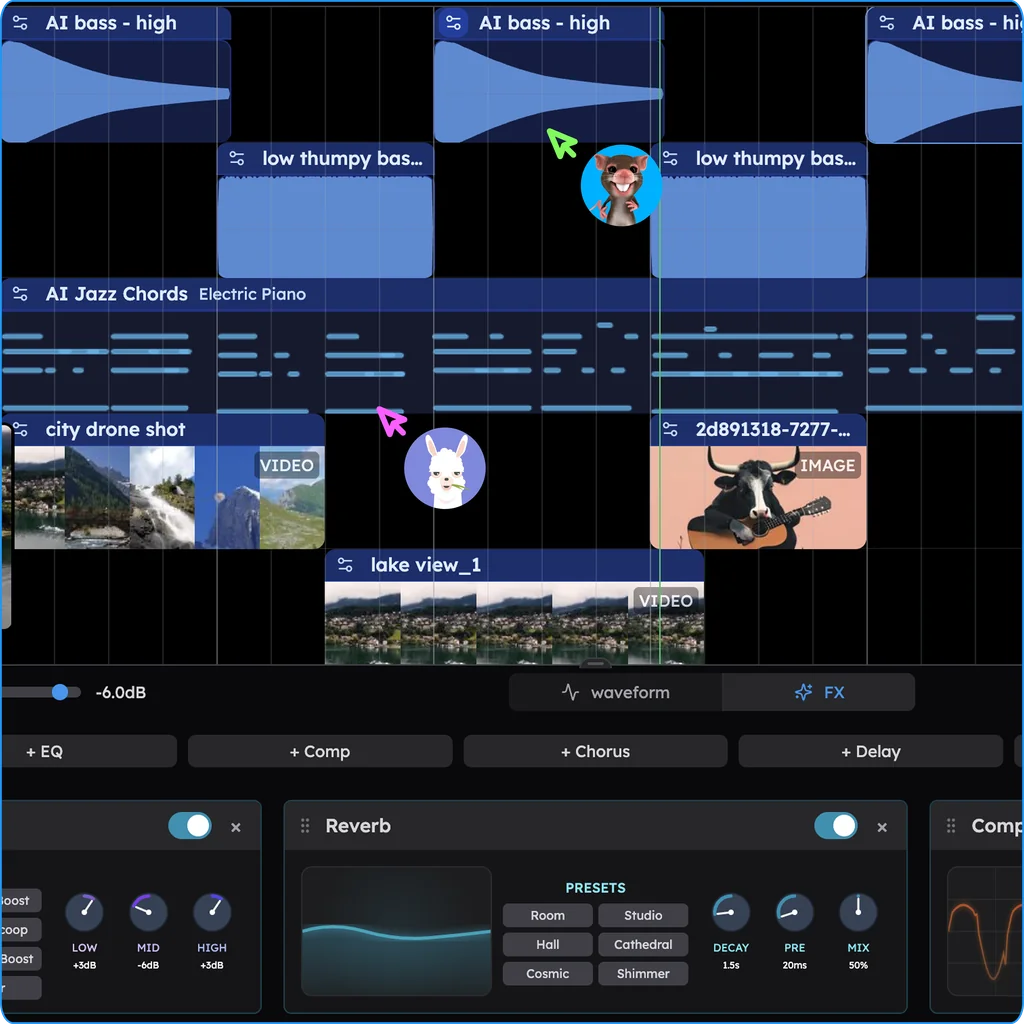
Record a minute of play, then drop the capture onto Veena's timeline: MP4, MOV, WebM, MKV, AVI and M4V all import, and CoProducer hears the audio in the clip. Line your stingers up with the moments on screen, and when the project contains video, Veena exports an MP4 of picture and music together for a trailer or a devlog. Making the game with a friend? Invite them into the session and you both edit the soundtrack live, with named cursors on the timeline.
Make game music with CoProducer
- Head to daw.veena.studio and sign in with Google. It runs in any modern browser on a Mac, Windows, Linux or Chromebook laptop, with no graphics card needed.
- Paste the prompt:
Make a 150 BPM 8-bit overworld theme in C major for a retro platformer: a Snap Pluck lead melody that rests for the whole A′ section, Bright Pluck 16th-note arpeggios on C–Am–F–G, a Square Bass bouncing root to octave in 8ths, and tight Pop kit drums with a kick on 1 and 3, a snare on 2 and 4 and 8th-note closed hats, all quantized hard. A 4-bar intro that plays once, then a 32-bar loop (A 8, A′ 8, B 8, A″ 8) whose last bar ends on G so it leads back to the top, with no reverb or delay tails across the loop point.
- Choose the theme. Every new part arrives as three options. Pick the melody you'd hum on the way to the next level; the parts that depend on it are written against your pick.
- Test the loop by dragging across the ruler from bar 5 to bar 36, then export the WAV, the stems or the MIDI. Every export is yours to ship, with no watermark.
Game music is one of the styles Veena delivers best: in Veena's own data, 86.2% of new users whose first request asks for game or chiptune music get a first result on day one.
Then build out the soundtrack in plain words:
- "Swap the drums to the Electronic kit." New CoProducer drums start on the clean Pop kit; the Electronic kit is more synthetic and chip-like.
- "Add a combat layer on new tracks: 16th-note Distortion Guitar chugs and double-time hats, same 32 bars."
- "Write a 4-bar victory jingle in C major that ends on a held C chord."
- "Give the lead a fake echo: a copy one 8th later at half the velocity."
- In a copy of the project: "Rewrite the theme in C minor as a boss loop, low and slow over driving toms."
Any of these comes back off with one Ctrl/Cmd+Z, and the MIDI export carries the notes into any other music tool; the MIDI generator covers that side in depth.
Game music mistakes
- A melody that never rests. Fatigue arrives within minutes. Give every loop stretches with no lead.
- An audible restart. If you can hear where the loop begins again after ten passes, so can every player. Fix the last bar, not the first.
- Loops that end like endings. A big final hit or a slowing tempo sounds like the end, then restarts. Save conclusions for fanfares.
- Music that fights the sound effects. Footsteps, hits and dialogue need room in the upper mids. Keep bright leads sparse under gameplay.
- Every cue from a different world. A new key, tempo and palette for each cue breaks the game's identity and makes transitions clash. Keep a home key and one signature sound.
- Layers from separate projects. Export every layer of a cue from the same project so they stay in step.
Game music terms
Cue: one piece of music for one situation. Spotting: deciding where music plays. Loop point: where the loop body restarts. Intro and loop: a lead-in that plays once before the repeating body. Vertical layering: stacked layers the game fades in and out. Horizontal re-sequencing: sections the game jumps between. Stinger: a 1–3 second musical event. Jingle: a short, complete cue for winning, losing or leveling up. Leitmotif: a theme tied to a character or place. Middleware: audio tools such as FMOD and Wwise that play and mix music inside a game.
Game music styles to try next
- 8-bit and chiptune: 130–160 BPM, square waves, 16th-note arpeggios, four voices at most.
- 16-bit RPG: strings, flutes and brass from the sample search over a synth bass, with a big melodic theme.
- Orchestral fantasy: String Ensemble, Pizzicato Strings, Contrabass and a Hall reverb; see how to make cinematic music.
- Synthwave racer: Retro Pulse Bass arpeggios, Bright Saw Lead and a TR909 kit; see how to make synthwave.
- Cozy and life sim: 70–90 BPM, Electric Piano, nylon guitar and Bell Pluck; the lofi toolkit fits, see how to make lofi music.
- Horror: no pulse, the Drone and Dark Pad presets, Contrabass clusters and long silences.
Name the style in your first message and CoProducer writes the cue in it. For more styles to borrow from, browse make music by genre.
Try this in Veena
Make a 150 BPM 8-bit overworld theme in C major for a retro platformer: a Snap Pluck lead melody that rests for the whole A′ section, Bright Pluck 16th-note arpeggios on C–Am–F–G, a Square Bass bouncing root to octave in 8ths, and tight Pop kit drums with a kick on 1 and 3, a snare on 2 and 4 and 8th-note closed hats, all quantized hard. A 4-bar intro that plays once, then a 32-bar loop (A 8, A′ 8, B 8, A″ 8) whose last bar ends on G so it leads back to the top, with no reverb or delay tails across the loop point.
Frequently asked questions
Can I make game music for free?
Yes. Veena is an AI DAW with a personal music producer built in. Describe the song you want and CoProducer builds it with you — beats, chords, melody, arrangement and mix — as real tracks you can edit, mix and export. Free, in your browser. For a game, that means a title theme, exploration and battle loops, jingles and stingers, each part on its own track and exported as WAV or stems with no cap.
Can I use music made in Veena in a commercial game?
Yes. Veena's terms say you own the Output you generate, and commercial use is open on every plan, the free one included. Veena asks for no royalties and puts no watermark on exports, so a soundtrack you make in Veena can ship in a paid game, its trailer and a soundtrack release. Sounds from Veena's library are licensed for use inside your own tracks.
How do I make a seamless game music loop?
Split the cue into an intro that plays once and a loop body built from whole 8- or 16-bar blocks, and write the body's last bar as a pickup into its first. Vary the passes (A, A′, B, A″) so the loop never wears thin. In Veena, drag across the ruler over the body to hear the restart, export the intro and the body as separate 24-bit/48 kHz WAVs, and set the loop in your engine.
Can Veena make 8-bit chiptune music?
Yes. Veena's Square Bass is a hollow square over a clean sine sub built for chiptune lines, Snap Pluck is a square-wave pluck with a pitch blip for lead melodies, and Bright Pluck handles fast arpeggios. Ask CoProducer for "8-bit, four channels, 16th-note arpeggios" and it writes every part as editable MIDI; the sample search adds chiptune hits and game sounds like power-ups.
What format should game music be exported in?
WAV for anything that loops: Veena writes 24-bit/48 kHz WAV, and every audible track can come out as its own stem, zipped together, for vertical layering. MP3 at 320 kbps suits trailers and previews, and MIDI carries the notes to another tool. Let your engine compress the WAVs on import. Veena caps none of these exports and adds no watermark.
Meet your personal music producer
Free, in your browser. Describe the song you want and CoProducer builds it with you.
Make music free