Make Cinematic Music
Make cinematic music the way composers do: start from the scene. Free in your browser, Veena's personal music producer, CoProducer, turns a description ("a slow reveal, dread building to a hit") into real tracks: strings, pads, piano, percussion and the swell between them, every note editable. It can even score your own video.
Cinematic music is not a genre in the usual sense. It has no fixed tempo, no standard drum pattern and no chorus. What it has is a job: make a picture feel something, and change that feeling at exactly the right moment. It's also the genre Veena's users ask for most often when they type their own request, and in Veena's own data 80.3% of new users whose first request asks for cinematic music get a first result on day one.
Start from the scene
Pick the emotion first. The tempo, the mode and the sounds follow from it:
| Scene | Tempo | Harmony | Veena sounds to start with |
|---|---|---|---|
| Suspense | 60–80, or no clear pulse | Minor, a held pedal note, half-step motifs | Contrabass pedal, Dark Pad, Drone, Pizzicato Strings in short bursts |
| Action, chase | 120–150 | Minor, driving 8th- or 16th-note ostinatos | Pizzicato Strings and String Ensemble ostinatos, low toms, Riser |
| Wonder, discovery | 70–100 | Lydian (a raised 4th), unexpected major chords | Glass Pad, Acoustic Grand Piano, Violin, Vox Pad |
| Grief, loss | 50–70 | Minor, slow suspensions that resolve late | Solo Cello, Acoustic Grand Piano, String Ensemble |
| Triumph | 90–120 | Major, bVII–IV cadences, a big bass line | String Ensemble tutti, toms, an impact on the peak |
| Horror | Free | Clusters, tritones, notes that never resolve | Drone, Dark Pad, Contrabass, reversed audio |
Orchestrating with Veena's strings
The strings are the heart of most scores, and Veena's Strings shelf is a full section. Give each instrument the job its register is built for:
- Violin (sampled from G#3 up to D7): the theme. Long, lyrical notes; the bow swells in rather than speaking instantly.
- Viola (C#3 to G6): darker and reedier. The countermelody under the violin.
- Cello (C#2 to E6): the most human voice in the orchestra. Warm solos low down, singing lines up high.
- Contrabass (F1 to D3): the only true bass. Hold the floor with sustained roots or a pedal.
- String Ensemble: two layered samples on every note make a wide, slightly detuned section with the slowest swell of all. Built for held chords.
- Pizzicato Strings: plucked and short, the section's rhythmic voice. Ostinatos, stabs and arpeggios.
Keep the low end open. Close intervals below the C an octave under middle C turn to mud, so space the bass and the next voice an octave or more apart, and pile the close harmony higher up. And write dynamics into the notes: velocity is your pianissimo and your fortissimo.
The engine of a modern cue is the ostinato, a short figure repeated under changing chords. Over Dm–Bb–F–C in D minor, run Pizzicato Strings in 8th notes on each chord's root, fifth, third and fifth: D–A–F–A, then Bb–F–D–F, F–C–A–C, C–G–E–G. Double it on String Ensemble an octave down for weight, then tighten it to 16ths for the last act. More figures are written out in string ostinato patterns.
Harmony that sounds like film
- i–bVI–bIII–bVII (Dm–Bb–F–C): the epic minor loop behind countless trailers.
- i–bVI–iv–V (Dm–Bb–Gm–A): the same darkness with a pull back home at the end.
- The chromatic mediant (C major to Ab major, or C to E major): two major chords a third apart, sharing one note. Instant wonder, the sound of a door opening onto something huge.
- Lydian I–II (C to D major over a held C): the raised 4th (F#) makes the music float. Flying, magic, childhood.
- I–iv in major (C to Fm): the borrowed minor chord is pure bittersweet nostalgia.
- The pedal point: hold one bass note while the chords change above it. Tension rises with every change, and releasing the pedal is a resolution.
The chord progression generator writes any of these as MIDI by name or numerals, and every voicing can be moved in the piano roll.
Percussion, impacts and hybrid sound design
Trailer music is orchestral and electronic at once. For drums, low toms carry most cues: Veena's JCLive kit is a live-recorded acoustic kit with natural room, and the Chaos kit is heavier and distorted for aggressive hybrid cues. Drive the climax with 8th-note toms, and save the crash for the moment everything changes.
For the hybrid layer, Veena's synth has a Dark Pad that breathes open and shut over a seven-second cycle, a Drone with a metallic shimmer that never quite resolves, a Glass Pad for cold sparkle, a Vox Pad for a vowel-like choir bed, and a Riser that climbs into whatever comes next. Ask CoProducer for an impact, a whoosh, a reverse cymbal or a downlifter and it searches Veena's sample library, which holds hundreds of impacts and whooshes, and offers ten preview cards to choose from. For horns, the library has brass phrases, or you can load your own orchestral library through the Veena Bridge: CoProducer knows Kontakt by name and starts from real presets.
A trailer cue, act by act
| Section | Bars | What happens |
|---|---|---|
| Act one: establish | 16 | Cello and Contrabass on a low D pedal, a Dark Pad, near silence. The mood before the story |
| Act two: build | 16 | The Pizzicato ostinato enters, String Ensemble swells, the Violin theme appears |
| Act three: climax | 12 | Everything: 16th-note ostinato, full strings, toms, an impact on the first beat, the theme doubled |
| Final hit | 1 | One huge chord and its reverb tail |
That's 45 bars, exactly 2 minutes at 90 BPM. Build it by stacking layers slowly: start with a single instrument, add the section, and save the low end and the percussion for the climax. And leave space. Silence before a hit is as powerful as the hit.
Scoring to your own video
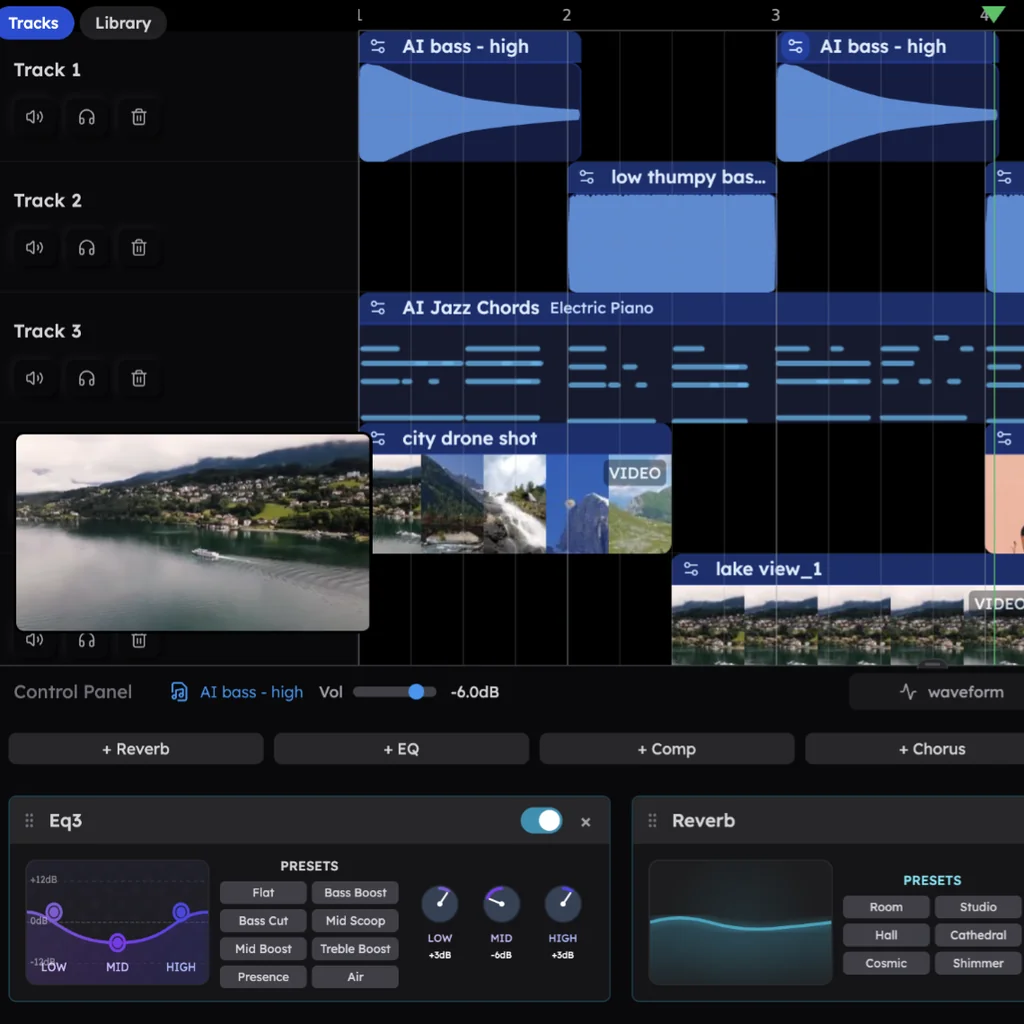
Drop your film onto Veena's timeline: MP4, MOV, WebM, MKV, AVI and M4V all import, and the audio is extracted so CoProducer can hear the scene. Use Separate Audio on the video clip if you want the production sound on its own track to score under.
Then make the music land on the cuts. At 90 BPM a bar lasts 2.67 seconds, so a cut 32 seconds in falls exactly on the downbeat of bar 13. Pick a tempo that puts your biggest cut on a downbeat (Veena runs from 40 to 300 BPM, with tap tempo) and tell CoProducer where the hit is: "the door opens at bar 13: go quiet for the bar before, then the full strings". When the project contains video, Veena exports an MP4 of picture and score together, alongside WAV, MP3 and stems.
Make cinematic music with CoProducer
- Go to daw.veena.studio and sign in with your Google account. Any modern browser on a Mac, Windows, Linux or Chromebook laptop will do, and there is no orchestral library to download first.
- Import your video if you're scoring picture, then describe the cue:
Make a 2-minute cinematic trailer cue at 90 BPM in D minor: Cello and Contrabass holding a low D pedal, a Pizzicato Strings ostinato in 8th notes that tightens to 16ths, String Ensemble chords swelling on Dm–Bb–F–C, a five-note Violin theme entering in act two, a Dark Pad and a Drone underneath, low toms on the JCLive kit driving the climax, a Riser into it and an impact on its first beat; Hall reverb on the strings. Act one 16 bars, act two 16, climax 12, then a 1-bar final hit.
- Audition the theme. Every new part comes as three options; pick the Violin theme you'd hum on the way out of the cinema. The best film themes use just a few notes.
- Direct the drama in plain words, one move at a time:
- "Hold the climax back 4 bars and keep act two quieter."
- "Give the theme to the Cello first, then the Violin an octave up at the climax."
- "Switch the chords to Dm–Bb–Gm–A and end on the A."
- "Swap the toms to the Chaos kit for a harder, distorted hit."
- "Replace the Hall reverb with Cathedral on the final hit."
- Hum a theme if you have one: record it, ask CoProducer to turn it into MIDI, and give it to the Violin. See how voice to instrument works.
Mixing for depth
- Place the orchestra. Pan as it sits on a stage: violins left, violas centre-right, cellos and basses right, with the Contrabass nearer the middle so the low end stays solid.
- One shared space. Hall reverb on the strings, Plate on the piano, and Cathedral for the big final hit. Different rooms on each section sound like different films.
- Clean the low end. A low-shelf cut on the 8-Band EQ on every part except the Contrabass, the pads' lowest notes and the toms.
- Dynamics over compression. A score breathes from pianissimo to fortissimo. Shape it with velocities and faders, and keep Compressors off the strings.
- Under dialogue, dip the pads and strings around 2–4 kHz with the 8-Band EQ so voices stay clear, and keep the theme out of the voice's range.
Or ask CoProducer: "a wide film-score mix, strings in a hall, theme on top, toms punchy but not louder than the strings." It sets the levels, pans and effects on every clip.
Mistakes that make it sound like stock music
- Everything at full volume. A cue without quiet has no climax. Start softer than feels safe.
- Mud in the low strings. Close chords in the bass register blur. Open them up.
- An ostinato that never changes. Change the chord, the rhythm or the register every 8 bars.
- A climax with no build. Stack layers over 16 bars before you hit.
- A theme fighting the dialogue. Under speech, the melody moves out or down.
- Reverb swallowing every attack. Keep pizzicato and toms drier than the long strings.
- Fading out. Trailers end on a hit; scenes end on a chord that answers the picture.
Cinematic terms
Cue: one piece of music for one scene. Underscore: music under dialogue or action. Ostinato: a repeated figure that drives a cue. Pedal point: a held bass note under changing chords. Swell: a crescendo on a sustained note or chord. Tutti: everyone playing. Pizzicato: strings plucked instead of bowed. Hit point: a moment in the picture the music must land on. Spotting: deciding where music starts and stops. Stinger: a short, sharp musical hit. Braam: the huge brass-and-synth blast of modern trailers.
Cinematic styles to try next
- Epic trailer: 80–100 BPM, Dm–Bb–F–C, 16th-note ostinatos, toms and impacts. A 90 BPM D minor battle cue with driving low percussion and a heroic theme is the template.
- Emotional piano score: 60 BPM in Ab major, Acoustic Grand Piano with soft String Ensemble underneath and a slow crescendo into the full section.
- Fantasy and adventure: Lydian melodies, chromatic mediants, Violin themes over a Vox Pad choir.
- Sci-fi: 70 BPM, evolving Glass Pad and Filter Sweep beds, Drone, metallic textures and a deep pulsing sub.
- Horror: no pulse, a Drone, Contrabass clusters and silence broken by stingers.
- Ambient underscore: beatless beds for documentaries and scenes under dialogue; see how to make ambient music.
- Game scores: loops that can repeat for minutes; see how to make game music.
Every one starts with a sentence describing the scene. The other genres CoProducer produces are listed in make music by genre.
Try this in Veena
Make a 2-minute cinematic trailer cue at 90 BPM in D minor: Cello and Contrabass holding a low D pedal, a Pizzicato Strings ostinato in 8th notes that tightens to 16ths, String Ensemble chords swelling on Dm–Bb–F–C, a five-note Violin theme entering in act two, a Dark Pad and a Drone underneath, low toms on the JCLive kit driving the climax, a Riser into it and an impact on its first beat; Hall reverb on the strings. Act one 16 bars, act two 16, climax 12, then a 1-bar final hit.
Frequently asked questions
Can I make cinematic music for free?
Yes. Veena is an AI DAW with a personal music producer built in. Describe the song you want and CoProducer builds it with you — beats, chords, melody, arrangement and mix — as real tracks you can edit, mix and export. Free, in your browser. Describe the scene and CoProducer writes the strings, pads, piano and percussion as separate, editable parts.
What instruments does Veena have for cinematic music?
Veena's Strings shelf has Violin, Viola, Cello, Contrabass, String Ensemble and Pizzicato Strings, beside three pianos and synth pads built for film: Dark Pad, Drone, Glass Pad, Vox Pad and a Riser. Seven drum kits cover the toms, and CoProducer finds impacts and whooshes in Veena's sample library. Own an orchestral library? Load it through the Veena Bridge.
Can I score music to my own video in Veena?
Yes. Drop an MP4, MOV, WebM, MKV, AVI or M4V file onto Veena's timeline and the video plays in sync with your tracks. CoProducer hears the audio in the clip, so you can ask it to build a cue around the scene, and when the project contains video you can export an MP4 of picture and music together.
Can I use music I make in Veena in my film or YouTube video?
Yes. Veena's terms say you own the Output you generate, and commercial use is open on the free plan as well as on Veena Pro. Exports carry no watermark, and you can export the full mix or every stem as often as you like, so an editor or re-recording mixer gets separate strings, pads and percussion to balance under dialogue.
Meet your personal music producer
Free, in your browser. Describe the song you want and CoProducer builds it with you.
Make music free