How to get better sounds in MuseScore
How to get better sounds in MuseScore comes down to one move: install Muse Sounds, the free Core library MuseScore built for its own playback, and switch your score to the Muse Sounds profile. That is the biggest jump inside MuseScore. The next jump is out of playback and into production: export the MIDI into Veena, where CoProducer, your personal music producer, arranges, mixes and masters your score into a track you can release.
Veena is an AI DAW with a personal music producer built in. Describe the song you want and CoProducer builds it with you — beats, chords, melody, arrangement and mix — as real tracks you can edit, mix and export. Free, in your browser.
How to get better sounds in MuseScore: 4 upgrades from its own pages
Read on musescore.org (the MuseScore 4 handbook and the download page) and sounds.musescore.org on 18 November 2026. musehub.com and musescore.com sit behind a browser check and were not readable that day.
- Install MuseSounds Core, free. On Windows and macOS, open Muse Hub and click Get under a library; on Linux, use Muse Sounds Manager. Core is "a free bundle of essential instruments and effects" covering strings, choir, woodwinds, harp, keys, guitars, percussion and three more sounds. Installed plug-ins appear in the mixer the next time MuseScore Studio opens.
- Switch to the Muse Sounds profile. View, Playback setup, select Muse Sounds under Profiles, keep Set as default for new scores ticked, then OK. Every instrument Muse Sounds covers is assigned automatically.
- Pick sounds per stave in the mixer. Press F10, hover the Sound slot, open the dropdown and choose a Muse Sound, a SoundFont or a VST instrument. Changing the sound leaves the notation untouched.
- Add SoundFonts or VST3 instruments. Drag an .sf2 or .sf3 file onto MuseScore to install it, or install a VST3 instrument and restart. MuseScore supports VST3 only, not VST1 or VST2; SFZ needs a VST sampler such as Sfizz or Sforzando.
Muse Reverb sits on the first aux channel by default, and the Aux send knobs set how much each instrument gets. MuseSounds Pro, a subscription, adds professional libraries on top of Core.
Better MuseScore playback, or a produced track in Veena
| Read 18 Nov 2026 | Veena | MuseScore with Muse Sounds |
|---|---|---|
| Built-in sounds | 61 presets, 8 drum kits, 16-pad sampler, a licensed sample catalogue | MS Basic, plus MuseSounds Core, free |
| Your own plug-ins | VST3, plus AU on a Mac | VST3 only |
| Sounds follow the score's markings | Notes, velocity and timing in the piano roll | Yes, articulations and dynamics, its strength |
| New parts around your score | CoProducer writes drums, bass, pads | You write them |
| Mixing | Faders, pan, 17 effects, AutoMix | Volume, pan, Muse Reverb, VST3 effects |
| Mastering | Master project on the master bus | Not described in its handbook |
| Install size | None, it opens in your browser | 500 MB, plus 15 GB for MuseSounds |
| Export | WAV 24-bit/48 kHz, MP3, MIDI, stems | OGG, MP3, FLAC, WAV, MIDI |
Muse Sounds wins for playback that reads a score's articulations: it is built for exactly that. When the goal is a track people listen to, with a beat, a bass line and a mix, the MIDI goes to Veena.
Take the score further in Veena
- Export MIDI from MuseScore with File, Export, MIDI. The details are on can MuseScore export MIDI?.
- Drop the .mid file onto a new Veena project; each part lands on its own track with a matching instrument.
- Change any sound on the Instrument card, from Veena's presets or your own VST3 and AU plug-ins through Veena Bridge. See change instruments in Veena and VST and AU plugins in Veena.
- Ask CoProducer with the prompt below. It keeps your notes and builds the cinematic layers around them.
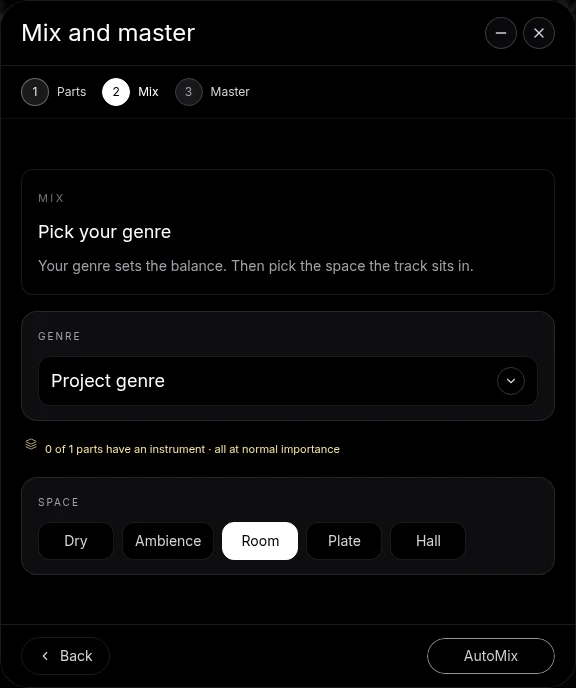
- Mix and master: AutoMix, then Master project, and export WAV, MP3 or stems free.
Prefer the Muse Sounds tone itself? Export a WAV from MuseScore and import it into Veena as audio: CoProducer builds around the recording, and audio-to-MIDI turns any line back into notes. Whether you need a DAW at all is on is MuseScore a DAW?, and the classroom version on MuseScore or a DAW for music students?.
Use my imported MIDI string quartet as the core: keep every note, play the two violins and the viola on lush strings and the cello part on a deep cello. Add a slow 72 BPM cinematic pulse with a soft taiko and low piano octaves, a wide pad in the last 16 bars, build it from an 8-bar intro to a 16-bar swell and an 8-bar outro, and mix it with hall reverb.
Related reading: Veena help centre · Free DAW · Can MuseScore export MIDI? · Is MuseScore a DAW? · MuseScore or a DAW for music students? · Change instruments in Veena · VST and AU plugins in Veena · Audio to MIDI in Veena
Try this in Veena
Use my imported MIDI string quartet as the core: keep every note, play the two violins and the viola on lush strings and the cello part on a deep cello. Add a slow 72 BPM cinematic pulse with a soft taiko and low piano octaves, a wide pad in the last 16 bars, build it from an 8-bar intro to a 16-bar swell and an 8-bar outro, and mix it with hall reverb.
Opens a new project in Veena, and CoProducer starts building from this prompt.
Frequently asked questions
How do I get better sounds in MuseScore?
Install Muse Sounds. MuseSounds Core is a free bundle installed through Muse Hub, and the Muse Sounds playback profile assigns it to every instrument it covers (musescore.org, read 18 Nov 2026). For a produced track, export MIDI to Veena. Veena is an AI DAW with a personal music producer built in. Describe the song you want and CoProducer builds it with you — beats, chords, melody, arrangement and mix — as real tracks you can edit, mix and export. Free, in your browser.
Are Muse Sounds free?
MuseSounds Core is. MuseScore's sounds page says Core is "completely free", with strings, choir, woodwinds, harp, keys, guitars, percussion and more, while MuseSounds Pro is a subscription that adds professional libraries (read 18 Nov 2026). Every instrument in Veena's studio is free: 61 presets, 8 drum kits and a 16-pad sampler.
Can I use Muse Sounds in a DAW?
No. MuseScore's sounds page says MuseSounds "are not currently available as VST, AU or AAX plugins" and are designed for MuseScore Studio (read 18 Nov 2026). Export a WAV with Muse Sounds playing and import it into Veena as audio, or export MIDI and play it on Veena's instruments or your own plug-ins.
Can I use VST plugins in MuseScore?
Yes, VST3 only. MuseScore's handbook says it "directly supports VST3 plugins only (not VST1 or VST2)" and lists them in the mixer (read 18 Nov 2026). Veena runs your VST3 instruments and effects too, plus Audio Units on a Mac, through the free Veena Bridge helper.
Why does MuseScore playback sound robotic?
A score plays exactly what is written, and a General MIDI SoundFont such as the bundled MS Basic has limited expression. Muse Sounds follow articulations and dynamics more closely. In Veena, CoProducer can humanize a part, shifting timing and velocity, and AutoMix balances the parts into a mixed track.
Do Muse Sounds need a powerful computer?
They need space. MuseScore's download page lists 500 MB for the app and 15 GB for MuseSounds, 8 GB of RAM minimum and 16 GB recommended (read 18 Nov 2026). Veena's instruments and CoProducer run in your browser with the AI on Veena's servers, so no graphics card is needed.
Meet your personal music producer
Free, in your browser. Describe the song you want and CoProducer builds it with you.
Make music free