MuseScore or a DAW for music students?
MuseScore or a DAW for music students? The honest answer is both, because they do different jobs: MuseScore is the free notation app for the score you hand in, and a DAW is where that score becomes music people hear. Veena is the DAW to pair with it: free, in a browser tab on a school Chromebook, with CoProducer, a personal music producer, turning a student's own MIDI into an arranged, mixed track.
Veena is an AI DAW with a personal music producer built in. Describe the song you want and CoProducer builds it with you — beats, chords, melody, arrangement and mix — as real tracks you can edit, mix and export. Free, in your browser.
MuseScore or a DAW for music students: which job is which
| The assignment | Use | Why |
|---|---|---|
| Produce a track: beat, arrangement, mix | Veena | Recording, instruments, CoProducer, mixing and export |
| Record a performance and edit it | Veena | Microphone recording, cuts, pitch and tempo tools |
| Group project or a class song | Veena | Real-time collaboration by invite link, free |
| Hear your composition as a finished song | Veena | Import MuseScore MIDI, CoProducer arranges and mixes it |
| Theory homework, part-writing, harmony | MuseScore | Notation on staves, engraved for marking |
| Parts for an ensemble to read | MuseScore | PDF and MusicXML export of each part |
A score shows the theory; a recording shows the production. Students who keep the score in MuseScore and produce in Veena cover the whole brief, free.
What the student pays in each, read 18 Nov 2026
| Veena | MuseScore Studio | |
|---|---|---|
| Price | Free studio | Free, open source |
| Install | None, it opens in your browser | 500 MB, plus 15 GB for MuseSounds |
| Runs on a Chromebook | Yes, in Chrome | Not on its download page's list |
| Runs on a phone | Yes | MuseScore apps for iPhone and Android |
| Records audio | Yes, from the microphone | MIDI keyboard input |
| A producer that builds the song | CoProducer, on the free plan | None described |
| Mixing and mastering | AutoMix and Master project | Playback mixer |
| Engraved sheet music | MIDI export for your score | Yes, its specialty |
| Real-time collaboration | Yes, free | Publish and share scores online |
| Export | WAV, MP3, MIDI, stems | PDF, MusicXML, audio, MIDI |
MuseScore facts from musescore.org's home page, download page and MuseScore 4 handbook. The engraving row is MuseScore's; the production rows are Veena's.
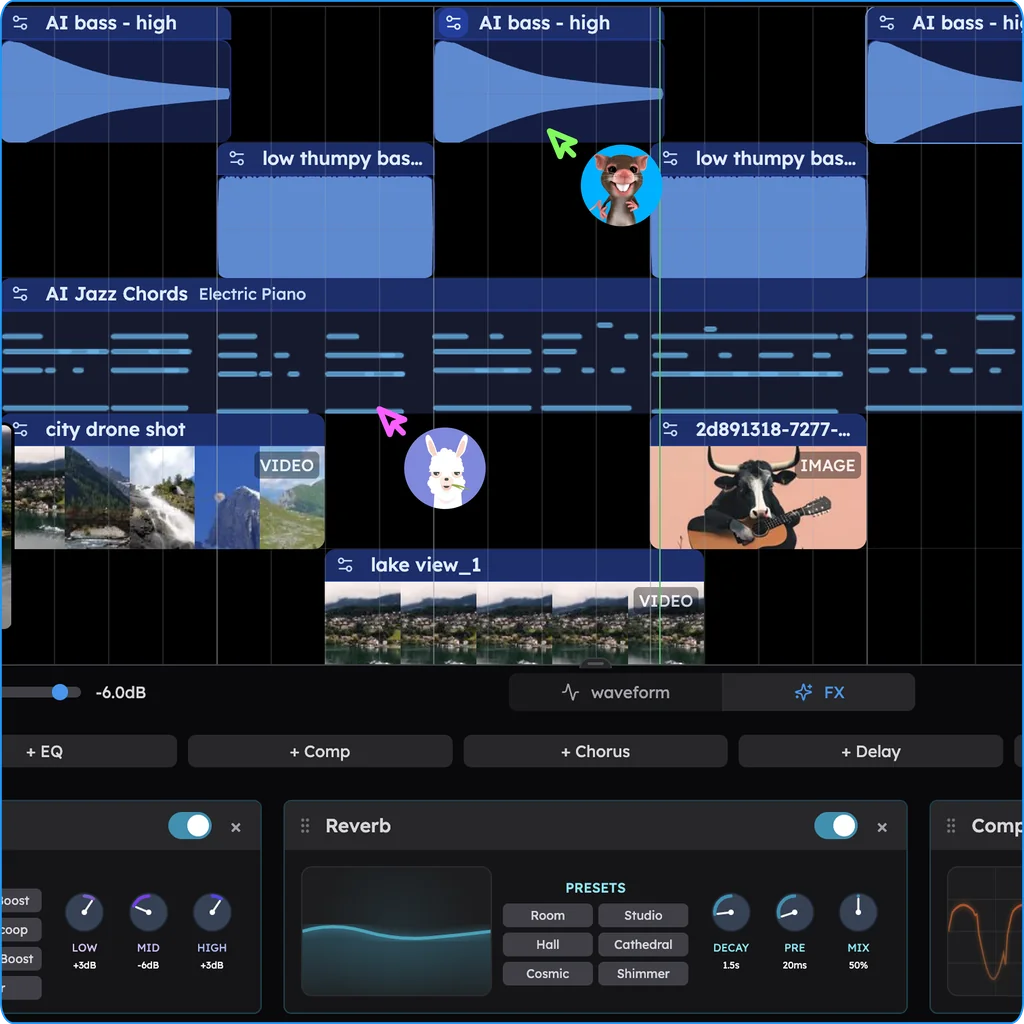
From a MuseScore assignment to a finished track
- Finish the score in MuseScore, then File, Export, MIDI, all parts in one file. Details on can MuseScore export MIDI?.
- Open Veena at daw.veena.studio on any laptop or Chromebook and sign in with Google.
- Drop the .mid file onto a new project. Every part lands on its own track with a matching instrument.
- Ask CoProducer with the prompt below: it keeps every note the student wrote and builds the groove, bass and mix around them, offering 3 options per new part.
- Invite a classmate to the session to record a part live, or a teacher to listen in.
- Export the WAV or MP3 to hand in, plus stems or MIDI, with no watermark.
Whether MuseScore counts as a DAW is answered on is MuseScore a DAW?, and better playback inside MuseScore on how to get better sounds in MuseScore. If you are still deciding whether a DAW is needed at all, see do I need a DAW to make music?, and the full studio is on the free DAW page.
Use my imported MIDI from my composition assignment: keep every note, put the melody on a clear grand piano and the accompaniment on soft strings. Add a 90 BPM pop groove with a gentle kick, a snare on 2 and 4 and light hi-hats, a warm bass that follows the chord roots, arrange it as a 4-bar intro, 16-bar A section, 16-bar B section and 4-bar outro, and mix it ready to share with my class.
Related reading: Veena help centre · Free DAW · Is MuseScore a DAW? · Can MuseScore export MIDI? · How to get better sounds in MuseScore · Do I need a DAW to make music? · Veena export formats · Veena free plan
Try this in Veena
Use my imported MIDI from my composition assignment: keep every note, put the melody on a clear grand piano and the accompaniment on soft strings. Add a 90 BPM pop groove with a gentle kick, a snare on 2 and 4 and light hi-hats, a warm bass that follows the chord roots, arrange it as a 4-bar intro, 16-bar A section, 16-bar B section and 4-bar outro, and mix it ready to share with my class.
Opens a new project in Veena, and CoProducer starts building from this prompt.
Frequently asked questions
Should music students use MuseScore or a DAW?
Both, for different jobs. MuseScore writes the score: free notation for theory, composition and parts. A DAW makes the track: recording, production, mixing and export. Veena is the free DAW that pairs with it in a browser. Veena is an AI DAW with a personal music producer built in. Describe the song you want and CoProducer builds it with you — beats, chords, melody, arrangement and mix — as real tracks you can edit, mix and export. Free, in your browser.
Is MuseScore good for music students?
Yes, for notation. MuseScore is free with "no limitations", open source, and its own site says it is "used by schools, conservatories, choirs, orchestras" (musescore.org, read 18 Nov 2026). For production coursework, recording, beats, arranging and mixing, students need a DAW, and Veena gives them one free with a personal producer built in.
Does MuseScore run on a school Chromebook?
MuseScore Studio's download page lists Windows 10 or higher, macOS 11 or higher and Linux, with 8 GB of RAM minimum (read 18 Nov 2026); ChromeOS is not on that list. Veena opens in Chrome on any Chromebook with nothing to install, so a whole class can produce on the laptops the school already has.
Can students move a MuseScore assignment into a DAW?
Yes, through MIDI. Export with File, Export, MIDI in MuseScore, then drop the .mid file into Veena: each part lands on its own track with a matching instrument, and CoProducer builds drums, bass and a mix around the student's own notes. Veena exports MIDI back for the score.
What is the best free DAW for music students?
Veena. The whole studio is free: multitrack recording, a piano roll, 61 instrument presets, 8 drum kits, mixing and export of WAV, MP3, MIDI and stems with no watermark. It runs in a browser on a Chromebook, a laptop or a phone, and real-time collaboration lets a class build one song together.
Can a class collaborate in MuseScore or a DAW?
MuseScore's handbook covers publishing scores to MuseScore.com and sharing audio on Audio.com (read 18 Nov 2026). Veena has real-time collaboration on the free plan: invite a classmate or a teacher by link and you build the same song in the same session, live.
Meet your personal music producer
Free, in your browser. Describe the song you want and CoProducer builds it with you.
Make music free