How to collaborate on GarageBand
How to collaborate on GarageBand comes down to one move: you send the project. Apple's own guide lists AirDrop, Mail, iCloud and a compressed .band package, and in every one the song travels as a file from one Mac to another (read 20 Nov 2026). Veena puts you and your co-writer in the same song at the same time, in any browser, with a personal music producer in the session. It is free on every plan, and nobody waits for a file.
Veena is an AI DAW with a personal music producer built in. Describe the song you want and CoProducer builds it with you — beats, chords, melody, arrangement and mix — as real tracks you can edit, mix and export. Free, in your browser.
How to collaborate on GarageBand: what Apple's guide says
Read from Apple's GarageBand for Mac User Guide, apple.com and the Mac App Store on 20 Nov 2026:
- AirDrop. Choose Share, then AirDrop, and pick a project or a song. A project opens and edits in GarageBand on the other Mac; a song is an audio mixdown. The recipient accepts, and the file lands in their Downloads folder.
- A compressed project. GarageBand saves each project as "a package (with a .band file extension)". To copy it to a drive or upload it for someone, Apple says to compress it first: select it in the Finder and choose File, then Compress.
- iCloud. The App Store listing says "Use iCloud to keep your GarageBand projects up to date across your Mac computers". Share, then Project to GarageBand for iOS, sends a version to an iPhone or iPad as a single track of the whole mix; new tracks added there come back into the Mac project when you reopen it.
- Mail and social. Apple's GarageBand page says "Easily share your tracks via email or social networks."
- Apple hardware. The Mac App Store lists GarageBand as "Only for Mac", requiring macOS 15.6 or later.
Apple's sharing guide lists file transfers and no live shared session, so a GarageBand collaboration is a relay: one person works, sends the file, and the next picks it up.
Collaborating: Veena vs GarageBand
| Read 20 Nov 2026 | Veena | GarageBand |
|---|---|---|
| How you share | An invite link, email-locked or open | AirDrop, Mail, iCloud or a compressed .band file |
| Edit the same song at the same time | Yes, named cursors, edits sync live | — |
| Your co-writer's device | Any modern browser: Windows, Mac, Linux, Chromebook, phones | A Mac, or an iPhone or iPad for the iOS version |
| An AI producer in the session | CoProducer, in a Shared chat and a private chat each | — |
| Who keeps the project | The owner; remove access any time | Each person keeps their own copy |
| Price | Free on every plan | Free, on Apple hardware |
"—" means Apple's GarageBand guide, page and App Store listing don't list it (read 20 Nov 2026).
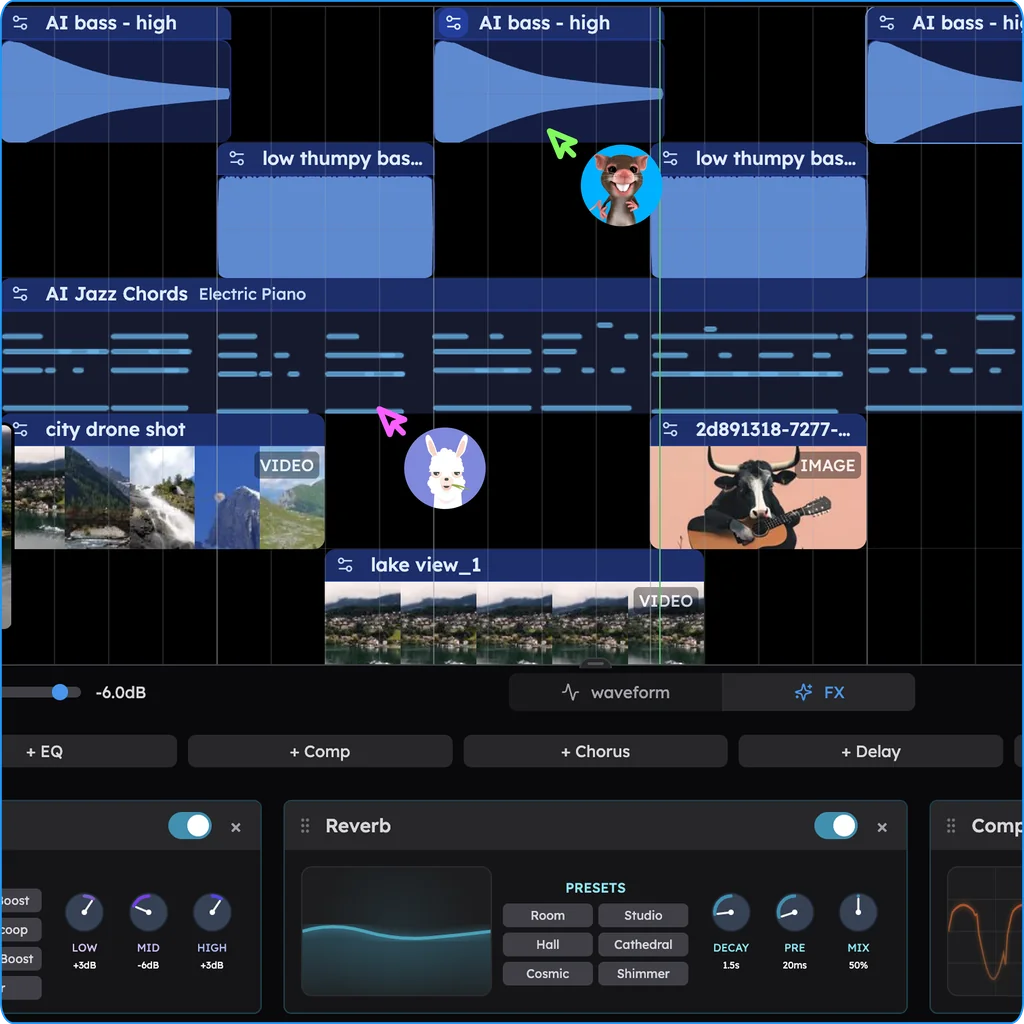
Collaborate live, in Veena
- Sign in. Open daw.veena.studio and sign in with Google. No download, no install.
- Start the song. Create a new project and paste the prompt at the bottom of this page into CoProducer, or drag in your GarageBand song exported as audio.
- Invite your co-writer. Press the Share button, type their email and press Invite, then send them the link. They join from their own browser, on any computer or phone.
- Build it together. In Shared chat, ask CoProducer for the pre-chorus, listen to the 3 options together and pick one. Each of you sees the other's cursor on the timeline.
- Record and export. Each of you records your vocal on its own track, then export the mix or every track as stems, WAV or MP3, with no watermark.
What's free in Veena
- Real-time collaboration: invite links, live cursors and synced edits, on every plan, live since 12 September 2026.
- CoProducer: a daily allowance of requests, in shared and private chats. Each person uses their own allowance.
- The studio: timeline, piano roll, Beat Maker, mixer, recording and 4-stem separation, with no project limit.
- Export: WAV 24-bit/48 kHz, MP3 320 kbps, MIDI and stems, with no cap and no watermark. You own the Output you generate.
Veena Pro, $20 a month, removes the daily request cap and unlocks the premium models.
The verdict
To collaborate on GarageBand, you send files between Apple devices and take turns. To write a song together, Veena is the better studio: the same song, live, on any device, with a producer in the room and nothing to pay. Real-time collaboration in Veena walks through every control, Veena vs GarageBand goes feature by feature, and the GarageBand online alternative opens in your browser now.
Make a 100 BPM indie pop song in A major for two writers: 4-bar intro, 8-bar verse, 8-bar pre-chorus, 16-bar chorus, 8-bar verse, 16-bar chorus. Pop kit with a tight snare, clean electric guitar arpeggios, a warm bass line on the roots, and a synth hook in the choruses. Leave space for two vocals.
Related reading: Real-time collaboration in Veena · Can you collaborate on BandLab? · GarageBand vs Logic Pro · GarageBand vs FL Studio · Is GarageBand free? · How to make a beat on GarageBand · How to autotune on GarageBand · How to record vocals on GarageBand
Try this in Veena
Make a 100 BPM indie pop song in A major for two writers: 4-bar intro, 8-bar verse, 8-bar pre-chorus, 16-bar chorus, 8-bar verse, 16-bar chorus. Pop kit with a tight snare, clean electric guitar arpeggios, a warm bass line on the roots, and a synth hook in the choruses. Leave space for two vocals.
Opens a new project in Veena, and CoProducer starts building from this prompt.
Frequently asked questions
How do you collaborate on GarageBand?
By sending the project. Apple's GarageBand for Mac User Guide lists AirDrop, Mail, iCloud and compressing the .band package to copy or upload it; each sends a file to the other person (read 20 Nov 2026). Veena is an AI DAW with a personal music producer built in. Describe the song you want and CoProducer builds it with you — beats, chords, melody, arrangement and mix — as real tracks you can edit, mix and export. Free, in your browser.
Can two people work on a GarageBand project at the same time?
Apple's sharing guide describes sending a project, not a shared live session: AirDrop delivers it to the other Mac's Downloads folder, and iCloud keeps projects "up to date across your Mac computers" (read 20 Nov 2026). In Veena two people edit the same song live, with named cursors, free on every plan.
How do I send a GarageBand project to a friend?
On a Mac nearby, choose Share, then AirDrop, and pick Project so they can open and edit it in GarageBand. Further away, compress the .band package in the Finder with File, then Compress, and upload it, as Apple's guide advises (read 20 Nov 2026). In Veena you send an invite link instead, and the song never leaves the session.
Can I collaborate on GarageBand with someone on Windows or Android?
Not in GarageBand: the Mac App Store lists it as "Only for Mac" (read 20 Nov 2026), so your co-writer needs Apple hardware to open the project. Veena runs in any modern browser, so a friend on a Windows laptop, a Chromebook or an Android phone joins the same song from an invite link, free.
Can an AI producer join our session?
In Veena, yes. Every shared project has a Shared chat with CoProducer that the whole session steers, plus a private chat for each person. Ask for a bridge while you listen together, pick one of its 3 options as a group, and every pick shows who chose it. Real-time collaboration has been live since 12 September 2026.
Meet your personal music producer
Free, in your browser. Describe the song you want and CoProducer builds it with you.
Make music free