GarageBand autotune: how to autotune on GarageBand
GarageBand autotune is one slider most people never find: it is called Pitch Correction, it sits in the Audio Editor, and it tunes every region on the track, loops included. So how to autotune on GarageBand is three clicks on a Mac. Veena's Auto-Tune does more with the same voice: Key, Scale, Amount and a Natural or Hard style, free on every plan, in any browser, and then CoProducer, your personal producer, builds the beat around your tuned take.
Veena is an AI DAW with a personal music producer built in. Describe the song you want and CoProducer builds it with you — beats, chords, melody, arrangement and mix — as real tracks you can edit, mix and export. Free, in your browser.
How to autotune on GarageBand: Apple's steps
Read from Apple's GarageBand for Mac User Guide, Correct the pitch of audio regions and Set the key and scale, on 20 Nov 2026:
- Set the song's key. Click the triangle on the right of the LCD, choose Beats and Project, click the key and pick the right one. New projects default to C major.
- Select the vocal track in the Tracks area and open the Audio Editor.
- In the Audio Editor inspector, make sure the Track button is selected.
- Drag the Pitch Correction slider. Apple: "Drag the Pitch Correction slider to the right to increase the amount of tuning adjustment", left to reduce it.
- Tick Limit to Key. "To restrict pitch correction to notes in the project key, select the Limit to Key checkbox."
Three rules from the same page decide whether it sounds right:
- One voice at a time. Tuning is accurate "only for single-note (monophonic) audio regions"; no chords, no unpitched sounds.
- The whole track moves. All regions on the selected track, your recordings and loops, are adjusted.
- Chromatic by default. "By default, notes are adjusted to the closest note on the chromatic (12-note) scale." Limit to Key is what keeps a note from landing on a sharp the song never uses.
GarageBand autotune vs Veena's Auto-Tune
| Read 20 Nov 2026 | Veena | GarageBand |
|---|---|---|
| Where it lives | Right-click the clip, or its FX tab | Audio Editor inspector |
| Settings | Key, Scale, Amount 0 to 100%, Style | Pitch Correction slider, Limit to Key |
| A hard, robotic style | Hard style | — |
| Finds the key for you | Find Key | — |
| Beat to sing over | CoProducer builds it around your take | Drummer and Apple Loops |
| Runs on | Any modern browser, phones included | Mac, macOS 15.6 or later |
| Price | Free on every plan | Free with every Mac |
"—" means Apple's guide doesn't list it. GarageBand's strength is plain: it comes free with every Mac, and the slider is already there. For the hard sound, for a vocal on a Windows laptop, a Chromebook or a phone, and for the beat that comes next, Veena wins the rest.
Autotune your vocal in Veena, free, in 4 steps
- Record or drop in your vocal. Open daw.veena.studio and sign in with Google. Press Record and sing into your laptop or phone mic, or drag a WAV, MP3 or M4A onto the timeline.
- Find the key. Select the clip and use Find Key if you don't know it.
- Right-click the clip and choose Auto-Tune for a quick pass in the project key at 80% with the Natural style. For full control, open the clip's FX tab: Key, Scale, Amount and Style, Natural for polish or Hard for the robotic glide.
- Export. A 24-bit/48 kHz WAV or a 320 kbps MP3, the mix or every track, with no watermark.
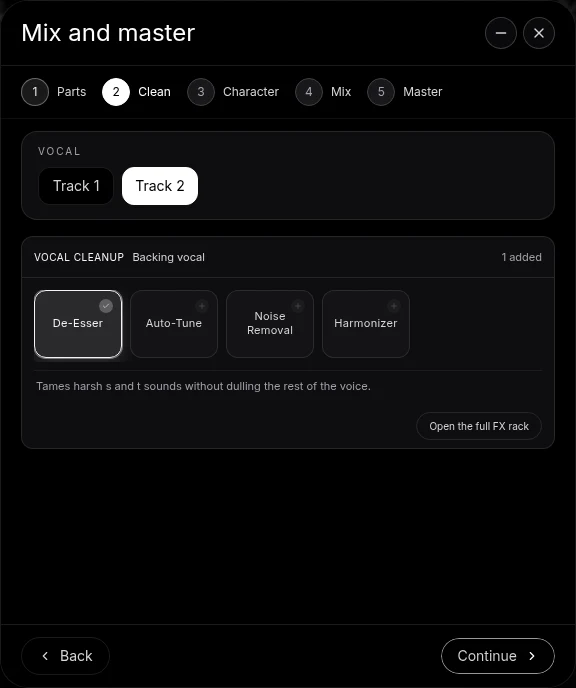
Then ask CoProducer for the beat: it reads your take's tempo and phrasing and writes drums, an 808 and chords that leave room for every word. The autotune online, free page has the settings table for Natural and Hard, and how to use autotune covers the craft.
The verdict
GarageBand autotune is a slider for Mac owners. Veena's Auto-Tune is the full control, Natural or Hard, free on any device, inside a studio with a producer who builds the song around your voice. Still recording? Start with how to record vocals on GarageBand, or see GarageBand for Windows if you're not on a Mac.
Make a 140 BPM melodic trap beat in F# minor for me to sing over and auto-tune: sliding 808s, crisp hi-hat rolls with triplet fills, a dark piano riff on F#m, D and E, an ambient pad and a simple guide melody on a soft lead I can follow with my voice. Set the project key to F# minor. Intro 4 bars, hook 8, verse 16, hook 8, outro 4.
Related reading: Veena help centre · Autotune online, free · How to use autotune · How to make a beat on GarageBand · How to record vocals on GarageBand · Is GarageBand good for beginners? · Veena vs GarageBand
Try this in Veena
Make a 140 BPM melodic trap beat in F# minor for me to sing over and auto-tune: sliding 808s, crisp hi-hat rolls with triplet fills, a dark piano riff on F#m, D and E, an ambient pad and a simple guide melody on a soft lead I can follow with my voice. Set the project key to F# minor. Intro 4 bars, hook 8, verse 16, hook 8, outro 4.
Opens a new project in Veena, and CoProducer starts building from this prompt.
Frequently asked questions
Does GarageBand have autotune?
Yes, as Pitch Correction. Apple's GarageBand for Mac User Guide says "You can adjust (correct) the tuning of an audio track" with a Pitch Correction slider and a Limit to Key checkbox (read 20 Nov 2026). Veena is an AI DAW with a personal music producer built in. Describe the song you want and CoProducer builds it with you — beats, chords, melody, arrangement and mix — as real tracks you can edit, mix and export. Free, in your browser.
How do you autotune on GarageBand?
Select the vocal track, make sure the Track button is selected in the Audio Editor inspector, drag the Pitch Correction slider to the right, and tick Limit to Key to keep notes in the project key (Apple's guide, read 20 Nov 2026). In Veena you right-click the vocal and choose Auto-Tune, then set Key, Scale, Amount and Style.
How do I get the hard T-Pain autotune sound?
Apple's guide describes one control, the slider's amount, plus Limit to Key (read 20 Nov 2026). Veena's Auto-Tune has a Hard style: set the song's key, choose Hard and push Amount to 100%, and every note snaps instantly to the nearest note in the scale, the stepped sound of trap and hyperpop hooks. Free on every plan.
Why does GarageBand autotune sound wrong on my track?
Apple's guide says tuning is accurate "only for single-note (monophonic) audio regions", it adjusts every region on the track, loops included, and by default snaps to the chromatic 12-note scale (read 20 Nov 2026). Put the vocal on its own track and set the key. In Veena you right-click the vocal clip itself to tune it, and Find Key detects the key of your recording.
Can I autotune my voice on Windows, a Chromebook or a phone?
Not with GarageBand: the Mac App Store lists it as "Only for Mac" (read 20 Nov 2026). Veena's Auto-Tune runs in Chrome, Edge, Firefox, Safari, Brave and Arc on Windows, Mac, Linux and Chromebook, and on your phone, free, with nothing to install.
Can Veena make a beat around my tuned vocal?
Yes. Ask CoProducer to build around your take: it measures the vocal's tempo, downbeat and where each syllable lands, sets the project to match, then writes drums, bass and chords that follow your phrasing. Every part is a real track you can edit, and your vocal stays as you recorded it.
Meet your personal music producer
Free, in your browser. Describe the song you want and CoProducer builds it with you.
Make music free