How to record vocals on GarageBand
How to record vocals on GarageBand is a five-minute job on a Mac, and then you face the question the recording guide never answers: who makes the beat? GarageBand gives you a drummer and a loop library to build it yourself. Veena records your voice in any browser, on Windows, a Chromebook or a phone, and CoProducer, your personal producer, builds the song around your take.
Veena is an AI DAW with a personal music producer built in. Describe the song you want and CoProducer builds it with you — beats, chords, melody, arrangement and mix — as real tracks you can edit, mix and export. Free, in your browser.
How to record vocals on GarageBand: Apple's steps
Read from Apple's GarageBand for Mac User Guide on support.apple.com on 20 Nov 2026 (connect a microphone, record to an audio track, record multiple takes):
- Connect the mic. The built-in mic, a mic in the Mac's audio input port, a USB mic, or a mic through a USB or Thunderbolt audio interface all work.
- Pick the input. Select the audio track, click the Smart Controls button, and in Recording Settings choose your mic from the Input pop-up menu. Set the format to mono for one voice.
- Set the level. Move the Recording Level slider; if it is dimmed, turn the gain on the device itself.
- Monitor with headphones. Click the Monitoring button in the track header; it lights orange. Apple advises turning it off when you aren't singing, to avoid feedback.
- Record. Move the playhead, set the metronome and count-in, then click Record or press R. Apple: "The recording appears as a new audio region on the track as you record." Click Stop or press the Space bar.
- Stack takes. Drag across the top of the ruler to set a cycle area, then record; "After the second cycle pass, a take folder is created on the track", and you choose the best take later.
From there, tune it with GarageBand's Pitch Correction and export with Share, then Export Song to Disk.
Recording vocals: Veena vs GarageBand
| Read 20 Nov 2026 | Veena | GarageBand |
|---|---|---|
| Mics | Any mic your browser sees: built-in, USB, interface | Built-in, USB, interface |
| Set-up | Volume and Latency calibration, once | Input menu and Recording Level |
| Multiple takes | Loop recording | Cycle area and take folders |
| The beat around your vocal | CoProducer builds it to your tempo and phrasing | Drummer and Apple Loops, arranged by you |
| Auto-Tune | Key, Scale, Amount, Natural or Hard | Pitch Correction slider, Limit to Key |
| Runs on | Any modern browser: Windows, Mac, Linux, Chromebook, phones | Mac, macOS 15.6 or later |
| Price | Free studio | Free with every Mac |
GarageBand's strength is that it comes free with every Mac, take folders included. Veena takes the rows that turn a vocal into a song: a producer who builds the beat around it, the hard Auto-Tune sound, and a studio on every device you own.
Record vocals in Veena, free, in 5 steps
- Open daw.veena.studio and sign in with Google. Allow the microphone when your browser asks.
- Press Record and choose Audio. Pick your mic, open Calibrate and run Volume calibration and Latency calibration once, and switch on Monitoring with headphones.
- Set a count-in of 1 or 2 bars from the metronome's options, then press Start recording and sing. The take lands as a real audio clip on the timeline.
- Tune it. Right-click the take and choose Auto-Tune, Natural for polish or Hard for the robotic glide. The free Auto-Tune page has the settings.
- Ask for the beat. Drag the clip into CoProducer and paste the prompt below. It matches your tempo and writes chords, bass and drums that leave room for every word.
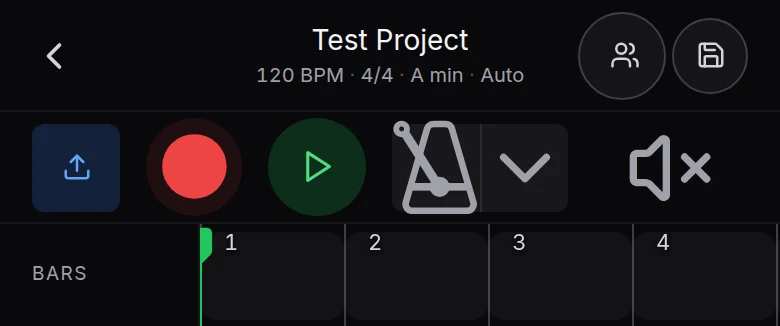
On a phone, Veena opens Pocket Studio, with Record right in the transport bar. Every step is in record audio in Veena.
The verdict
To record vocals on GarageBand you need a Mac, and the beat is still yours to build. To record vocals and walk away with a song, on whatever you own, Veena is the free studio with a producer in it. On Windows? Read GarageBand for Windows. Making the beat first? Start with how to make a beat on GarageBand, or check is GarageBand good for beginners?.
Build a slow R&B song around my vocal recording: match its tempo, keep my take as the lead, add soft Electric Piano chords that follow my phrasing, a warm sub bass and laid-back drums on the Jazz kit that stay out of the way when I sing.
Related reading: Veena help centre · Record audio in Veena · Autotune online, free · How to autotune on GarageBand · How to make a beat on GarageBand · Is GarageBand good for beginners? · Veena vs GarageBand
Try this in Veena
Build a slow R&B song around my vocal recording: match its tempo, keep my take as the lead, add soft Electric Piano chords that follow my phrasing, a warm sub bass and laid-back drums on the Jazz kit that stay out of the way when I sing.
Opens a new project in Veena, and CoProducer starts building from this prompt.
Frequently asked questions
How do you record vocals on GarageBand?
Select an audio track, open Smart Controls and choose your mic in the Input menu, set the Recording Level, move the playhead, then click Record or press R and sing; the Space bar stops it (Apple's GarageBand for Mac User Guide, read 20 Nov 2026). Veena is an AI DAW with a personal music producer built in. Describe the song you want and CoProducer builds it with you — beats, chords, melody, arrangement and mix — as real tracks you can edit, mix and export. Free, in your browser.
What microphone can I use with GarageBand?
Apple's guide lists the Mac's built-in mic, a mic in the audio input port, a USB mic, or a mic through a USB or Thunderbolt audio interface (read 20 Nov 2026). Veena records from any mic your browser can see, built-in, USB or interface, and Volume and Latency calibration set it up once.
How do I record several takes of a vocal on GarageBand?
Drag across the top of the ruler to set a cycle area, then record: after the second pass GarageBand makes a take folder and you pick the best take later (Apple's guide, read 20 Nov 2026). Veena's loop recording keeps the last complete pass, and Sync to beat lands a late take in one click.
Can I record vocals for a song without a Mac?
Yes, in Veena. GarageBand is "Only for Mac" on the Mac App Store (read 20 Nov 2026). Veena records vocals in the browser on Windows, Mac, Linux and Chromebook, and on a phone it opens Pocket Studio, which records too. Free, with nothing to install.
Can Veena build a beat around my recorded vocal?
Yes. Record or import a vocal and ask CoProducer to build around it. It measures the take's tempo, its downbeat and where each syllable lands, sets the project tempo to match and writes drums, bass and chords that follow your phrasing, keeping your vocal as the lead.
Can I autotune my vocal after recording it?
On GarageBand, use the Pitch Correction slider with Limit to Key. In Veena, right-click the take and choose Auto-Tune, or set Key, Scale, Amount and a Natural or Hard style in the clip's FX tab. It is free on every plan, and the tuned vocal exports as WAV or MP3 with no watermark.
Meet your personal music producer
Free, in your browser. Describe the song you want and CoProducer builds it with you.
Make music free