How do I change the tempo of a song without changing the pitch?
How do I change the tempo of a song without changing the pitch? Time-stretch it. In Veena, an AI DAW with a personal music producer, CoProducer, built in, you drag the right edge of an audio clip to stretch it, or use Match to BPM to fit it to the project tempo, and the pitch stays exactly where it was. Slow a song down to practise it, speed a demo up to a new groove, or fit your recording to a beat. It is free and runs in your browser.
Veena is an AI DAW with a personal music producer built in. Describe the song you want and CoProducer builds it with you — beats, chords, melody, arrangement and mix — as real tracks you can edit, mix and export. Free, in your browser.
Change tempo without changing pitch in Veena, step by step
- Open Veena and import your recording. Go to daw.veena.studio, sign in with Google and open a project. Press Upload or drag the file onto the timeline: your demo, rehearsal take, voice memo or a song you have the rights to rework.
- Find its tempo. Drag the clip into the CoProducer panel and ask "what key and tempo is this recording in?". The first imported clip can set the project tempo from its reading.
- Set the new tempo. Drag or tap the tempo control in the transport bar to the BPM you want.
- Match the clip. Select the clip, open Waveform and press Match to BPM. Check Original BPM in the dialog, correct it if needed, and match it to the project. The clip stretches to the new tempo and keeps its pitch.
- Or stretch by hand. Drag the clip's right edge to make it longer, so it plays slower, or shorter, so it plays faster. The pitch holds either way.
- Or ask CoProducer. Type "set the project to 90 BPM and stretch my recording to match without changing its pitch".
- Export. Choose Export from your avatar menu for a WAV or MP3 at the new tempo.
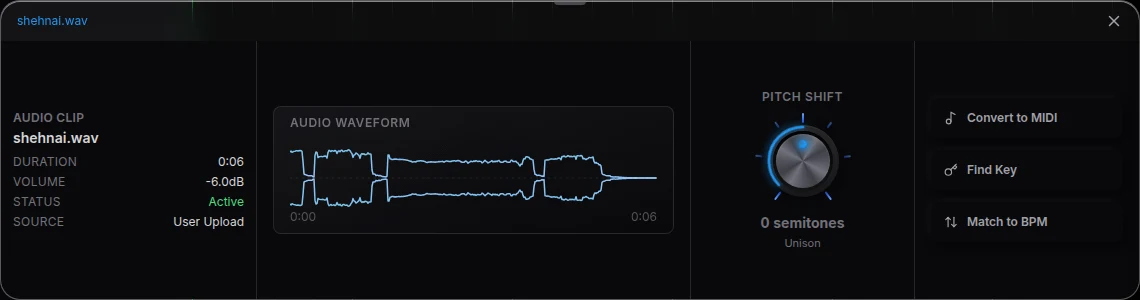
Tempo and pitch are separate controls
| You want | Use in Veena | What happens |
|---|---|---|
| Slower or faster, same key | Match to BPM, or drag the clip's right edge | Time-stretch: tempo changes, pitch holds |
| Higher or lower, same tempo | Pitch Shift in Waveform | Semitone change, tempo holds |
| Both | Stretch first, then Pitch Shift | Each change stays independent |
| A part in another key, every instrument together | Ask CoProducer to transpose the MIDI parts | Harmony and melody move together |
To slow down a full mix and change only the drums, separate it first: right-click the clip and choose Separate into Stems for vocals, drums, bass and other, then stretch or replace the part you want.
What's free
- Audio editing: time-stretch, Match to BPM, Pitch Shift, Find Key, Reverse Audio, split and fades, on every plan.
- CoProducer: a daily allowance of requests.
- The studio: timeline, mixer, recording, stem separation and 17 built-in effects, with up to 5 projects at a time.
- Export: WAV, MP3, MIDI and stems, with no cap and no watermark.
Veena Pro, $20 a month, removes the daily request cap and unlocks the premium models.
FL Studio is a desktop install that starts at $99 for the Fruity Edition, which can't record audio (as of October 2026). In Veena the stretch, the recording and a producer who builds new parts at your new tempo are free in the browser.
For the key instead of the tempo, read change the key of a song. Every clip tool is in edit audio in Veena, readings are in find key and tempo in Veena, and the quick tool is the pitch shifter. Every other answer is in the Veena help centre.
Related reading: Change the key of a song · Edit audio in Veena · Find key and tempo in Veena
Try this in Veena
Set the project to 90 BPM, time-stretch my recording to match without changing its pitch, then add Boom Bap kit drums and a Round Bass line that follow it.
Frequently asked questions
How do I change the tempo of a song without changing the pitch?
Time-stretch it. In Veena, drag the right edge of the audio clip to stretch it while the pitch stays the same, or open Waveform and use Match to BPM to fit it to the project tempo. Veena is an AI DAW with a personal music producer built in, and CoProducer does the same in words: "stretch my recording to 90 BPM".
Can I slow down a song without making it sound lower?
Yes. Time-stretching in Veena keeps the recording's pitch, so a song slowed from 120 to 100 BPM keeps its key. To change the key on purpose, use Pitch Shift in the Waveform panel, a separate control measured in semitones. Both work on your own recordings, free, in your browser.
How do I match a loop or recording to my song's tempo?
In Veena, select the audio clip, open Waveform and press Match to BPM. Check Original BPM in the dialog, correct it if the reading is wrong, and match it to the project. The clip stretches to the project tempo and keeps its pitch, ready to play with CoProducer's parts.
How do I find the tempo of a song first?
Drag the clip into the CoProducer panel in Veena and ask "what key and tempo is this recording in?". The first audio clip you import can also set the project tempo from its reading. Then set the new tempo in the transport and Match to BPM, or ask CoProducer to stretch it.
Meet your personal music producer
Free, in your browser. Describe the song you want and CoProducer builds it with you.
Make music free