Find key and tempo in Veena
Find key and tempo in Veena by asking CoProducer about your recording, or by using the audio clip’s Find Key and Match to BPM controls in Waveform.
Veena is an AI DAW with a personal music producer built in. Describe the song you want and CoProducer builds it with you — beats, chords, melody, arrangement and mix — as real tracks you can edit, mix and export. Free, in your browser.
Find key and tempo in Veena, step by step
- Import or record the audio. Press Upload or Record. The first imported audio clip can set the project’s tempo from its reading.
- Identify the part for CoProducer. Drag its clip into the panel on a laptop, or name its track and bars. Ask "what key and tempo is this recording in?"
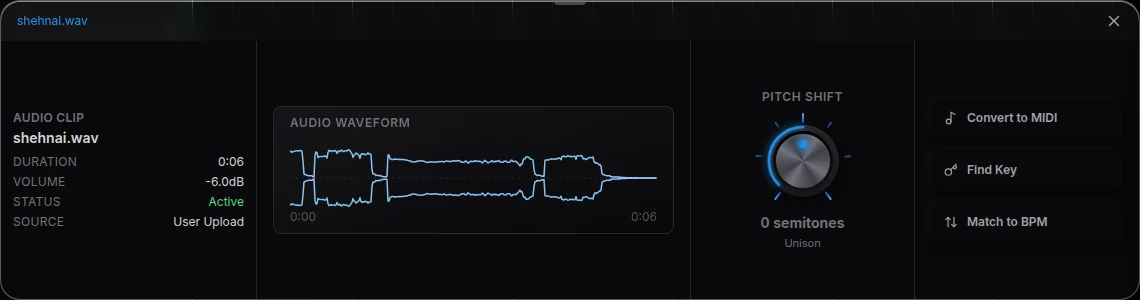
- Open Waveform for its manual controls. Select the audio clip and choose Waveform. Press Find Key to analyze its notes and see the result.
- Choose the project tempo. Drag or tap the tempo control in the transport, or use Tempo in the phone’s Project sheet.
- Use Match to BPM to fit a loop. In the matching dialog, check Original BPM, then match it to the project. Time-stretching keeps the recording’s pitch.
- Set the project’s key. Open Change Key in the transport bar, or use Key in the phone’s Project sheet. The project can use a major or minor key.
- Build around the reading. Tell CoProducer to write bass and chords around your recording, keeping its melody and the tempo you chose.
Key is the musical centre
Veena reads the notes in your recording to identify its tonal centre. Set the project’s key and ask CoProducer to build chords and bass around your take. You can name the key directly in a request and keep your own melody at the centre of the arrangement.
Tempo is the beat you work in
An 80 BPM groove and a 160 BPM interpretation can describe related metrical levels. Choose the grid that makes the phrases and bar lengths convenient to arrange. CoProducer reads your material and works in the project’s musical context, while Match to BPM fits a recorded loop to that context. On a phone, tap the song’s title to reach Tempo and Key in Project.
See the key and BPM finder page for this capability in the full Veena studio.
Related reading: Veena help centre, Mix & Master, CoProducer edits, Release note.
Try this in Veena
Read the key and tempo of my recording, then build drums and bass around its phrasing while keeping my take in the song.
Frequently asked questions
How do I find a recording’s key and tempo in Veena?
Select an audio clip in Veena, open Waveform and use Find Key for its key reading. The panel also offers Pitch Shift and Match to BPM for placing the recording in your project. Set the project’s key and tempo from the transport, then use Match to BPM to fit the recording to your song while keeping its pitch.
How can I correct a half or double tempo in Veena?
Set the tempo you intend in Veena’s transport bar, or Tempo in the phone’s Project sheet. For an audio loop, open Waveform and Match to BPM, check Original BPM and match it to the project. Then ask CoProducer to build the new parts at that tempo so the arrangement uses the grid you chose.
Can CoProducer read my recording’s key and tempo in Veena?
Yes. Point CoProducer at your recorded or imported clip in Veena and ask for its key and tempo. You can also set a known key and tempo directly in the project. When requesting new musical parts, state the recording to follow and which melody, phrasing or groove should remain in the song.
Meet your personal music producer
Free, in your browser. Describe the song you want and CoProducer builds it with you.
Make music free