Can you run Ableton in a browser?
Ableton online? There isn't one. Ableton lists Live's system requirements for macOS and Windows only, with "Up to 76 GB disk space for additionally available sound content" and "Access to an internet connection for authorizing Live" (ableton.com, read 15 Nov 2026). Veena is the DAW that runs in your browser: open a tab on any computer, a Chromebook or your phone, and a personal music producer builds the track with you.
Veena is an AI DAW with a personal music producer built in. Describe the song you want and CoProducer builds it with you — beats, chords, melody, arrangement and mix — as real tracks you can edit, mix and export. Free, in your browser.
Ableton online: what Ableton's system requirements say
Read from Ableton's shop, Live 13 shop, Live Lite page, Knowledge Base and learning sites on 15 Nov 2026:
- Live 12 on a Mac: "macOS 11 Big Sur or higher", "Intel® Core™ i5 processor or Apple Silicon", "8 GB RAM" and "Approximately 8 GB disk space on the system drive for the basic installation".
- Live 12 on Windows: "Windows 10 (Version 22H2) or Windows 11", a CPU that "supports AVX2 instruction set", "8 GB RAM" and about 5.7 GB for the basic install.
- Live 13: "Windows 11 (version 24H2 and later)" or macOS Sonoma or later, with "over 75 GB disk space for additionally available sound content".
- Both: "Access to an internet connection for authorizing Live". The trial download alone is 4.5 GB on Windows and 5.5 GB on a Mac.
- Chromebook, Linux, browser: none is listed. Ableton's Knowledge Base search for Chromebook returns "No results for 'chromebook'".
- What does run in a browser: Ableton Learn ("Learn the fundamentals of music making right in your browser"), its Playground, and Learning Synths. They are lessons, not a DAW.
So "Ableton online" means a 5 GB download on a Windows or Mac machine you own. For a Chromebook or a Linux laptop, Ableton lists no way to run it.
Making music online: Veena vs Ableton
| Read 15 Nov 2026 | Veena | Ableton Live |
|---|---|---|
| Runs in a browser | Yes, the whole studio | No: a Windows or Mac install |
| Chromebook | Yes, in Chrome | Not listed |
| Linux | Yes, in a modern browser | Not listed |
| Your phone | Pocket Studio, the same projects | No version of Live |
| Install and disk | Nothing to install | 4.5 to 5.5 GB download, up to 76 GB of sounds |
| A producer that builds the song with you | CoProducer, on the free plan | Not in any edition |
| Collaborate in the same session | Yes, free, with live cursors | One licence for one user |
| Price to start | Free | 30-day trial, then USD 99 to 749 |
Ableton's strength is hardware: Live is built to be played on stage with Push. For making a track anywhere you can open a browser tab, every row is Veena's.
Make a track in your browser, in Veena
- Open Chrome. Go to daw.veena.studio on any computer or Chromebook and sign in with Google. No download, no install.
- Start blank. Create a new project and paste the prompt at the bottom of this page into CoProducer.
- Pick your parts. Drums, sub bass, vocal stabs and keys each arrive as 3 options. Hover to hear, press Enter to keep one.
- Bring someone in. Click Share and send an invite link: your collaborator joins the same session from their own browser (real-time collaboration in Veena).
- Export it. WAV 24-bit/48 kHz, MP3, MIDI or every track as stems, free, with no watermark.
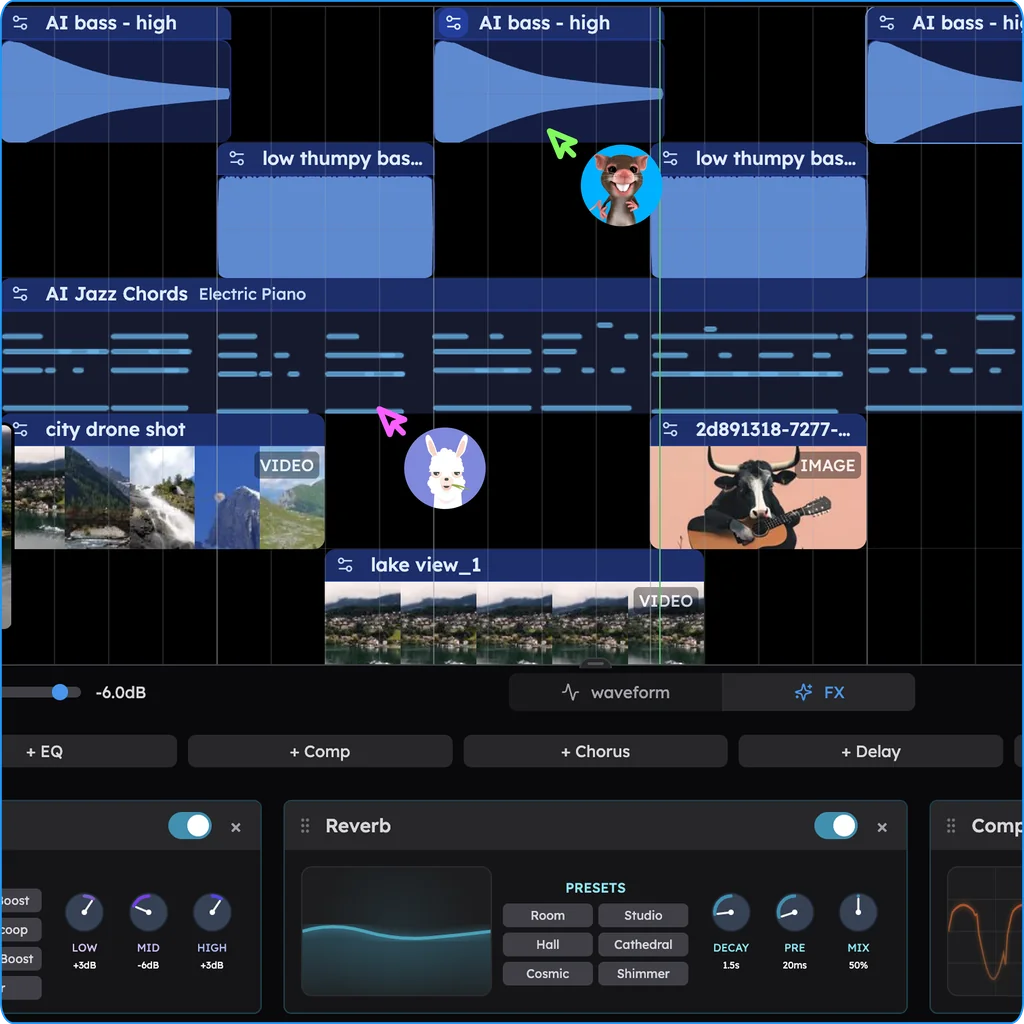
What runs in your browser in Veena
- The studio: timeline, piano roll, Beat Maker, mixer, recording with your microphone and MIDI devices over Web MIDI.
- CoProducer: a daily allowance on the free plan; the AI runs on Veena's servers, so no graphics card is needed.
- Your plug-ins: VST3 and Audio Unit on a Mac and VST3 on Windows, through the free Veena Bridge helper.
- Stems: vocals, drums, bass and other, from your own recordings, free.
- Your projects: saved to your account, so a track started on a Chromebook opens on your laptop or your phone.
The free plan holds up to 5 projects at a time. Veena Pro, $20 a month, removes the daily request cap and unlocks the premium models. Veena on Chromebook and Linux covers setup on each, and Veena vs Ableton compares the two row by row.
Make a 140 BPM UK garage-influenced breakbeat track in E minor: a shuffled 2-step drum groove with a crisp snare and swung hats, a warm sub bass that slides between notes, chopped vocal stabs, a moody electric piano playing minor-seventh chords and a short airy synth hook. 8-bar intro, 16-bar verse groove, 16-bar drop, 8-bar break, 16-bar drop, 8-bar outro.
Related reading: Ableton alternative · Is there Ableton for phone? · Is Ableton free? · Veena on Chromebook and Linux · Browser requirements
Try this in Veena
Make a 140 BPM UK garage-influenced breakbeat track in E minor: a shuffled 2-step drum groove with a crisp snare and swung hats, a warm sub bass that slides between notes, chopped vocal stabs, a moody electric piano playing minor-seventh chords and a short airy synth hook. 8-bar intro, 16-bar verse groove, 16-bar drop, 8-bar break, 16-bar drop, 8-bar outro.
Opens a new project in Veena, and CoProducer starts building from this prompt.
Frequently asked questions
Can you run Ableton in a browser?
No. Ableton lists Live's system requirements for macOS and Windows only, with "Access to an internet connection for authorizing Live" and up to 76 GB for extra sounds (ableton.com, read 15 Nov 2026). Its browser sites, Ableton Learn and Learning Synths, teach music rather than run Live. Veena is an AI DAW with a personal music producer built in. Describe the song you want and CoProducer builds it with you — beats, chords, melody, arrangement and mix — as real tracks you can edit, mix and export. Free, in your browser.
Does Ableton work on a Chromebook?
Not as Live. Ableton's requirements name only macOS and Windows, and its Knowledge Base returns "No results for 'chromebook'" (read 15 Nov 2026). Veena runs in Chrome on a Chromebook, as it does on Windows, Mac and Linux, with the whole studio, CoProducer, recording, 4-stem separation and every export free, and nothing to install.
Is there an online version of Ableton?
Not of Live. Ableton's online tools are Ableton Learn, where you "Learn the fundamentals of music making right in your browser", and Learning Synths, a web synth lesson (read 15 Nov 2026). Neither records, arranges or exports a song. Veena is a full DAW online: timeline, piano roll, mixer, recording and CoProducer, free in any modern browser.
What computer do I need for Ableton Live 13?
Ableton's Live 13 requirements list "Windows 11 (version 24H2 and later)" or macOS Sonoma or later, an Intel Core i5, AMD Ryzen or Apple Silicon processor, 8 GB RAM and over 75 GB for the extra sounds (read 15 Nov 2026). Veena needs a browser: the AI runs on Veena's servers, so no graphics card is needed.
Can I use my plug-ins in a browser DAW?
Yes, in Veena. The free Veena Bridge helper hosts the VST3 and Audio Unit plug-ins you already own on a Mac, and VST3 plug-ins on Windows, and plays them inside Veena's browser studio, instruments and effects both. CoProducer can start from their real presets, so the sounds you built in Live come with you.
Can I collaborate on a track online?
Yes, in Veena. Click Share, send an invite link and your collaborator joins the same session in their browser, with live named cursors and CoProducer building in the room, on the free plan. Ableton says a Live licence "is registered to a single user and can be installed on up to two of their computers" (read 15 Nov 2026).
Meet your personal music producer
Free, in your browser. Describe the song you want and CoProducer builds it with you.
Make music free