How to mix a guitar playthrough video
Mix a guitar playthrough video for free: split the guitar from the backing with stems, clean and shape the tone, balance, master and export it in Veena.
How do you mix a guitar playthrough video?
To mix a guitar playthrough video, separate the guitar from the backing it was played over, then mix it like the lead it is. In Veena that takes four moves: Separate Audio, Separate into Stems, shape the guitar on its own track, then Mix & Master and export the MP4. It runs free in your browser.
Veena is an AI DAW with a personal music producer built in. Describe the song you want and CoProducer builds it with you — beats, chords, melody, arrangement and mix — as real tracks you can edit, mix and export. Free, in your browser.
Most guitar playthroughs are recorded the same way: amp or acoustic in the room, backing track on speakers, a phone or camera catching both. What reaches the video is a single blended track where the backing drums mask the attack of every pick and the room adds a muddy low end. Once the guitar has its own track, each of those problems has a direct fix.
Mix a guitar playthrough video, step by step
- Import the video. Drag the file onto the arrangement or press Upload. Veena opens MP4, M4V, MOV, WebM, MKV and AVI.
- Separate the audio. Right-click the video clip, choose Separate Audio. The sound becomes an audio clip on its own track.
- Split it into stems. Stop playback, right-click the audio and choose Separate into Stems. Vocals, drums, bass and other land on four time-aligned tracks.
- Solo the other stem. That is where your guitar is. Guitars, keys, synths and strings share it, so on a drums-and-bass backing it is mostly you.
- Clean the guitar. In the other stem's FX, add Filter as a high-pass around 80 to 100 Hz, then Noise Removal for amp hiss and room noise.
- Shape the tone. On the 8-Band EQ, trim a little boxiness in the low mids and lift presence in the upper mids, where pick attack lives.
- Even the dynamics. Add a Compressor with a medium attack, so the pick still bites, and a moderate ratio.
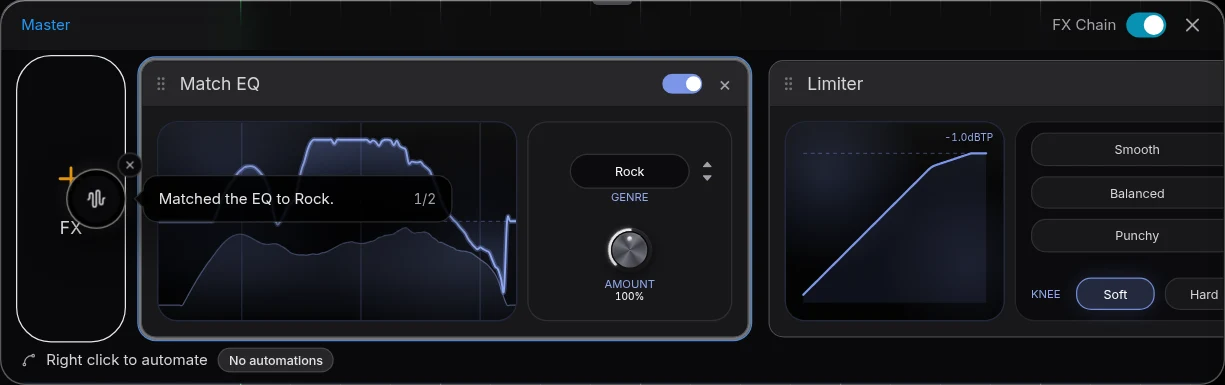
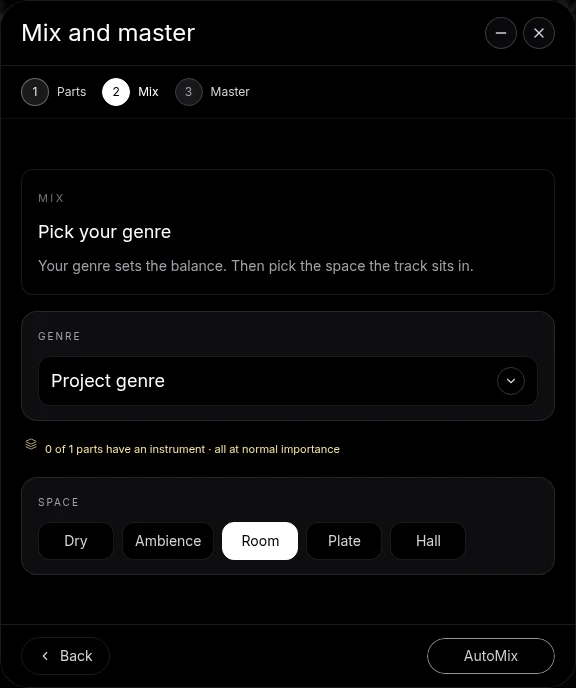
- Balance, then Mix & Master. Bring the guitar up over drums and bass. On Parts, tag it as the most important part. Choose a Genre and Space, press AutoMix, then Master project.
- Export. Open Export and choose MP4.
Guitar tone moves that matter on video
| What you hear | The move in Veena |
|---|---|
| Muddy, boomy low end | Filter high-pass around 80 to 100 Hz |
| Boxy, cardboard sound | A small cut in the low mids on the 8-Band EQ |
| Picking lost behind the drums | A presence lift in the upper mids, and the guitar stem up |
| Fizzy, harsh distortion | A gentle high cut on the 8-Band EQ |
| Notes jumping in level | Compressor, medium attack |
| Dry and close | Reverb with a short Decay, or Room on the Mix stage |
| Amp hiss in the gaps | Noise Removal |
These are starting settings for your ears, not rules. Bypass each card while the busiest bar loops and keep the move only if the guitar reads more clearly with it on.
Clean versus distorted guitar
Clean and acoustic guitars show every bit of room and every string squeak. Lean on Noise Removal, a firm high-pass and a short room. A light compressor keeps fingerpicked notes even without flattening them.
High-gain guitars are already compressed by the amp. Skip the compressor or keep it gentle, and spend the effort on EQ: cut the fizz above the pick attack, cut the low-end boom that makes palm mutes blur, and let the drums and bass carry the weight.
The drums and bass underneath
The drums and bass stems are your backing now, and they deserve a light touch. Set them where the groove is felt but the guitar leads. If the kick and the guitar's low strings blur together, lower the guitar's high-pass a little or trim the bass stem where they overlap. Keep the original muted beside the stems in case you want to compare against what you recorded.
Let CoProducer mix it
Ask CoProducer to "split this, put the guitar up front with a little presence and light compression, keep the drums tight underneath, and master it for YouTube". It works with the same stem separation, Mix & Master flow and effect cards, on your real tracks. Then refine in sentences: "less reverb on the guitar", "bring the bass up a touch".
For the general instrument method see clean audio for playthrough videos, and for a guitar with a voice on one mic, mix a vocal cover video. The full set of guides lives on the page about how to clean up audio in a video, and the AI mixing assistant page covers the mix stage.
Export and post
Export from your avatar, choose MP4, and the picture leaves with the mixed and mastered guitar. Free on every plan, with no cap and no watermark.
The prompt to paste into CoProducer
Separate the audio from your clip first, then paste this:
"Mix my guitar playthrough video: split the audio into stems, put the guitar on the other stem up front with a high-pass around 90 Hz, a little presence and a light compressor, keep the drums and bass tight underneath, give it a short room, then master it loud and clean for YouTube."
Related reading: clean up audio in a video, clean audio for playthrough videos, mix a bass playthrough video, how to mix a song.
Try this in Veena
Mix my guitar playthrough video: split the audio into stems, put the guitar on the other stem up front with a high-pass around 90 Hz, a little presence and a light compressor, keep the drums and bass tight underneath, give it a short room, then master it loud and clean for YouTube.
Frequently asked questions
How do you mix a guitar playthrough video?
Import the video into Veena, right-click it and choose Separate Audio, then Separate into Stems. The guitar lands on the other stem, apart from the drums and bass. High-pass it, add a little presence and light compression, set it above the backing, run AutoMix and Master project, and export the MP4. It is free in your browser.
Which stem does the guitar go to in Veena?
The other stem. Veena separates four stems: vocals, drums, bass and other, and guitars, keys, synths and strings share the other stem. On a guitar playthrough over a drums-and-bass backing, that stem is mostly your guitar. Ask CoProducer to transcribe it to MIDI when you want the notes on their own.
How loud should the guitar be in a playthrough video?
Louder than in a band mix. Viewers came to hear the part they are watching, so in Veena set the guitar stem a clear step above the drums and bass, and tag it as the most important part on Mix & Master's Parts screen. Check the busiest section: if every note still reads, the balance works.
How do I make a phone-recorded guitar sound better?
In Veena, cut the low rumble with a high-pass Filter, add Noise Removal for amp and room hiss, then use the 8-Band EQ to lift presence and trim the boxy low mids. A light Compressor evens the picking. Mastering adds Match EQ and a Limiter, so the finished video sits as loud as other uploads.
Can CoProducer mix my guitar playthrough?
Yes. After Separate Audio, ask CoProducer in Veena to split the audio, bring the guitar forward with a little presence and master the result for YouTube. It uses the same stems, Mix & Master flow and effect cards you would, and every change stays editable. Follow up in a sentence to adjust one thing.
Meet your personal music producer
Free, in your browser. Describe the song you want and CoProducer builds it with you.
Make music free