How to mix a drum cover video
Mix a drum cover video for free: split your kit from the backing with stems, tame harsh cymbals, add punch to the kick and snare, then master it in Veena.
How do you mix a drum cover video?
To mix a drum cover video, give the kit back its weight: in Veena, separate the clip's audio, split it into stems so your drums sit on their own track, add punch to the kick and snare, tame the cymbals, set the kit above the song and master it for upload. All of it is free, in your browser.
Veena is an AI DAW with a personal music producer built in. Describe the song you want and CoProducer builds it with you — beats, chords, melody, arrangement and mix — as real tracks you can edit, mix and export. Free, in your browser.
Drums are the hardest instrument to record on a phone. The cymbals sit closest to the mic and come out brittle, the kick loses its low end, and the phone's automatic level control squashes every hit into the next. The song you played along to arrives through speakers into the same mic. The result is a wall of cymbals with the groove buried inside it. Separation is the turning point: once your kit has its own track, you can fix the drums without wrecking the song, and set the song without burying the drums.
Mix a drum cover video, step by step
- Import the video. Drag it onto the arrangement or press Upload. Veena opens MP4, M4V, MOV, WebM, MKV and AVI.
- Separate the audio. Right-click the video clip and choose Separate Audio.
- Split it into stems. Stop playback, right-click the audio and choose Separate into Stems. Your kit lands on the drums stem; the song you played over lands on bass, vocals and other.
- Shape the kit. On the drums stem's FX, add the 8-Band EQ: lift the kick's low end, add body to the snare, and soften the harsh upper mids of the cymbals.
- Add punch. Add a Compressor after the EQ with a slower attack, so the stick hit passes before the compressor clamps, and use Makeup to bring the level back.
- Set the balance. Bring the drums up, or the song down, until the kit leads and the song keeps time with it.
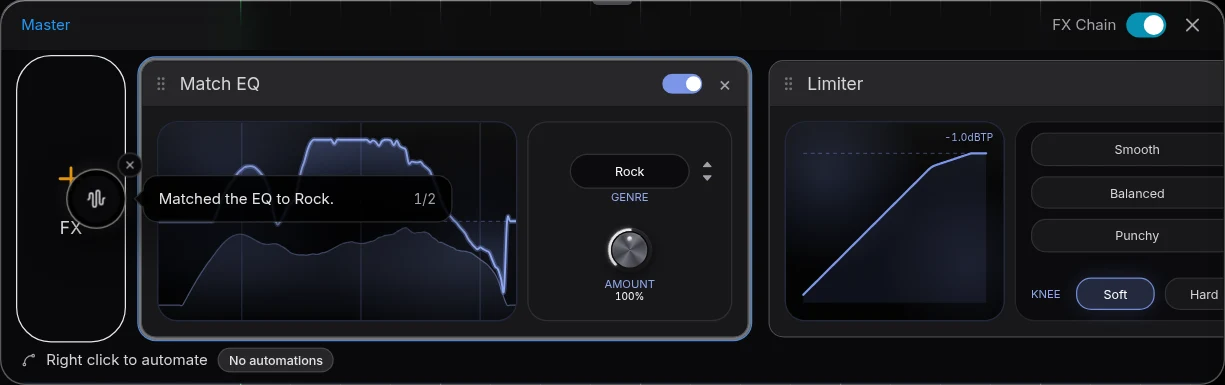
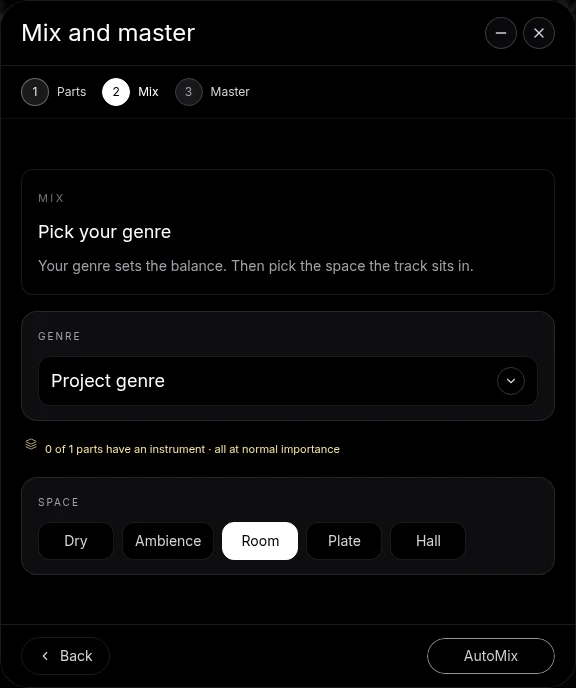
- Run Mix & Master. Tag the drums as the most important part on Parts, pick a Genre and a Space on Mix, press AutoMix, then Master project with playback paused.
- Export. Open Export and choose MP4.
Drum problems on video, and the fix for each
| What you hear | The move in Veena |
|---|---|
| Brittle, harsh cymbals | Gentle high cut or upper-mid dip on the 8-Band EQ |
| Kick with no weight | Low-end lift on the 8-Band EQ, and no high-pass on the drums |
| Flat, squashed hits | Compressor with a slow attack, then Makeup |
| Snare that rings on | A narrow cut on the ring frequency with the 8-Band EQ |
| Kit too dry for the song | Short Reverb, or Room on the Mix stage |
| Song louder than the kit | Drums stem up, or the bass, vocals and other stems down |
One caution that applies to drums more than any other instrument: skip the aggressive high-pass and heavy noise removal. The kick lives in the lowest octaves, and cymbal decay sounds like hiss to a noise reducer. Clean gently, and judge every move with the full groove playing.
Keep the song under the kit, not on top of it
The bass stem matters most here, because bass and kick share the low end. If the kick feels small next to the bass, trim the bass stem a little rather than pushing the kick into distortion. The vocals and other stems carry the song's identity; set them so a viewer recognises the song, and no louder. Veena keeps the original muted beside the stems, so you can switch back and compare at any point.
A drum cover lives on the song you chose, and the song still belongs to its writers. Check how your platform handles covers before you post.
Let CoProducer mix it
Ask CoProducer to "split this, put the drums up front with more punch on the kick and snare, tame the cymbals and master it for YouTube". It uses the same stem separation, Mix & Master flow and effect cards, on your real tracks. Then refine in sentences: "the cymbals a bit darker", "the bass down 2 dB".
The guide to clean audio for playthrough videos covers the method for any instrument, and mix a bass playthrough video covers the other half of the rhythm section. For every guide in the series, start at clean up audio in a video. The AI mastering page covers the finishing step.
Export and post
Export from your avatar, choose MP4, and the picture leaves with the mixed and mastered drums. Free on every plan, with no cap and no watermark.
The prompt to paste into CoProducer
Separate the audio from your clip first, then paste this:
"Mix my drum cover video: split the audio into stems, put the drums stem up front with more punch on the kick and snare, tame the harsh cymbals with a gentle high cut, keep the bass and the rest of the backing tucked under the kit, add a short room, then master it loud and clean for YouTube."
Related reading: clean up audio in a video, clean audio for playthrough videos, mix a bass playthrough video, mix a guitar playthrough video.
Try this in Veena
Mix my drum cover video: split the audio into stems, put the drums stem up front with more punch on the kick and snare, tame the harsh cymbals with a gentle high cut, keep the bass and the rest of the backing tucked under the kit, add a short room, then master it loud and clean for YouTube.
Frequently asked questions
How do you mix a drum cover video?
Import the video into Veena, right-click it and choose Separate Audio, then Separate into Stems. Your kit lands on the drums stem, apart from the bass and the rest of the backing. Compress and EQ the drums for punch, tame the cymbals, set the kit above the backing, run AutoMix and Master project, and export the MP4.
How do I make the drums louder than the song in a drum cover?
Split the camera audio into stems in Veena. The drums stem holds the kit, and the bass, vocals and other stems hold the song you played over. Raise the drums stem or lower the others, then tag the drums as the most important part on Mix & Master's Parts screen so AutoMix keeps them in front.
Why do cymbals sound harsh in my drum cover video?
Phone and camera mics sit close to the cymbals and compress hard, so the top end turns brittle. In Veena, put a gentle high cut or a small upper-mid dip on the drums stem with the 8-Band EQ, and leave the kick and snare body alone. Compare with the card bypassed while the busiest groove loops.
How do I get more punch from a phone-recorded drum kit?
Use a Compressor on the drums stem in Veena with a slower attack, so each hit's transient passes before the compressor clamps, then raise Makeup to taste. Lift the kick's low end and the snare's body on the 8-Band EQ. Master project then adds Match EQ and a Limiter for a loud, finished level.
Can CoProducer mix my drum cover?
Yes. After Separate Audio, ask CoProducer in Veena to split the audio, put the drums up front with more punch, tame the cymbals and master the result. It reaches the same stem separation, Mix & Master flow and effect cards you use by hand, so every change stays editable on your real tracks.
Meet your personal music producer
Free, in your browser. Describe the song you want and CoProducer builds it with you.
Make music free