How to extract audio from video to mix
Extract audio from video to mix in Veena: import the clip, choose Separate Audio, split it into 4 stems, mix and master, then export WAV, MP3 or the MP4.
To extract audio from video to mix, you need more than a converter that saves an MP3. You need the sound on a track, split into parts you can balance, with the video still beside it. In Veena you import the clip, right-click and choose Separate Audio, split the recording into four stems, mix and master them, and export a WAV, an MP3, stems or the MP4 with its new mix.
Veena is an AI DAW with a personal music producer built in. Describe the song you want and CoProducer builds it with you — beats, chords, melody, arrangement and mix — as real tracks you can edit, mix and export. Free, in your browser.
Most "extract audio" tools stop at a file. That is the start of the job for a musician: the rehearsal video where the drums drown the vocal, the gig clip where the bass vanished, the lesson recording you want to turn into a clean listening copy. This page shows the full path in Veena, and it belongs to the guide to clean up audio in a video.
How to extract audio from video to mix, step by step
- Import the video. Drag the file onto the Veena timeline or press Upload in the transport. Veena reads MP4, M4V, MOV, WebM, MKV and AVI.
- Choose Separate Audio. Right-click the video clip. The sound lands on its own audio track, lined up with the picture.
- Stop playback. Separation starts while the transport is stopped.
- Choose Separate into Stems. Right-click the new audio clip. A "separating…" badge sits on it while the split runs on Veena's servers, about 45 to 120 seconds for a full song.
- Find the four stems. Vocals, drums, bass and other arrive on new tracks beside the original. Veena mutes the original rather than deleting it, so you can compare at any time.
- Name the parts. Open Mix & Master and set each stem's role on Parts: lead vocal, drums, bass, and the instrument in the other stem.
- Clean and shape. Vocal parts get the Clean stage, with De-Esser, Auto-Tune, Noise Removal and Harmonizer. Every track has its FX chain for EQ, compression and more.
- AutoMix and master. Choose Genre and Space, press AutoMix, then pause and press Master project for Match EQ and a Limiter.
- Export what you need. WAV or MP3 for the full mix, Stems for one file per track, or MP4 for the video with its new sound.
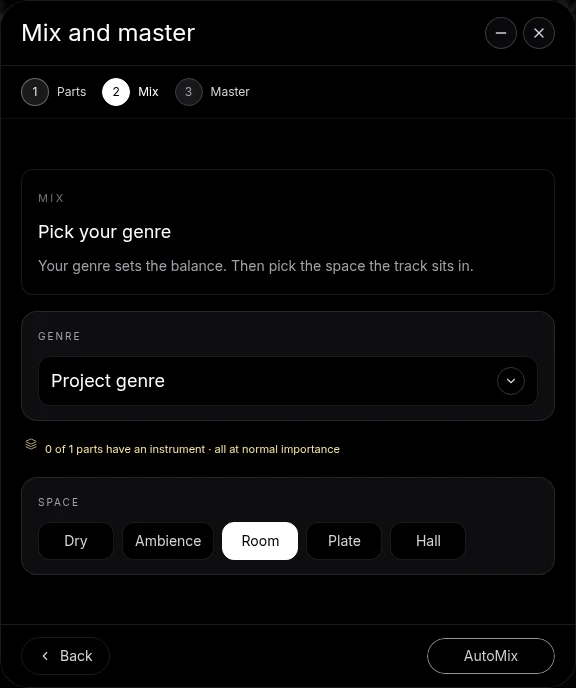
What you get at each stage
| Stage | What is on your timeline | What you can export |
|---|---|---|
| After import | The video clip | MP4 with its original sound |
| After Separate Audio | The video plus one audio track | WAV, MP3 or MP4 |
| After Separate into Stems | Vocals, drums, bass and other on four tracks, plus the muted original | The full mix, every stem in a zip, or MP4 |
| After Mix & Master | The same tracks with their effects and the master chain | A mastered WAV, MP3 or MP4 |
Stem separation specifications
| In Veena | |
|---|---|
| Stems | 4: vocals, drums, bass, other |
| Longest input | 95 MiB of audio, about 8½ to 9½ minutes of stereo |
| Time for a full song | About 45 to 120 seconds |
| Free plan | A right-click split costs nothing and uses no daily request |
| Export | WAV 24-bit, 48 kHz; MP3 320 kbps; MP4 when the project has video |
Mixing what you extracted
A recording pulled from a video is most often a single microphone hearing everything at once. Stems turn it into something mixable, and the mixing moves are the same ones you would make on a multitrack session:
- Rebalance first. Use the faders before any effect. Most rehearsal and gig videos need the vocal up and the drums down.
- Give the bass a lane. Camera mics hear little low end. Raise the bass stem and add a gentle low boost with 8-Band EQ.
- High-pass everything but the kick and bass. Add Filter to the vocal and the other stem to clear the rumble the room added.
- Tame the cymbals. If the drum stem is harsh, a gentle high cut on its EQ calms the cymbals without dulling the snare.
- Keep the space real. The room is already in the recording, so choose Dry or Room for Space.
For guitars and keys, which share the other stem, ask CoProducer to transcribe the other stem to MIDI and rebuild the part you need on its own track.
Extract for the right reasons
Stem separation in Veena is built for your own music: your rehearsals, your gigs, your lessons and songs you have the rights to rework. For a quick split without the video, the stem splitter and vocal remover pages walk through it in three clicks.
Related guides
If the extracted audio is from a phone, read how to improve phone video audio. For a whole band, read how to mix a band rehearsal video. To replace the extracted sound with a cleaner take, read how to sync audio and video for music covers.
The prompt to paste into CoProducer
Open the studio, import your video, choose Separate Audio and split it into stems, then paste this into the CoProducer panel with your own genre, tempo and key:
I extracted the audio from my band's rehearsal video at 110 BPM in A major and split it into stems. Mix it like a live indie rock record: vocal forward and centred, drums punchy with the kick and bass locked together, guitars wide, a short Room on everything, then master it Punchy for a WAV and an MP4.
Related reading: clean up audio in a video · improve phone video audio · mix a band rehearsal video · stem splitter
Try this in Veena
I extracted the audio from my band's rehearsal video at 110 BPM in A major and split it into stems. Mix it like a live indie rock record: vocal forward and centred, drums punchy with the kick and bass locked together, guitars wide, a short Room on everything, then master it Punchy for a WAV and an MP4.
Frequently asked questions
How do I extract audio from a video to mix it?
Veena is an AI DAW with a personal music producer built in. Describe the song you want and CoProducer builds it with you — beats, chords, melody, arrangement and mix — as real tracks you can edit, mix and export. Free, in your browser. Import the video, right-click it and choose Separate Audio, then split, mix and export the sound.
What video formats can Veena extract audio from?
Veena imports MP4, M4V, MOV, WebM, MKV and AVI. Drag the file onto the timeline or press Upload, right-click the video clip and choose Separate Audio. The sound lands on its own track as an ordinary recording you can move, split, process and mix, while the video stays on its own clip beside it.
Can I split the extracted audio into separate instruments?
Yes. Right-click the extracted recording in Veena and choose Separate into Stems. Veena splits it into four stems, vocals, drums, bass and other, on time-aligned tracks beside the original. A right-click split on the free plan costs nothing and uses no daily CoProducer request, and there is no daily cap on splits.
Can I export just the audio after mixing it in Veena?
Yes. In Veena's Export, choose WAV at 24-bit, 48 kHz or MP3 at 320 kbps for the full mix, or Stems for one file per track in a zip. Choose MP4 instead to keep the picture with your new mix. Veena puts no watermark on any export and no cap on how many you make.
How long a video can Veena separate into stems?
Stem separation in Veena takes up to 95 MiB of audio, about 8½ to 9½ minutes of stereo, and a full song splits in about 45 to 120 seconds. For a longer rehearsal or gig video, press C for split mode, cut the extracted clip into sections and separate each one.
Meet your personal music producer
Free, in your browser. Describe the song you want and CoProducer builds it with you.
Make music free