Make Podcast Music
The fastest way to make podcast music that sounds like your show and nobody else's is a personal music producer who writes it all from one motif. Free in your browser, Veena's CoProducer builds the whole kit as real tracks you own: an intro theme, a bed that sits under talking, stings between segments and an outro.
A theme is how listeners know it's your show before anyone speaks. The bed keeps the energy up under the conversation, and a sting tells the ear a new segment has started. A stock-library track could open anyone's show; a theme written for yours is a brand nobody else has.
The podcast music kit
One show needs six pieces of music, all grown from the same idea. At 120 BPM every bar lasts exactly 2 seconds, which makes the lengths easy to plan:
| Piece | Where it plays | Bars at 120 BPM | Length | What it needs |
|---|---|---|---|---|
| Cold-open sting | Right after the teaser clip | 1–2 | 2–4 s | The motif's first notes and one hit |
| Intro theme | The top of every episode | 8 | 16 s | The whole motif, full band |
| Bed | Under the welcome, recaps and segments | 16, looping | 32 s a pass | Chords and groove, no melody |
| Segment sting | Between topics | 2 | 4 s | The motif, clipped short |
| Ad-read bed | Under sponsor reads | 16 | 32 s | The bed's chords in a different colour |
| Outro | Credits and the call to action | 16 | 32 s | The theme, relaxed, ending on a chord |
Keep the intro under 20 seconds. People pressed play for the conversation, and a theme that outstays its welcome gets skipped, which means it stops doing its job as a signature.
One motif, the whole show
Sonic branding comes down to a motif: three to five notes a listener could hum, played by one signature sound. Build everything else out of it.
Take A–D–F#–E in D major. It climbs from the A below the tonic up to F#, then steps back to E, the second degree, so it sounds like a question the episode is about to answer. The outro plays A–D–F#–D and lands on the tonic: the answer, and the end. Then derive the rest:
- Intro: the motif twice on the signature sound, over the full band.
- Stings: the first three notes and a hit on the chord.
- Bed: the motif's chords (D–Bm–G–A) with the melody taken out.
- Ad-read bed: the same chords on a different instrument, so the ear hears the break.
- Outro: the answering phrase, drums thinned, a held final chord.
Choose a signature sound that still reads on earbuds at low volume: Bell Pluck (struck metal that rings out), Electric Piano, Pizzicato Strings or Acoustic Guitar (nylon). Then have CoProducer make the variations in plain words, such as "shorten the intro to a 2-bar sting that stops on the D chord" or "duplicate the bed with variation". Stuck for a motif? The melody generator drafts one.
Match the sound to the show
- Interview and conversation: 85–100 BPM, Upright Piano chords, Fretless Bass, the Brush kit. Warm, and out of the way.
- Tech and business: 110–124 BPM, Bright Pluck arpeggios, Deep House Bass, the Electronic kit. Confident and clean.
- True crime: 70–90 BPM in a minor key, a Pizzicato Strings pulse over Contrabass with a Dark Pad underneath, and no melody until the story turns.
- Comedy: 100–130 BPM, Slap Bass 1, a muted-guitar chank, stings that land like a rimshot.
- Narrative and documentary: 60–80 BPM, Acoustic Grand Piano, Cello and String Ensemble; see how to make cinematic music.
- Daily news: 120–128 BPM, a ticking 16th-note Snap Pluck over Sub Bass. Urgent without drama.
- Wellness: 60–70 BPM or no pulse at all, Warm Pad and Sine Pluck; see how to make meditation music.
- Study-with-me and chill shows: the lofi palette, from how to make lofi music.
Music that never covers a word
The one rule of spoken-word audio: the listener must never work to hear a word. Four habits get you there.
- Hand off, don't overlap. Let the intro play in full, then drop the drums and the melody on the bar where the host starts talking, and let the chords and bass carry on underneath. Ask CoProducer for "a dropout on bar 9: drums and melody out, chords and bass stay".
- Measure the voice. Record your welcome in Veena, or drag in any voice memo, and give the clip to CoProducer as context. It measures a clip's spectrum and loudness, so ask where your voice is strongest, then cut the music a few decibels there with the 8-Band EQ.
- Keep the bottom simple. A speaking voice's fundamental sits roughly between 85 and 255 Hz. A busy bass line in that range muddies it on laptop and phone speakers, so keep the bass on plain roots under talking.
- Level against the real voice. Balance each piece with the host's recording playing, never solo.
When the episode is assembled, bring the whole thing to podcast loudness. Apple recommends an overall loudness of around -16 LKFS, the same scale as LUFS, within 1 dB either way, with true peaks no higher than -1 dBFS (Apple Podcasts for Creators audio requirements, September 2026). Set that on the finished episode rather than on the music alone, and feed the loudness pass clean 24-bit/48 kHz WAVs from Veena.
Trailers and social clips
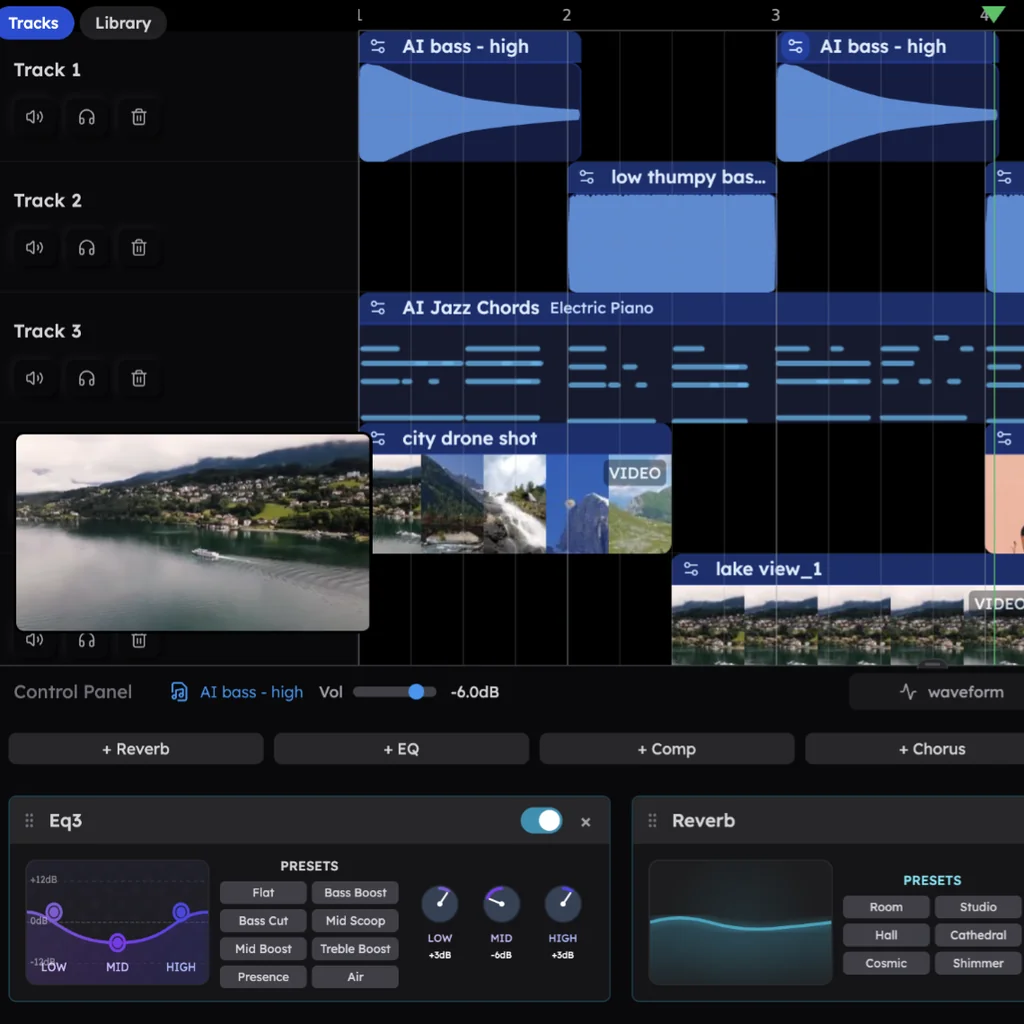
A season trailer or a 60-second clip for social needs the theme too, cut to the picture. Drop the video onto Veena's timeline and use Separate Audio to put the conversation on its own track. CoProducer hears the audio in the clip, so ask for the motif to land on the cut where your guest delivers the best line. When the project contains video, Veena exports an MP4 of picture and music together, ready to post.
How to make podcast music in Veena
- On your laptop, open daw.veena.studio and sign in with Google; there's nothing to download.
- Paste the kit prompt:
Make a podcast music kit at 120 BPM in D major for a friendly tech-and-culture show, with one empty bar after each piece: an 8-bar intro theme where Bell Pluck plays the motif A–D–F#–E over Electric Piano chords on D–Bm–G–A, a Round Bass on the roots and light Pop kit drums with a soft kick and no crashes; a 16-bar bed on the same chords with Electric Piano, bass and a Sine Pluck arpeggio but no melody; a 2-bar sting of the motif ending on a D chord; and a 16-bar outro that plays A–D–F#–D and ends on a held D chord.
- Pick the pieces. Each new part arrives as three options, and the parts that depend on it wait for your pick.
- Test it under your voice. Record a welcome on a new track, or import the first minute of an episode, and listen to the bed underneath at the level you would publish.
- Export and cut. Export the kit as a 24-bit/48 kHz WAV. Because every bar lasts 2 seconds, each piece starts on an even second: the intro runs 0:00–0:16, the bed 0:18–0:50, the sting 0:52–0:56 and the outro 0:58–1:30, so you split them in your editor at those marks. Export as often as you like: nothing is watermarked, and the kit belongs to your show.
Then shape the kit in plain words:
- "Swap the drums to the Brush kit for the interview episodes." New CoProducer drums start on the Pop kit; the Brush kit is softer and sits under conversation.
- "Make the bed loop: end its last bar on A so it leads back to D."
- "Make a 16-bar ad-read bed from the same chords on Acoustic Guitar (nylon), no drums."
- "Add a 1-bar cold-open sting: the first three notes on Bell Pluck with a short Room reverb."
- "Balance every piece to sit under a speaking voice."
That last request is CoProducer's AI mixing at work, balancing levels, pans and effects part by part, and any request you regret is a single undo.
Podcast music mistakes
- An intro that outstays its welcome. Past 20 seconds, listeners skip, and your signature goes unheard.
- A melody under the talking. The ear follows a tune over a voice. Keep melodies to the intro, stings and outro.
- A new theme every season. Recognition is built on repetition. Refresh the arrangement, keep the motif.
- Stings with long tails. A Hall reverb on a sting washes over the next sentence; a Room reverb keeps it tight.
- A handoff with no gap. The host's first word arrives over the full band. Drop the band a bar before.
- One bed for everything. Ads, segments and recaps on the same bed blur together. Give the sponsor break its own colour.
Podcast music terms
Cold open: a teaser clip that plays before the intro. Bed: music that runs under speech. Sting: a short musical hit that marks a transition. Bumper: a short piece that leads into or out of a break. Donut: a bed with a hole in the middle where a live read goes. Sonic logo: the few notes that identify a show or brand. Ducking: lowering music while someone speaks. LUFS: loudness units, the measure podcast platforms use. Stems: each part of the mix as its own file.
More sounds for shows and channels
The same kit approach works for a YouTube channel, a stream or a course: see how to make background music for beds cut to video, and make music by genre for every style CoProducer builds.
Try this in Veena
Make a podcast music kit at 120 BPM in D major for a friendly tech-and-culture show, with one empty bar after each piece: an 8-bar intro theme where Bell Pluck plays the motif A–D–F#–E over Electric Piano chords on D–Bm–G–A, a Round Bass on the roots and light Pop kit drums with a soft kick and no crashes; a 16-bar bed on the same chords with Electric Piano, bass and a Sine Pluck arpeggio but no melody; a 2-bar sting of the motif ending on a D chord; and a 16-bar outro that plays A–D–F#–D and ends on a held D chord.
Frequently asked questions
Can I make podcast intro music for free?
Yes. Veena is an AI DAW with a personal music producer built in. Describe the song you want and CoProducer builds it with you — beats, chords, melody, arrangement and mix — as real tracks you can edit, mix and export. Free, in your browser. Describe your show's tone and CoProducer writes an intro theme, a bed, stings and an outro from one motif, each part on its own track.
How long should a podcast intro be?
Keep it between 10 and 20 seconds: long enough to plant the theme, short enough that nobody reaches for the skip button. Plan it in bars rather than seconds. At 120 BPM each bar lasts exactly 2 seconds, so an 8-bar intro runs 16 seconds. Tell Veena's CoProducer "an 8-bar intro at 120 BPM" and it writes the theme to end right on time.
Can I use music made in Veena in my podcast and in ads?
Yes. The music is yours: Veena's terms give you ownership of the Output you generate and allow commercial use on the free plan and on Veena Pro alike, and nothing you export carries a watermark. Run the theme on every episode, under sponsor reads, in trailers and on YouTube, and put the motif in your ads. Library sounds are licensed for your own productions.
How loud should background music be under a podcast voice?
Low enough that nobody works to hear a word: set the bed by ear under the real voice, then pull it down a little more. Bring the finished episode to around -16 LUFS overall, the loudness Apple Podcasts recommends. In Veena, record or import your voice, ask CoProducer to balance the music under it, and export stems so you can re-level the bed episode by episode.
Can I record my podcast in Veena?
Yes. Veena records from your microphone in the browser, with latency and level calibration and a live waveform, so you can record the host, import a guest's file in WAV, MP3, M4A or ten other formats, and build the music around the conversation. Export the finished episode as a 24-bit/48 kHz WAV or a 320 kbps MP3, or every track as stems.
Meet your personal music producer
Free, in your browser. Describe the song you want and CoProducer builds it with you.
Make music free