What does iZotope RX do?
What does iZotope RX do? It repairs recorded audio: RX finds and removes noise, clicks, clipping, hum, reverb and unwanted sounds, module by module, in a spectrogram editor and as plug-ins inside a DAW. Veena does the job a musician brings to RX inside a free studio in your browser: Noise Removal and the De-Esser clean the take, Separate into Stems pulls a recording apart, and CoProducer builds the song around it.
Veena is an AI DAW with a personal music producer built in. Describe the song you want and CoProducer builds it with you — beats, chords, melody, arrangement and mix — as real tracks you can edit, mix and export. Free, in your browser.
What does iZotope RX do? Its modules, as iZotope documents them
From izotope.com's RX 12 product and compare pages, read 17 November 2026:
- Spectral repair: "Visually target and replace unwanted sounds like dog barks, string squeaks, and sirens in RX's Spectrogram".
- Repair modules: "tackle clicks, clips, hum, rustles, reverb, background noise, and tons more with bespoke repair modules": De-click, De-clip, De-hum, De-reverb, Voice De-noise, Spectral De-noise, De-ess, De-plosive and Mouth De-click among them.
- Repair Assistant: "intelligently recognizes and proposes fixes for specific problems that you can tweak to your taste".
- Stems: "Easily split stems in post production sound mixes and fully mastered tracks" with Stems View and Music Rebalance.
- Bleed and breath: De-bleed and Breath Control, both "now ML-based" in RX 12.
- Release checks: Loudness Optimize and Streaming Preview.
- Where it runs: a standalone audio editor plus AAX, AU and VST3 plug-ins, on Mac or Windows.
| RX 12 edition | Price | Scope |
|---|---|---|
| Elements | $99.00 | 6 plug-ins: Repair Assistant, Voice De-noise, De-click, De-clip, De-hum, De-reverb |
| Standard | $399.00 | 18 plug-ins and the audio editor, with Spectral Repair, De-bleed and Music Rebalance |
| Advanced | $1,399.00 | "50+ tool" suite, adding Scene Rebalance, Ambience Match, De-wind and Trim Silence |
What Veena does with a noisy or bleeding recording
- Bring in the take. Drag the voice memo, rehearsal take or old bounce onto a track at daw.veena.studio.
- Split it if it is a full mix. Stop playback, right-click the clip and choose Separate into Stems: vocals, drums, bass and other land on time-aligned tracks, with the original muted beside them.
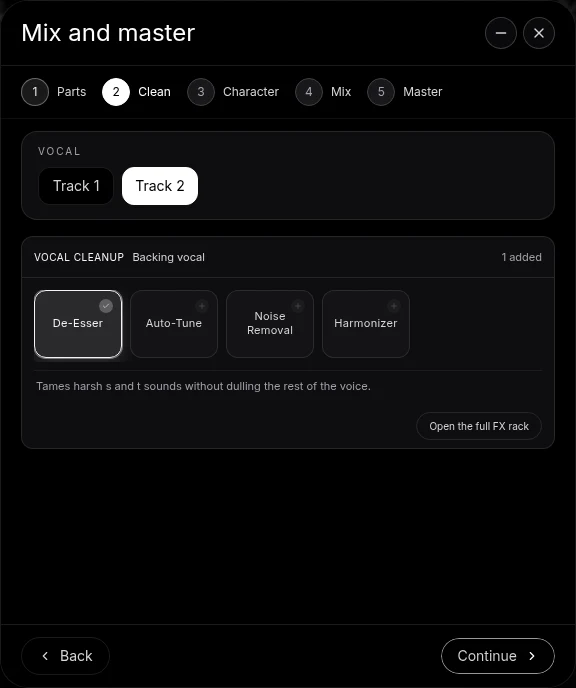
- Clean the vocal. Open Mix & Master, tag the vocal on Parts, and on Clean add Noise Removal for hiss, preamp noise and room tone and the De-Esser for sharp S sounds.
- Shape it by ear. Set Noise Removal's Noise Floor just above the hiss between words and its Reduction to taste; the Amount at 0 is your A/B.
- Build the song. Ask CoProducer to write drums, bass, chords and arrangement around the clean take, or to turn a stem into MIDI and re-voice it.
- Mix, master and export a 24-bit WAV or 320 kbps MP3, free.
RX or Veena?
| Veena | iZotope RX 12 | |
|---|---|---|
| Price | Free on every plan | $99 to $1,399 |
| Where it runs | Your browser, any computer | Mac or Windows |
| Noise and de-essing | Noise Removal and De-Esser | Yes |
| Stem separation | Free, 4 stems | Standard and Advanced |
| Makes the song too | Yes, CoProducer builds it with you | No |
| Depth of repair modules | Noise Removal, De-Esser, EQ and stems | Up to 50+ tools in Advanced |
RX's narrow win is the depth of its spectral repair modules, which iZotope sells as "the industry standard for post". Veena wins the job most musicians bring to RX, a clean take inside a song worth releasing, because it is free, splits stems on any clip and lives in the studio where the song gets made.
My phone voice memo is on the track called Demo: me singing over an acoustic guitar in a noisy room. Split it into stems, clean the vocal stem with Noise Removal and the De-Esser, turn the guitar part into MIDI, and build a 78 BPM acoustic ballad in G major around my voice: fingerpicked nylon guitar on G, Em, C and D, a soft upright bass, brushed drums and a warm string pad in the last chorus. Intro 4 bars, verse 16, chorus 8, verse 16, chorus 8, outro 8. Then mix and master it.
Related reading: Veena help centre · Clean vocals in Veena · Stem separation in Veena · Mixing in Veena · How much is iZotope RX?
Try this in Veena
My phone voice memo is on the track called Demo: me singing over an acoustic guitar in a noisy room. Split it into stems, clean the vocal stem with Noise Removal and the De-Esser, turn the guitar part into MIDI, and build a 78 BPM acoustic ballad in G major around my voice: fingerpicked nylon guitar on G, Em, C and D, a soft upright bass, brushed drums and a warm string pad in the last chorus. Intro 4 bars, verse 16, chorus 8, verse 16, chorus 8, outro 8. Then mix and master it.
Opens a new project in Veena, and CoProducer starts building from this prompt.
Frequently asked questions
What does iZotope RX do?
It repairs recorded audio. iZotope says RX lets you "visually target and replace unwanted sounds like dog barks, string squeaks, and sirens" in its Spectrogram, and "tackle clicks, clips, hum, rustles, reverb, background noise" with repair modules (izotope.com, read 17 Nov 2026). Veena is an AI DAW with a personal music producer built in. Describe the song you want and CoProducer builds it with you — beats, chords, melody, arrangement and mix — as real tracks you can edit, mix and export. Free, in your browser.
What is RX Repair Assistant?
RX's automatic starting point. iZotope says Repair Assistant "intelligently recognizes and proposes fixes for specific problems that you can tweak", and on RX 12 Elements you press Learn and "let the Assistant analyse your audio" (read 17 Nov 2026). In Veena, the Clean stage of Mix & Master offers Noise Removal, the De-Esser, Auto-Tune and Harmonizer for each vocal, free.
Can RX remove bleed from a recording?
In RX 12 Standard and Advanced. iZotope's compare table lists De-bleed, rebuilt with machine learning in RX 12, in those editions and not in Elements (read 17 Nov 2026). In Veena, Separate into Stems pulls a recording apart into vocals, drums, bass and other, so each part sits on its own track to clean and mix, free.
Does iZotope RX separate stems?
Yes, in Standard and Advanced. iZotope says RX 12 can "split stems in post production sound mixes and fully mastered tracks" with Stems View and Music Rebalance (read 17 Nov 2026). Veena splits any clip into vocals, drums, bass and other free, then CoProducer can write new parts around them in the same project.
Is RX for music or for film?
Both. iZotope calls RX 12 Advanced "the industry standard for post" and markets RX for post production, music production and content creation (read 17 Nov 2026). For musicians, Veena is the fuller answer: it cleans the take, splits stems and builds, mixes and masters the whole song in your browser, free.
Do I need RX to clean up a vocal?
No. In Veena, open Mix & Master, tag the vocal on Parts and use Clean: Noise Removal takes hiss, preamp noise and room tone off the take, and the De-Esser tames sharp S sounds, as editable track effects. Your own RX plug-ins still run on a Veena track through Veena Bridge if you own them.
Meet your personal music producer
Free, in your browser. Describe the song you want and CoProducer builds it with you.
Make music free