How to use autotune
How to use autotune: set it to your song's key, choose a style, Natural for polish or Hard for the robotic glide, set how strongly it pulls each note, then listen and adjust. In Veena that is one card with three controls, free in your browser, and when the vocal is in tune CoProducer, your personal music producer, builds the beat around it.
Veena is an AI DAW with a personal music producer built in. Describe the song you want and CoProducer builds it with you — beats, chords, melody, arrangement and mix — as real tracks you can edit, mix and export. Free, in your browser.
How to use autotune in Veena, step by step
- Get your vocal in. Open daw.veena.studio and sign in with Google. Press Record and sing, or drag a vocal file you already have onto the timeline.
- Find the key. Select the vocal clip and press Find Key in its panel. Veena reads the key from your recording.
- Add Auto-Tune. Right-click the clip and choose Auto-Tune: a quick pass in the project key at 80% with the Natural style. For full control, click the track's FX button, press FX in the rack and choose Auto-Tune under Vocal in the Stock FX picker.
- Set the three controls. On the Auto-Tune card, set Key to the song's note and major or minor, or tap Detected to use the key Find Key found. Set Amount from 0 to 100% and Style to Natural or Hard.
- Listen, then export. Play the vocal against the music, flip the card's switch to compare with the raw take, and move Amount until it sits. Export a 24-bit/48 kHz WAV or a 320 kbps MP3.
Or let CoProducer do it. Type "tune my vocal to A minor, natural, about 40%" and CoProducer sets the same card for you, which you can then adjust by hand.
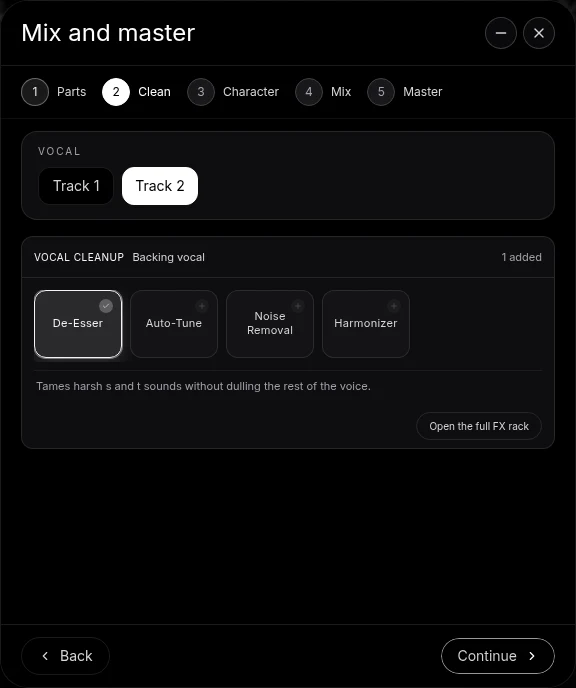
From Mix & Master. Open Mix & Master, tag your voice Lead vocal on Parts, press Continue to reach Clean and choose Auto-Tune, beside De-Esser, Noise Removal and Harmonizer. Open the full FX rack to set the key there.
The settings, at a glance
| The sound you want | Style | Amount | Key |
|---|---|---|---|
| Invisible polish | Natural | 20–40% | The song's key |
| A tight, modern pop vocal | Natural | 50–80% | The song's key |
| The stepped, robotic glide | Hard | 100% | The song's key |
Key decides which notes are allowed: the 12 notes, major or minor. An Auto-Tune added from the FX picker opens set to C major, so set it to your song before you judge the sound. Amount is how far each note is pulled toward the target, from 0% (untouched) to 100% (all the way). Style is how fast: Natural smooths the correction so slides and vibrato survive, Hard snaps each note straight to pitch.
Sing a single line into Auto-Tune: one voice at a time is what pitch correction listens to. For backing harmonies, tune each take on its own track, or stack voices from one take with the Harmonizer.
Before and after the tuning
- Before: check your instrument or your starting note with the free online tuner, and if the song sits too high for your voice, move it down with the free pitch shifter first.
- After: add De-Esser, the Compressor's Vocals preset and a Plate reverb on the same track, or ask CoProducer to "de-ess it and put it in a short room". Clean vocals in Veena walks through each control.
Want the short version with no steps? The free auto tune page is where to start, and the Veena help centre has every other answer.
Make a 140 BPM melodic trap beat in A minor to go under my tuned vocal: sliding 808s that follow my phrasing, crisp hi-hat rolls, a dark piano riff on Am, F and G, and an ambient pad. Leave space in the verse for the words, then mix it so the vocal sits on top.
Related reading: Free auto tune · Is Auto-Tune free? · Auto-Tune vs Melodyne · Is there a free auto tune app? · Is there a free autotune VST? · Clean vocals in Veena
Try this in Veena
Make a 140 BPM melodic trap beat in A minor to go under my tuned vocal: sliding 808s that follow my phrasing, crisp hi-hat rolls, a dark piano riff on Am, F and G, and an ambient pad. Leave space in the verse for the words, then mix it so the vocal sits on top.
Opens a new project in Veena, and CoProducer starts building from this prompt.
Frequently asked questions
How do I use autotune on my voice?
Set it to your song's key, pick a style and set the amount. In Veena, right-click your vocal clip and choose Auto-Tune for a quick pass in the project key, then open the track's FX to set Key, Amount and Natural or Hard. Veena is an AI DAW with a personal music producer built in. Describe the song you want and CoProducer builds it with you — beats, chords, melody, arrangement and mix — as real tracks you can edit, mix and export. Free, in your browser.
What key should I set autotune to?
The key of the song you are singing over. In Veena, select your vocal clip and press Find Key: it reads the key from your recording, and the Auto-Tune card then offers a Detected button that sets Key and major or minor in one tap. A wrong key pulls good notes to wrong ones, so this is the setting that matters most.
How do I get the hard, robotic autotune sound?
Choose Hard and push Amount to 100%. Hard snaps every note to the nearest note of the scale with almost no glide, which is the stepped sound of trap, hyperpop and modern pop hooks. In Veena it is the same Auto-Tune card, free on every plan, and you hear the change as you click.
How do I make autotune sound natural?
Choose Natural and keep Amount between 20 and 40%. Natural smooths each correction over time, so slides, vibrato and breath survive and the vocal simply sounds in tune. In Veena, flip the card's switch on and off while the chorus plays to hear exactly what the tuning is adding.
Does autotune change my original recording?
Not in Veena. Auto-Tune works on a copy of the sound before the rest of the track's effects, and your original take stays on the project untouched. Turn the card off and you hear the raw vocal again; change the key or style later and Veena tunes the take afresh.
Can I use autotune for free?
Yes. Veena's Auto-Tune is on every plan, free in your browser on a laptop, a Chromebook or a phone, with nothing to install. Record or drop in your vocal, tune it, and export it as WAV or MP3 with no watermark. Veena Pro, $20 a month, removes the daily request cap and unlocks the premium models.
Meet your personal music producer
Free, in your browser. Describe the song you want and CoProducer builds it with you.
Make music free