How do I add harmonies to my vocals?
How do I add harmonies to my vocals? Two ways, both free in Veena: add the Harmonizer effect to your vocal, which adds extra pitch voices to your own recorded voice, or record your own harmony takes on new tracks and blend them under the lead. Veena is an AI DAW with a personal music producer, CoProducer, built in, so you record, harmonize, mix and export the vocal in one place, in your browser.
Veena is an AI DAW with a personal music producer built in. Describe the song you want and CoProducer builds it with you — beats, chords, melody, arrangement and mix — as real tracks you can edit, mix and export. Free, in your browser.
Add harmonies with the Harmonizer, step by step
- Record your vocal. Go to daw.veena.studio, open your song and press Record. Run Latency calibration once so the take lands on the beat.
- Copy the vocal to its own track. Copy the clip onto a new track and name the track "Harmony". The lead stays clean on its own track.
- Add the Harmonizer. Click the harmony track's FX button, press FX in the rack and choose Harmonizer from the Stock FX picker. It adds pitch voices to the take.
- Tune it by ear. Start from a preset, turn one knob at a time while the chorus plays, and bypass the card with its switch to compare.
- Keep it in tune. Add Auto-Tune to the same chain, set to the song's key and scale, and drag the cards into the order that sounds best.
- Blend it. Bring the harmony track's fader down under the lead and pan it off-centre.
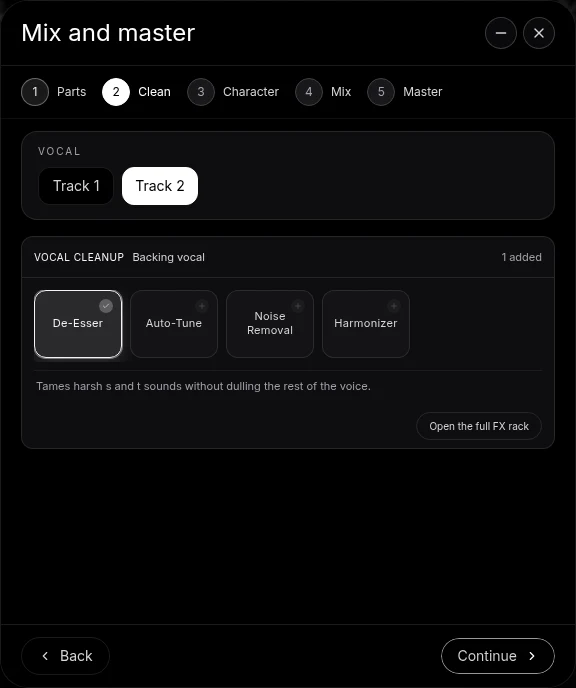
Or use Mix & Master. Open Mix & Master, tag the vocal Backing vocal on Parts, press Continue to reach Clean, and choose Harmonizer. Open the full FX rack for finer settings.
Record your own harmonies, step by step
- Find the harmony note. Loop the chorus and sing along a third above the melody; many pop harmonies sit there. Open the chords in the piano roll to see which notes fit.
- Record on a new track. Press Record, choose the new track and sing the harmony with the lead playing in your headphones. Loop recording keeps your last complete pass.
- Double it. Record the harmony twice on two tracks and pan them left and right for width.
- Clean and blend. Add De-Esser and Auto-Tune in the Clean stage, then set the harmonies under the lead.
Ask CoProducer for the mix: "keep the lead vocal close and give the backing vocals a wider space". It works on the same track chains you edit by hand.
What's free
- Vocal effects: Harmonizer, Auto-Tune, De-Esser, Noise Removal and Reverb among 17 built-in effects.
- Recording: microphone input, calibration, count-in and loop recording.
- Mixing: Mix & Master with vocal Clean and Character stages, and CoProducer's daily allowance.
- Export: WAV, MP3 and stems, with no cap and no watermark, with up to 5 projects at a time.
Veena Pro, $20 a month, removes the daily request cap and unlocks the premium models.
BandLab lists its Harmonizer on the Max plan, marked "Coming Soon" at $29.99 a month, so it is not on BandLab's free plan (as of October 2026). In Veena the Harmonizer is on the free plan today, beside the recorder and the mixer.
Pitch correction for the lead is on the free auto tune page. Vocal cleanup is in clean vocals in Veena, recording is in record your voice for a song, and the theory is in what is harmony. Every other answer is in the Veena help centre.
Related reading: Free auto tune · Clean vocals in Veena · Record your voice for a song
Try this in Veena
Build a 76 BPM soulful ballad in A-flat major around my lead vocal: soft Jazz kit drums, Electric Piano chords, a Round Bass line and Strings in the chorus. Add a Harmonizer to my backing vocal track, keep the lead close and give the backing vocals a wider space.
Frequently asked questions
How do I add harmonies to my vocals?
In Veena, open your vocal track's FX chain and add the Harmonizer, which adds pitch voices to your own voice, or choose Harmonizer in the Clean stage of Mix & Master. For fuller harmonies, record a second take a third above on a new track. Veena is an AI DAW with a personal music producer built in, free in your browser.
Can I add harmonies to my vocals for free?
Yes. Veena's Harmonizer is one of its 17 built-in effects, on every plan, free included. BandLab lists its Harmonizer on the Max plan, marked "Coming Soon" at $29.99 a month (as of October 2026). In Veena you record, harmonize, mix and export the vocal as WAV or MP3 with no watermark.
Should I record harmonies or use a harmonizer?
Both work, and many records use both. A harmonizer on your own voice is fast and follows every word you sing. Recording a harmony part yourself gives each line its own timing and tone. In Veena, try the Harmonizer first, then record a real harmony on a second track and blend the two in the mixer.
How do I make harmonies sit in the mix?
Keep the lead in the centre and the harmonies quieter and wider. In Veena, tag the parts Lead vocal and Backing vocal in Mix & Master, give the backing vocals a wider Character, pan two harmony takes left and right, and ask CoProducer to "keep the lead close and widen the backing vocals".
Meet your personal music producer
Free, in your browser. Describe the song you want and CoProducer builds it with you.
Make music free