Use effects in Veena
Use effects in Veena by opening a track’s FX chain or Master FX, adding an effect card and adjusting its controls while the song plays.
Veena is an AI DAW with a personal music producer built in. Describe the song you want and CoProducer builds it with you — beats, chords, melody, arrangement and mix — as real tracks you can edit, mix and export. Free, in your browser.
Use effects in Veena, step by step
- Choose the signal to process. Click a track’s FX button for that track, or Master FX in the left rail for the summed song.
- Press FX in the rack. The Stock FX picker opens. Use its search to find an effect by name and choose it.
- Start with a preset, then turn its knobs. Listen in the arrangement. Change one control at a time so you hear what it contributes.
- Set the order. Drag an effect card to move it earlier or later in the chain. EQ before a compressor changes what the compressor reacts to; reverb after it preserves the room tail.
- Compare. The card’s switch bypasses that effect. FX Chain switches the whole chain. The × on an ordinary insert removes that effect.
- Use VST for your own effect plug-in. Veena Bridge hosts it on your computer. Instrument plug-ins are chosen in the MIDI clip’s Instrument panel.
- Automate a control. Right-click an eligible knob and choose Automate. Edit the value over the song’s bars instead of setting one fixed value.
Choose the effect by the job
| Job | Effects and controls |
|---|---|
| Balance and stereo | Utility: Gain, Width, Balance, Mono and Polarity |
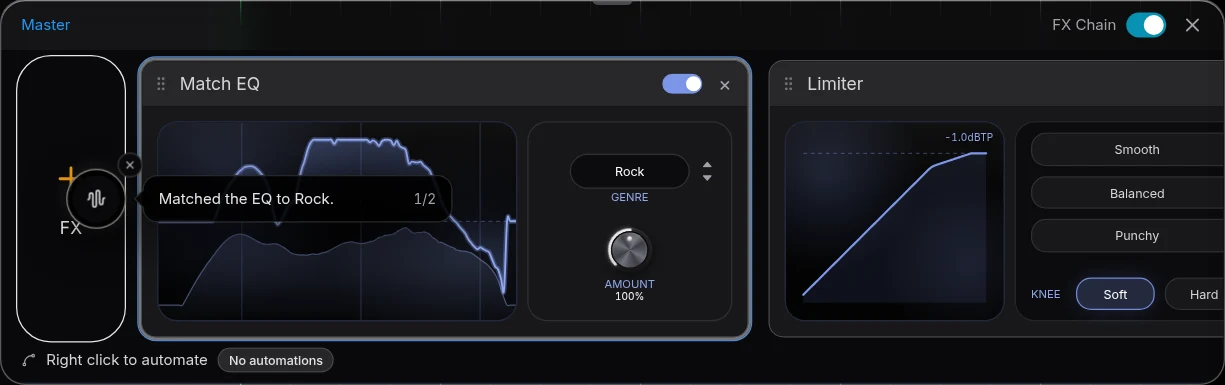
| Frequency shape | 8-Band EQ; Filter for a pass band; Match EQ for a genre-based curve and Amount |
| Dynamics | Compressor: Threshold, Ratio, Attack, Release, Knee and Makeup; Limiter: Drive, Ceiling, Release, Knee and Output |
| Vocal cleanup | De-Esser for sharp consonants; Noise Removal for background noise; Auto-Tune for key and scale; Harmonizer for additional pitch voices |
| Space and repeats | Reverb: Decay, Pre-Delay, Tone and Mix; Delay for tempo-synced or free repeats and ping-pong |
| Movement and colour | Chorus, Phaser, Flanger and Distortion |
| Make room for another part | Sidechain, with the other track selected as its key source |
Track processing and the final bus
A track chain processes the clips on that track. The master chain processes the sum after the tracks are mixed. Mastering adds Match EQ and Limiter cards to that bus, so you can see and revise the final processing. In both places the saved controls are the controls used by playback and export.
Ask CoProducer for an outcome, such as "clear the low-mid buildup on the keys and add a short room to the vocal." It can add and tune effects in the same project you edit.
See the AI mixing assistant page for this capability in the full Veena studio.
Release history: Smoother playback in Veena explains the change introduced on 2026-09-28.
Release history: Reverb tails in Veena explains the change introduced on 2026-10-09.
Related reading: Veena help centre, Mix & Master, CoProducer edits, Release note.
Try this in Veena
Put a short reverb on the snare, a tempo-synced delay on the lead, and gently reduce low-mid buildup on the piano track.
Frequently asked questions
How do I add effects to a track or master in Veena?
Press a track’s FX button in Veena for its rack, or Master FX in the rail for the whole song. Press FX for Stock FX or VST for an installed effect through Veena Bridge. Drag effect cards to reorder them and bypass a card to compare the change while listening.
Where do effects live in Veena?
Effects in Veena live on the track or master chain. Open a track’s FX button for that part, or Master FX in the left rail for the summed mix. MIDI instrument plug-ins have their own Instrument panel. The visible cards let you adjust, reorder and bypass processing without replacing your musical parts.
Can CoProducer adjust effects in Veena?
Yes. CoProducer can add, remove, reorder and tune effects in your Veena project. Name the part and the musical outcome, such as a drier lead vocal or a warmer bass. You can inspect the resulting cards, turn the same knobs yourself, and compare by switching an effect or its whole chain off.
Meet your personal music producer
Free, in your browser. Describe the song you want and CoProducer builds it with you.
Make music free