Mastering cards on Veena’s master bus
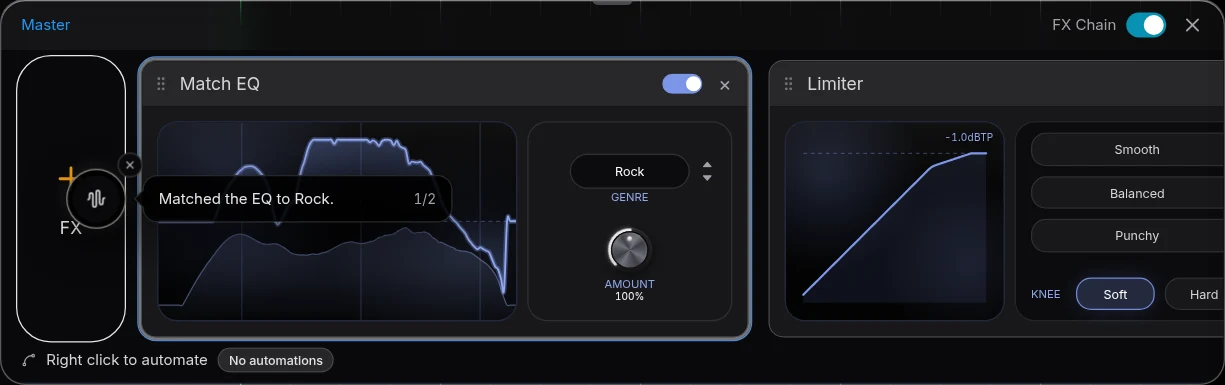
Mastering cards on Veena’s master bus, released on 8 October 2026, replace the separate mastered file with Match EQ followed by Limiter in the master FX chain.
Veena is an AI DAW with a personal music producer built in. Describe the song you want and CoProducer builds it with you — beats, chords, melody, arrangement and mix — as real tracks you can edit, mix and export. Free, in your browser.
Mastering cards on Veena’s master bus: what changed
Master project measures the mix and installs the mastering pair at the end of the master chain. Play plays the processed bus and Export exports it. Mastering again updates that pair in place. Your individual tracks remain unchanged by the mastering action.
Match EQ offers a genre choice and Amount, with the learned correction saved in the project. Limiter adds visible Knee and Output controls beside Drive, Ceiling and Release. The master panel’s FX Chain switch bypasses the whole chain for playback and export. The workflow minimizes into its bubble, points at the cards it installed and finishes with Done with mastering.
Try it in your song
- Pause the song. The mastering run needs the transport stopped before measuring.
- Choose the genre. Open Mix & Master, select Master and choose the target genre.
- Press Master project. Wait for the bubble to finish, then inspect Match EQ and Limiter in Master FX.
- Compare and export. Use FX Chain to compare the bus, turn it on for the master and export Full mix.
In your editable project
The processing is an editable part of the project. A later request for a louder result can change the limiter card rather than place another rendered clip. To hear or export the unprocessed mix, turn the master FX chain off. Closing Mix & Master only closes that surface; it does not remove the mastering cards or their saved settings.
Related reading: Veena help centre, what’s new in Veena, Follow the mastering cards on Veena’s master bus guide, Edit the track and master effect cards.
Try this in Veena
Master this finished pop song with clear low end and a warm top end, then raise the limiter output a little without replacing any tracks.
Frequently asked questions
Where does Veena put the mastering result?
Veena puts its mastering result on the master bus as editable Match EQ followed by Limiter. Master project installs or updates that pair instead of placing a separate master render on a track. Play and Export use the enabled bus processing; FX Chain compares the whole chain switched off and on.
Does Master project create another audio file in Veena?
Master project in Veena measures the mix and installs Match EQ followed by Limiter on the master bus. It does not place a separate mastered audio file on a track. Play and Export use that same enabled processing, and another mastering pass updates the pair while the song’s separate tracks stay editable.
How do I compare the mastered and clean mix in Veena?
Use FX Chain in Veena’s Master FX panel to switch the whole master chain off and on. The choice applies to playback and export. Closing the Mix & Master window does not bypass processing. Inspect Match EQ and Limiter directly when you want to refine the genre amount, output or dynamics of the master.
Meet your personal music producer
Free, in your browser. Describe the song you want and CoProducer builds it with you.
Make music free