Does SoundID Reference work in a browser DAW?
Does SoundID Reference work in a browser DAW? Yes: in Veena it works two ways. SoundID Reference's Systemwide app calibrates everything your computer plays, so Veena in your browser is calibrated with nothing to set up inside the studio, and its VST3 and AU plug-ins load on Veena's Master FX through Veena Bridge, a free helper app on your computer. Either way you mix on a flat reference, in a studio that costs nothing.
Veena is an AI DAW with a personal music producer built in. Describe the song you want and CoProducer builds it with you — beats, chords, melody, arrangement and mix — as real tracks you can edit, mix and export. Free, in your browser.
SoundID Reference's formats, from Sonarworks' pages
Read on sonarworks.com and Sonarworks' support pages on 19 November 2026:
- Two ways to run: "a standalone app and a DAW plugin", the app being "a standalone Systemwide app calibrating audio across your entire system".
- Plug-in formats: the installer "will install the plugins (VST, VST3, AU, and AAX)": the VST3 to the standard VST3 folder on Mac and Windows, and the AU to the Mac's Components folder.
- Placement: "The SoundID Reference DAW plugin should always come last in the chain", on the master output, and "must be fully bypassed for exporting audio from your DAW".
- Computers: macOS 11 Big Sur to 26 Tahoe and Windows 10 and 11, online; "This product is compatible with Mac and Windows only."
- Trial: "Fully functional 21-day free trial", "no credit card required".
How SoundID Reference meets Veena
| Your computer | SoundID Systemwide | SoundID plug-in through Veena Bridge |
|---|---|---|
| Mac, Intel or Apple silicon | Calibrates the browser and Veena | AU or VST3 on Master FX |
| Windows 10 or 11 | Calibrates the browser and Veena | VST3 on Master FX |
| Chromebook or phone | Not installed there | Veena's built-in mixing and mastering, free |
Veena Bridge was read in Veena's own documentation on 19 November 2026: it scans Audio Units and the standard VST3 folders, plus any folder you add, lists every effect plug-in in the Master FX picker, and opens the plug-in's own window. SoundID's AU and VST3 builds are the formats it hosts.
| Veena with SoundID Reference | SoundID in a desktop DAW | |
|---|---|---|
| Studio price | Free | The DAW's own price, on top of SoundID |
| Runs on | Any current browser; SoundID on Mac or Windows | Mac or Windows |
| Makes the song too | Yes, CoProducer builds it with you | No |
| Mixing and mastering | AutoMix and Master project, free | Depends on the DAW |
| Real-time collaboration | Yes, free | Depends on the DAW |
Room and headphone calibration is SoundID's own job, and it does it in front of any app. Veena is the studio it sits in front of: free, in the browser, with CoProducer, mixing and mastering built in. That makes Veena a $0 home for a SoundID licence.
Set up SoundID Reference with Veena, step by step
- Install SoundID Reference from sonarworks.com, the trial or your licence; the installer adds Systemwide and the plug-ins.
- For Systemwide: open it, load your headphone profile or measured speaker profile, and set your audio interface or headphones as its output. Open Veena at daw.veena.studio and play; you hear it calibrated.
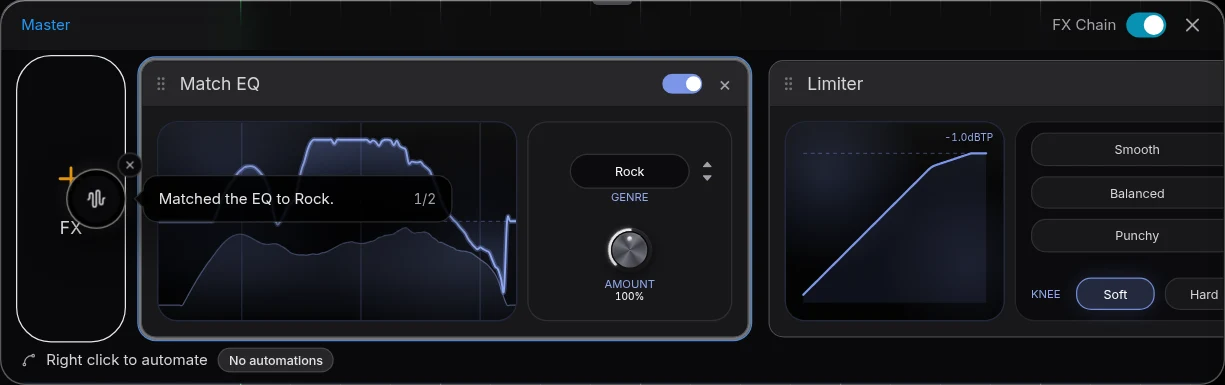
- For the plug-in: install Veena Bridge when Veena asks, press Launch and allow local network access. Open Master FX, press VST and pick SoundID Reference, last in the chain.
- Open plugin window to load your profile and choose the filter mode. The settings save with the project.
- Mix with CoProducer. Paste the trap prompt below, then use AutoMix and Master project and fine-tune by ear.
- Export. With Systemwide, export WAV, MP3 or stems as they are; with the plug-in, take it off Master FX first, as Sonarworks advises for every DAW.
Setup details for every plug-in are on VST and AU plugins in Veena. This week's SoundID prices are on does Sonarworks go on sale for Black Friday.
Make a 140 BPM trap beat in C minor that I will mix on calibrated headphones: a long 808 on C that slides into each new bar, crisp hi-hats with triplet rolls, a snappy clap on 3, a dark bell melody on Cm, Ab and G, and a choir pad in the hook. Intro 4 bars, hook 8, verse 16, hook 8, verse 16, hook 8, outro 4. Then mix it with the 808 and kick sitting together and master it loud and clean for streaming.
Related reading: Veena help centre · What is SoundID Reference? · Does Sonarworks go on sale for Black Friday? · VST and AU plugins in Veena · Mix & Master in Veena · Can you use iZotope RX in a browser DAW? · Black Friday DAW deals 2026
Try this in Veena
Make a 140 BPM trap beat in C minor that I will mix on calibrated headphones: a long 808 on C that slides into each new bar, crisp hi-hats with triplet rolls, a snappy clap on 3, a dark bell melody on Cm, Ab and G, and a choir pad in the hook. Intro 4 bars, hook 8, verse 16, hook 8, verse 16, hook 8, outro 4. Then mix it with the 808 and kick sitting together and master it loud and clean for streaming.
Opens a new project in Veena, and CoProducer starts building from this prompt.
Frequently asked questions
Does SoundID Reference work in a browser DAW?
Yes, in Veena, two ways. SoundID Reference's Systemwide app calibrates "audio across your entire system", the browser included, and its VST3 and AU plug-ins load on Veena's Master FX through the free Veena Bridge helper (sonarworks.com, read 19 November 2026). Veena is an AI DAW with a personal music producer built in. Describe the song you want and CoProducer builds it with you — beats, chords, melody, arrangement and mix — as real tracks you can edit, mix and export. Free, in your browser.
Should I use SoundID Systemwide or the plug-in with Veena?
Systemwide, for most people. It sits after the browser, so Veena, the reference tracks you play in other apps and YouTube all go through the same calibration, and your exports carry only your mix. The plug-in on Veena's Master FX is there when you want the calibration saved with one project.
What plug-in formats does SoundID Reference come in?
Sonarworks says its installer adds "the plugins (VST, VST3, AU, and AAX)" on Mac and Windows (Sonarworks support, read 19 November 2026). Veena Bridge hosts VST3 on Mac and Windows and Audio Units on a Mac, so SoundID's VST3 or AU loads on Veena's Master FX, and its window opens from Veena.
Where does the SoundID plug-in go in Veena?
Last on Master FX. Sonarworks says "the SoundID Reference DAW plugin should always come last in the chain", after metering, and "must be fully bypassed for exporting audio" (read 19 November 2026). In Veena, put it after Match EQ and Limiter while you mix, and take it off Master FX before you export.
Can I use SoundID Reference on a Chromebook?
SoundID Reference installs on Mac and Windows only, Sonarworks says (read 19 November 2026). Veena runs in any current browser, on a Chromebook and on your phone, so you can write and arrange there with CoProducer and mix on your calibrated Mac or Windows computer in the same project.
Do I need SoundID Reference to mix in Veena?
No. Veena's free Mix & Master sets your parts, cleans vocals, runs AutoMix and masters the song with editable Match EQ and Limiter cards on any headphones. SoundID Reference flattens what your headphones or speakers add, so the decisions you make in Veena translate to every other speaker.
Meet your personal music producer
Free, in your browser. Describe the song you want and CoProducer builds it with you.
Make music free