Does Soundation work on a phone?
Does Soundation work on a phone? Soundation's own pages describe a studio for computers, "Compatible with all Chrome computers", and none of the pages we read names a phone app. Veena puts the studio on your phone: open it in your phone's browser and Pocket Studio opens on the same project as your laptop, with CoProducer building the song with you, free.
Veena is an AI DAW with a personal music producer built in. Describe the song you want and CoProducer builds it with you — beats, chords, melody, arrangement and mix — as real tracks you can edit, mix and export. Free, in your browser.
Does Soundation work on a phone? What Soundation's own pages say
Read on soundation.com/studio-tools/record-audio, edu.soundation.com and soundation.com/support/gennie-faq on 16 November 2026:
- Computers with Chrome: "Compatible with all Chrome computers", and the studio "runs on low-performance computers as well, in fact any computer that runs Chrome."
- The browsers it names: "all that's required is a Google Chrome och Microsoft Edge browser. No installation is needed."
- Chromebooks are in: the recording page answers "how to record audio on Chromebook".
- Phones are not named: none of these pages, nor its plans page, mentions a phone, a tablet or a mobile app.
- Export, on any device, is paid: "To export audio from Soundation, you need to be on one of the paid plans."
Making music on a phone: Veena vs Soundation
| Read 16 Nov 2026 | Veena | Soundation |
|---|---|---|
| Works on a phone | Yes, Pocket Studio in your phone's browser | Its pages name Chrome computers |
| An app to install | None | None named for phones |
| The AI | CoProducer builds the song, with 3 options per part | Gennie, one generated sample per credit |
| Record with the phone's microphone | Yes | Not described for phones |
| Export audio | Free: WAV, MP3, MIDI and stems | Paid plans only |
Soundation's real strength is a long-running browser studio with a deep loop library on its paid plans. For making music wherever you are, Veena is the studio that comes with you. The full head-to-head is Veena vs Soundation.
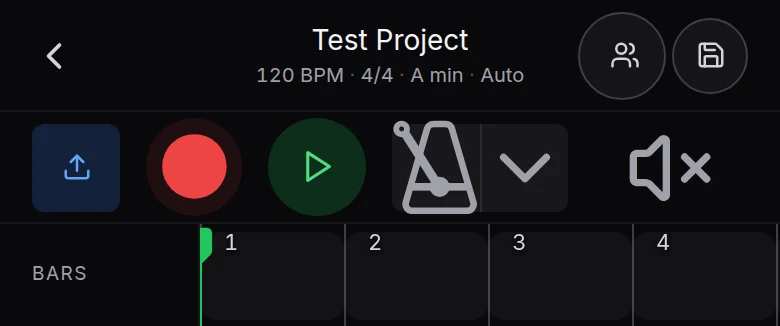
Make a song on your phone in Veena
- Open it. Go to daw.veena.studio in Safari or Chrome on your phone and sign in with Google. Pocket Studio opens.
- Describe the song. Paste the trap prompt at the bottom of this page into CoProducer's prompt box in a new project.
- Pick your parts. Each part arrives as 3 chips: tap one to hear it in the mix, then Select and Continue.
- Record your take. Tap record and sing or rap straight into your phone's microphone over the beat.
- Finish anywhere. Share the project from the header, or open the same song on your laptop and keep going in the full studio.
Every phone control is in Veena on phones and tablets. Veena's free plan holds 5 projects, with CoProducer on a daily allowance. Veena Pro, $20 a month, removes the daily request cap and unlocks the premium models.
Make a 140 BPM trap beat in C# minor: a hard 808 that slides between notes, crisp hi-hat rolls, a snare on beat 3, a dark bell melody and a soft choir pad under the hook. Intro 4 bars, hook 8, verse 16, hook 8, verse 16, hook 8, outro 4. Leave space for my vocal.
Related reading: Veena help centre · Veena vs Soundation · Is Soundation free? · How much is Soundation? · Can you collaborate on Audiotool? · Veena on phones and tablets
Try this in Veena
Make a 140 BPM trap beat in C# minor: a hard 808 that slides between notes, crisp hi-hat rolls, a snare on beat 3, a dark bell melody and a soft choir pad under the hook. Intro 4 bars, hook 8, verse 16, hook 8, verse 16, hook 8, outro 4. Leave space for my vocal.
Opens a new project in Veena, and CoProducer starts building from this prompt.
Frequently asked questions
Does Soundation work on a phone?
Soundation's own pages describe a studio for computers: "Compatible with all Chrome computers", and its education page says "all that's required is a Google Chrome och Microsoft Edge browser"; none of the pages we read names a phone app (soundation.com, read 16 Nov 2026). Veena is an AI DAW with a personal music producer built in. Describe the song you want and CoProducer builds it with you — beats, chords, melody, arrangement and mix — as real tracks you can edit, mix and export. Free, in your browser.
Is there a Soundation app for iPhone or Android?
None of Soundation's pages that we read on 16 November 2026 names one: they describe a browser studio for "any computer that runs Chrome". Veena needs no app on either: open daw.veena.studio in Safari or Chrome on your phone and Pocket Studio opens, free, with CoProducer building the song with you.
Does Soundation work on a Chromebook?
Yes, by Soundation's account: its recording page says the studio runs on "any computer that runs Chrome" and offers itself as the answer to "how to record audio on Chromebook" (read 16 Nov 2026). Veena runs on a Chromebook too, and the same project then opens on your phone as Pocket Studio.
What can I do in Veena on my phone?
Start a song from one sentence and pick each part CoProducer writes from 3 options, then play it, record a take with your phone's microphone, move and trim clips, add sections and share the project. Every change is the same project your laptop opens, and it is free, with up to 5 projects at a time.
Can I export my song from my phone in Veena?
Yes. Tap the song's title to open the Project sheet and choose Export. Veena exports WAV 24-bit/48 kHz, MP3 320 kbps, MIDI and stems on the free plan, with no cap and no watermark. Soundation's FAQ says "To export audio from Soundation, you need to be on one of the paid plans" (read 16 Nov 2026).
Meet your personal music producer
Free, in your browser. Describe the song you want and CoProducer builds it with you.
Make music free