Can you collaborate on Audiotool?
Can you collaborate on Audiotool? Yes: Audiotool's pages promise live, multiplayer sessions where several producers edit one cloud project at once. What its session doesn't seat is a producer who writes. Veena's real-time collaboration is free too, and it puts you, your co-writers and CoProducer in the same song, on a laptop or on your phone.
Veena is an AI DAW with a personal music producer built in. Describe the song you want and CoProducer builds it with you — beats, chords, melody, arrangement and mix — as real tracks you can edit, mix and export. Free, in your browser.
Can you collaborate on Audiotool? What Audiotool's own pages say
Read on audiotool.com/online-daw, audiotool.com/product and audiotool.com on 16 November 2026:
- Live in one project: "Invite anyone into the same project and produce together live, then remix and fork tracks across an open community."
- Several editors at once: "real-time multiplayer means several producers can edit the same cloud project at once, with changes appearing live."
- The community around it: "the community is built around remixing and forking each other's tracks."
- Free: "100% free + no ads".
- AI in the session comes from developers: "Build apps, plugins, and AI tools that join live multiplayer sessions."
- Where it runs: "on Windows, macOS, Linux, or a Chromebook", with "Safari and other niche browsers" called "out of scope" in its help centre.
Making music together: Veena vs Audiotool
| Read 16 Nov 2026 | Veena | Audiotool |
|---|---|---|
| Edit the same song live | Yes, named cursors, edits sync instantly | Yes, changes appear live |
| A producer in the session | CoProducer, in a Shared chat and a private chat each | Through apps developers build |
| Write a new part on request | Ask in plain words, pick from 3 options together | Program it by hand, or use a developer's app |
| Join from a phone | Pocket Studio, the same project | Its pages name computers and Chromebooks |
| Safari | Opens in Safari | "out of scope" |
| Price | Free on every plan | Free |
Audiotool's real strength is its long-running community: open a track, see how it was patched and fork it. For writing a song with other people, Veena seats the producer in the session as well. The full head-to-head is Veena vs Audiotool.
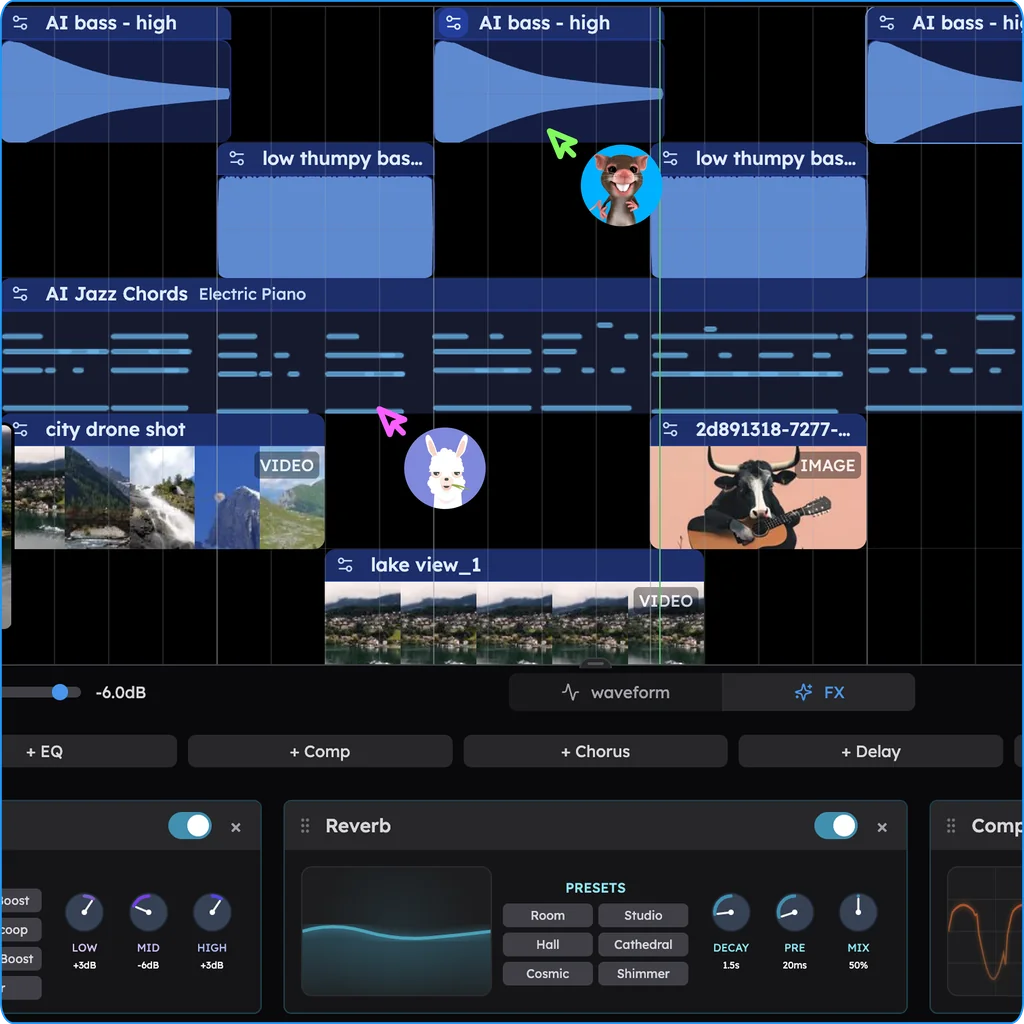
Collaborate in real time, in Veena
- Sign in. Open daw.veena.studio and sign in with Google. No download, no install.
- Start the song. Paste the future house prompt at the bottom of this page into CoProducer in an empty project.
- Share it. Press Share in the transport bar, create an invite link and send it to your co-writer.
- Build it together. In Shared chat, ask CoProducer for the break, audition the 3 options together and pick one. Each pick shows who chose it.
- Finish it. Record the topline on its own track, mix in Mix & Master, and export the mix or every track as stems.
Every control is in real-time collaboration in Veena. Veena's free plan holds 5 projects, with CoProducer on a daily allowance. Veena Pro, $20 a month, removes the daily request cap and unlocks the premium models.
Make a 128 BPM future house track in G minor: a bouncy kick and clap, shuffled hats, a metallic pitch-bent bass on the offbeats, bright chord stabs on Gm7, Ebmaj7, Bb and F, and a vocal-chop style lead in the drop. Intro 8 bars, build 8, drop 16, break 8, build 8, drop 16, outro 8. Leave room for a topline from my co-writer.
Related reading: Veena help centre · Veena vs Audiotool · Is Audiotool free? · Does Soundation work on a phone? · Can you collaborate on BandLab? · Audiotool alternative
Try this in Veena
Make a 128 BPM future house track in G minor: a bouncy kick and clap, shuffled hats, a metallic pitch-bent bass on the offbeats, bright chord stabs on Gm7, Ebmaj7, Bb and F, and a vocal-chop style lead in the drop. Intro 8 bars, build 8, drop 16, break 8, build 8, drop 16, outro 8. Leave room for a topline from my co-writer.
Opens a new project in Veena, and CoProducer starts building from this prompt.
Frequently asked questions
Can you collaborate on Audiotool?
Yes. Audiotool's online DAW page says "multiple people can work in the same project simultaneously", with changes "appearing live" (audiotool.com, read 16 Nov 2026). Veena is an AI DAW with a personal music producer built in. Describe the song you want and CoProducer builds it with you — beats, chords, melody, arrangement and mix — as real tracks you can edit, mix and export. Free, in your browser.
Is Audiotool collaboration free?
Yes: Audiotool is "100% free + no ads" (read 16 Nov 2026). So is Veena's real-time collaboration, on every plan since 12 September 2026, and Veena's session holds one more member than Audiotool's: CoProducer, who writes the parts the room asks for while everyone listens.
Can an AI producer join an Audiotool session?
Only one a developer builds. Audiotool's product page invites developers to "Build apps, plugins, and AI tools that join live multiplayer sessions" (read 16 Nov 2026). In Veena the producer is already in the room: every shared project has a Shared chat with CoProducer that the whole session steers, plus a private chat for each person.
Can I collaborate from my phone?
In Veena, yes. Open the shared song on your phone and Veena opens Pocket Studio on the same project: play it, record a take with your phone's microphone, ask CoProducer for a part and share the project from the header. Your co-writer keeps working on a laptop, in the same song.
How do I invite someone in Veena?
In Veena, press Share in the transport bar and create an invite link: email-locked to one Google account by default, or open to anyone who has it. Links work for joining for 30 days, the project stays yours, and you remove anyone's access with one click. Everyone sees named cursors on the timeline as they edit.
Meet your personal music producer
Free, in your browser. Describe the song you want and CoProducer builds it with you.
Make music free