Does Audiotool work on Safari?
Does Audiotool work on Safari? No: Audiotool's own help centre says "Safari and other niche browsers are currently out of scope" and that bug reports from them "might not be considered". It focuses on Chrome and supports Firefox. Veena opens in Safari on a Mac, an iPhone or an iPad, and CoProducer, your personal music producer, builds the song with you there as real tracks.
Veena is an AI DAW with a personal music producer built in. Describe the song you want and CoProducer builds it with you — beats, chords, melody, arrangement and mix — as real tracks you can edit, mix and export. Free, in your browser.
Does Audiotool work on Safari? What Audiotool's own pages say
Read on audiotool.com/help/supported-browsers and audiotool.com/online-daw on 22 November 2026:
- Safari is out. "Safari and other niche browsers are currently out of scope. Bug reports might not be considered."
- Unsupported means unpredictable. "Other browsers are not supported and our DAW might break in unexpected ways."
- Chrome comes first. "Google Chrome and its derivatives make up a market share of over 80%, so this is the browser we focus on", with "extensive automated testing on Chrome". Edge, Brave, Opera and other Chromium browsers "should work as well".
- Firefox, with gaps. "We don't perform automated testing on Firefox", and on Firefox "Not all audio input devices can be used to record audio".
- Where it runs. "On Windows, macOS, Linux, or a Chromebook."
Browsers and devices: Veena vs Audiotool
| Read 22 Nov 2026 | Veena | Audiotool |
|---|---|---|
| Safari on a Mac | Opens the studio, CoProducer included | "out of scope" |
| Chrome, Edge, Brave | Built for them | Chrome first; Chromium browsers "should work" |
| Firefox | Supported | Supported, without automated testing |
| Safari on an iPhone | Pocket Studio, the same project | "out of scope" |
| An AI producer in the studio | CoProducer, on every plan | None in the studio |
| Price | Free studio, CoProducer on a daily allowance | Free |
Audiotool's real strength is its modular studio and remix community: 37 built-in devices you patch with cables, and published tracks anyone can open to see how they were built. For making a song in the browser you already use, every row above goes to Veena. The full head-to-head is Veena vs Audiotool.
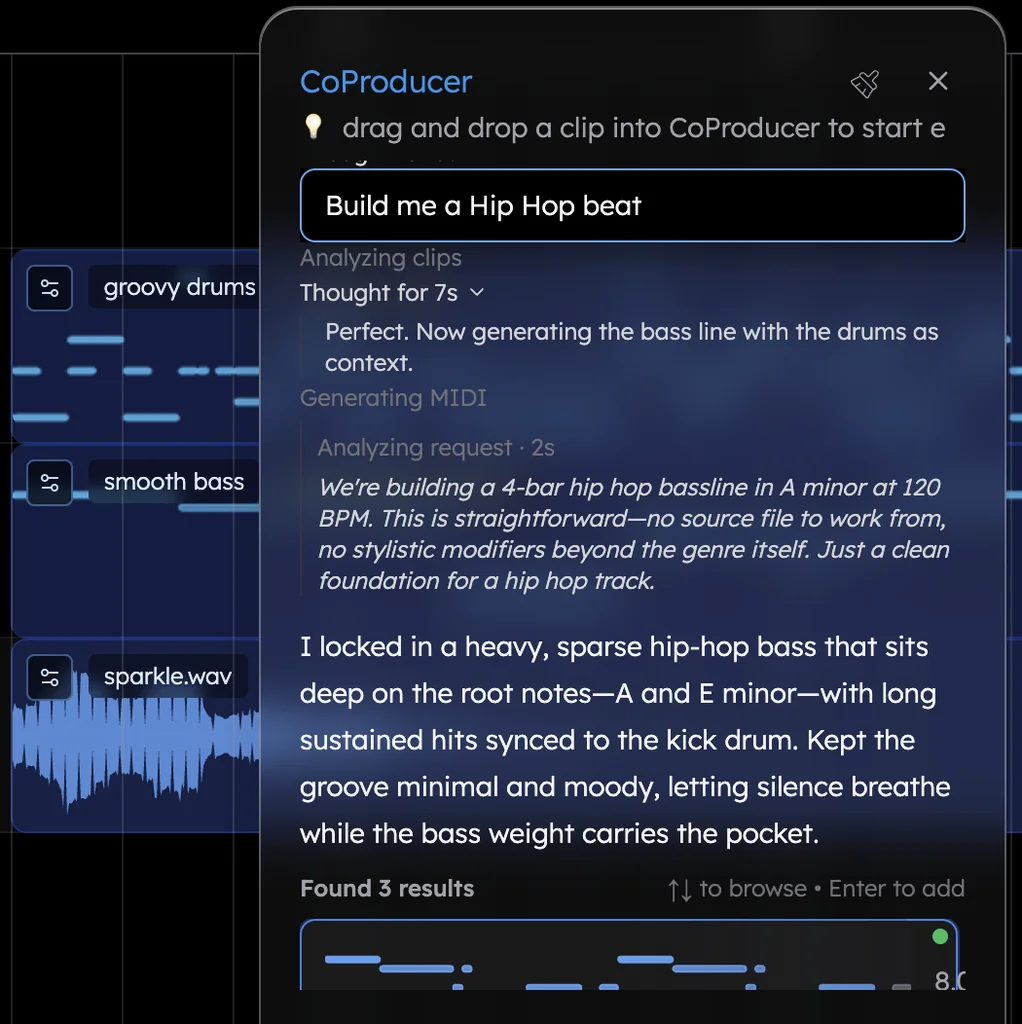
Make a song in Safari, in Veena
- Open Veena in Safari. Go to daw.veena.studio on your Mac, iPhone or iPad and sign in with Google. Nothing to install.
- Describe the song. Paste the indie pop prompt at the bottom of this page into CoProducer in an empty project.
- Pick your parts. Drums, guitar, bass and the glockenspiel hook each arrive as 3 options. Keep the ones you like.
- Play and record. Record a vocal or guitar with your microphone, or play a part on your computer keyboard: the A to ' row plays white keys, the W to ] row black keys, and Z and X shift the octave.
- Mix, master and export. In Mix & Master, press AutoMix, then Master project. Export WAV 24-bit/48 kHz, MP3, MIDI and stems, with no cap and no watermark.
Veena's free plan has no project limit and gives CoProducer a daily allowance. Veena Pro, $20 a month, removes the daily request cap and unlocks the premium models.
Veena browser requirements lists every browser and device, Veena on phones and tablets covers Pocket Studio, and the Veena help centre answers the rest. More Audiotool answers: is Audiotool free? and can you collaborate on Audiotool?
Make a 100 BPM indie pop song in G major: a bright live-feel kit with a tambourine on the off-beats, strummed acoustic guitar on G, D, Em and C, a melodic bass, a glockenspiel hook in the chorus and warm pad swells in the bridge. Intro 4 bars, verse 16, chorus 8, verse 16, chorus 8, bridge 8, chorus 8, outro 4.
Related reading: Veena browser requirements · Veena vs Audiotool · Is Audiotool free? · Veena on phones and tablets
Try this in Veena
Make a 100 BPM indie pop song in G major: a bright live-feel kit with a tambourine on the off-beats, strummed acoustic guitar on G, D, Em and C, a melodic bass, a glockenspiel hook in the chorus and warm pad swells in the bridge. Intro 4 bars, verse 16, chorus 8, verse 16, chorus 8, bridge 8, chorus 8, outro 4.
Opens a new project in Veena, and CoProducer starts building from this prompt.
Frequently asked questions
Does Audiotool work on Safari?
No. Audiotool's help centre says "Safari and other niche browsers are currently out of scope. Bug reports might not be considered" (audiotool.com/help/supported-browsers, read 22 Nov 2026). Veena is an AI DAW with a personal music producer built in. Describe the song you want and CoProducer builds it with you — beats, chords, melody, arrangement and mix — as real tracks you can edit, mix and export. Free, in your browser, Safari included.
Which browsers does Audiotool support?
Chrome first, then Firefox. Audiotool's help centre says Chrome is "the browser we focus on", other Chromium browsers such as Edge, Brave and Opera "should work as well", and Firefox is supported without automated testing (read 22 Nov 2026). Veena is built for Chrome, Edge, Brave and Arc, supports Firefox and opens in Safari, with the same studio and the same CoProducer.
Can I use Audiotool on a Mac?
In Chrome or Firefox, yes: Audiotool's pages say it opens "on Windows, macOS, Linux, or a Chromebook", and its help centre puts Safari out of scope (read 22 Nov 2026). Veena runs on a Mac in Safari, Chrome, Edge, Brave, Arc or Firefox, and Veena Bridge loads your own Audio Unit and VST3 plug-ins, free.
Does Veena work in Safari on an iPhone or iPad?
Yes. Open daw.veena.studio in Safari on your iPhone and Pocket Studio opens: start a song from one sentence, pick each part from 3 options, record with the phone's microphone and export. An iPad opens the full studio when the window is 1000 px or wider, on the same project your laptop opens.
What can I do in Veena in Safari?
The whole song. In Safari, Veena opens with CoProducer, recording, editable tracks and export: describe the song and CoProducer builds every part with you, then play notes on your computer keyboard, mix, master and export a 24-bit WAV, MP3, MIDI or stems with no watermark.
Meet your personal music producer
Free, in your browser. Describe the song you want and CoProducer builds it with you.
Make music free