Can you use Eventide plugins in a browser DAW?
Can you use Eventide plugins in a browser DAW? Yes: in Veena, Blackhole, the H3000 and the rest of Eventide's range run on your tracks and on the master inside the studio in your browser. Eventide ships VST3 on Windows and AU and VST3 on a Mac, and Veena Bridge, a free helper app on your computer, hosts exactly those. Eventide's plug-ins are not free, but each has a 14-day demo, and Veena's studio is free all year.
Veena is an AI DAW with a personal music producer built in. Describe the song you want and CoProducer builds it with you — beats, chords, melody, arrangement and mix — as real tracks you can edit, mix and export. Free, in your browser.
Eventide's formats, from its own pages
Read on eventideaudio.com's plug-ins, Blackhole and H3000 Factory Mk II pages and store.eventideaudio.com on 18 November 2026:
- Plug-in formats (Windows 10+, x64): "AAX 64-bit, VST2 64-bit, VST3 64-bit".
- Plug-in formats (macOS 10.14+, Intel and Apple Silicon): "AAX 64-bit, AU 64-bit, VST2 64-bit, VST3 64-bit".
- Blackhole on iOS: "AUv3 64-bit, Standalone 64-bit", on iOS 11 or later.
- Authorization: "iLok Account Required", "No physical dongle necessary".
- Demos: "Free 14-Day Demos", "Fully unlocked plugins so you can try before you buy".
- Prices: Blackhole $99, H3000 Factory Mk II $149, Anthology '27 $649 instead of $1,299; no plug-in listed free.
How Eventide's formats meet Veena Bridge
| Your computer | Eventide ships | Veena Bridge hosts | In Veena |
|---|---|---|---|
| Mac, Intel or Apple silicon | AU, VST3, VST2, AAX | AU and VST3, one universal helper | Eventide on any track or the master |
| Windows 10 or later, 64-bit | VST3, VST2, AAX | VST3 | Eventide on any track or the master |
| Chromebook or phone | Not installed there | Built-in effects | Veena's Reverb, Delay, Chorus, Harmonizer and more |
Veena Bridge scans Audio Units and the standard VST3 folders, plus any folder you add, and opens each plug-in's own window, so Blackhole's Gravity control and the H3000's patching view are a click away. Setup and troubleshooting are on VST and AU plugins in Veena.
Veena and a desktop DAW, both hosting Eventide
| Veena with Eventide | A desktop DAW with Eventide | |
|---|---|---|
| The studio's price | Free | The DAW's own price |
| Install | Veena Bridge only; the studio opens in your browser | The full DAW, plus Eventide |
| Writes and arranges the song | Yes, CoProducer, from a sentence | You write it |
| Built-in effects alongside | 17, including Harmonizer and Match EQ | The DAW's own |
| Export | WAV, MP3, MIDI and stems, free | Depends on the DAW |
Blackhole sounds as big in Veena as anywhere else. What changes is how quickly there is a song to put it on, and in Veena the producer is built in.
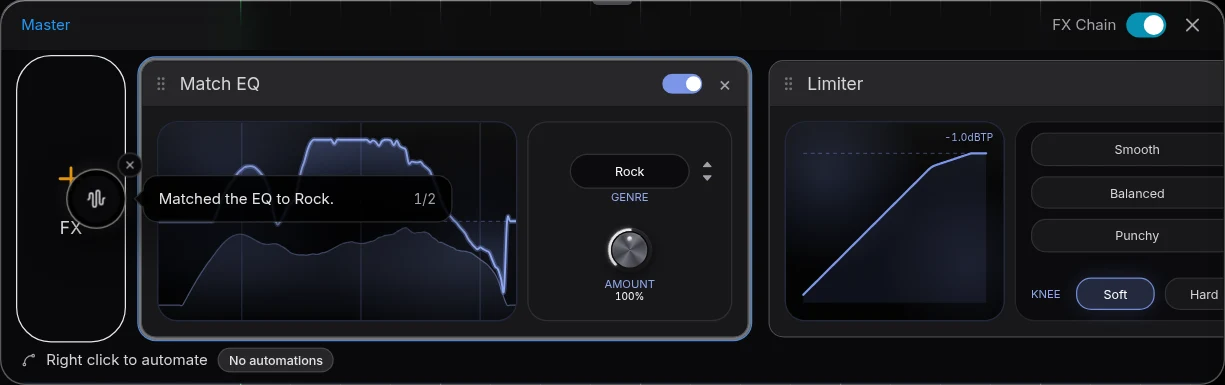
Use Eventide in Veena, step by step
- Install Eventide from your account or a 14-day demo, as VST3, or as an Audio Unit on a Mac, and activate it with your iLok account.
- Open Veena at daw.veena.studio and paste the dream-pop prompt below; CoProducer builds the song.
- Install Veena Bridge when Veena asks: press Download, install, then Launch and allow local network access.
- Open the pad track's FX, press VST and pick Blackhole; put the H3000 on the guitar.
- Open plugin window to pick a preset. The settings save with the project.
- Export WAV 24-bit/48 kHz, MP3, MIDI or stems, free, with Eventide in the mix.
This week's Eventide prices are on does Eventide go on sale for Black Friday?. The same steps for synths: can you use u-he plugins in a browser DAW?, and for two more effects makers: can you use Valhalla plugins in a browser DAW? and do Soundtoys plugins work in a browser DAW?
Make a 84 BPM dream-pop song in B flat major: a soft live-feel kit, a round bass under Bbmaj7, Gm9, Ebmaj7 and F, chorused clean guitar arpeggios, a breathy synth pad sent to a vast reverb, a detuned vocal-style lead and a pitch-shifted shimmer on the last chorus. Intro 8 bars, verse 16, chorus 16, verse 16, chorus 16, outro 8. Then mix it.
Related reading: Veena help centre · VST and AU plugins in Veena · VST plugins in your browser · Does Eventide go on sale for Black Friday? · Can you use u-he plugins in a browser DAW? · Can you use Valhalla plugins in a browser DAW? · Do Soundtoys plugins work in a browser DAW? · Plug-in bridge troubleshooting
Try this in Veena
Make a 84 BPM dream-pop song in B flat major: a soft live-feel kit, a round bass under Bbmaj7, Gm9, Ebmaj7 and F, chorused clean guitar arpeggios, a breathy synth pad sent to a vast reverb, a detuned vocal-style lead and a pitch-shifted shimmer on the last chorus. Intro 8 bars, verse 16, chorus 16, verse 16, chorus 16, outro 8. Then mix it.
Opens a new project in Veena, and CoProducer starts building from this prompt.
Frequently asked questions
Can you use Eventide plugins in a browser DAW?
Yes, in Veena. Eventide lists Blackhole and H3000 Factory Mk II as AAX, VST2 and VST3 on Windows 10+ and AAX, AU, VST2 and VST3 on macOS 10.14+ (eventideaudio.com, read 18 Nov 2026), and the free Veena Bridge helper hosts VST3 on Mac and Windows and Audio Units on a Mac, so Eventide effects play inside Veena's studio in your browser. Veena is an AI DAW with a personal music producer built in. Describe the song you want and CoProducer builds it with you — beats, chords, melody, arrangement and mix — as real tracks you can edit, mix and export. Free, in your browser.
Are Eventide plugins free?
Not to own: Eventide's plug-in store listed no free plug-in on 18 November 2026, and every plug-in has a "Free 14-Day Demo", "fully unlocked". Install a demo as VST3 or AU and it runs in Veena's free studio for those 14 days; Veena's 17 built-in effects stay free after that.
Does Blackhole work in Veena?
Yes. Blackhole, $99 on Eventide's store, installs as VST3 on Windows and as AU or VST3 on a Mac (read 18 Nov 2026). Launch Veena Bridge, open a track's FX or Master FX, press VST and pick Blackhole; its own window opens for the Gravity and Size controls.
Does the H3000 plug-in work in a browser DAW?
In Veena, yes. H3000 Factory Mk II, with 621 presets and up to 18 effects blocks, lists VST3 on Windows and AU and VST3 on macOS (eventideaudio.com, read 18 Nov 2026). Veena Bridge hosts both, so the H3000 sits on any track in Veena's free studio.
Do Eventide plugins need an iLok?
An iLok account, yes; a dongle, no: Eventide says "iLok Account Required" and "No physical dongle necessary" (read 18 Nov 2026). Once the plug-in is activated on your computer, Veena Bridge hosts it like any other VST3 or Audio Unit.
Can I use Eventide in Veena on a Chromebook or phone?
Eventide's desktop plug-ins run on the Mac or Windows computer where they are installed. On a Chromebook or phone, Veena plays its own 17 built-in effects, among them Reverb, Delay, Chorus, Harmonizer and an 8-Band EQ, free.
Meet your personal music producer
Free, in your browser. Describe the song you want and CoProducer builds it with you.
Make music free