Can you use Ardour on a Chromebook?
Can you use Ardour on a Chromebook? Not as a ChromeOS app: Ardour's ready-to-run builds are for Linux, Windows and macOS, and ardour.org names no ChromeOS, Android or browser version. Veena runs the whole studio in Chrome on your Chromebook, free, with a personal music producer who builds the song with you.
Veena is an AI DAW with a personal music producer built in. Describe the song you want and CoProducer builds it with you — beats, chords, melody, arrangement and mix — as real tracks you can edit, mix and export. Free, in your browser.
Can you use Ardour on a Chromebook? What ardour.org lists
Read on ardour.org and its download pages on 18 November 2026:
- Three systems: "Record, Edit, and Mix on Linux, macOS and Windows". The download page asks you to "Select the operating system you will run Ardour on": GNU/Linux, Windows or macOS.
- The Linux build: "Compatible with any 64 bit Intel/AMD or ARM GNU/Linux releases since circa 2009 (except NixOS). Requires X11 support."
- The price: the ready-to-run build costs from US$1, the Free/Demo version "Periodically goes silent after 10 minutes", and the source code is free to build yourself, with no help from Ardour.
No ChromeOS, Android or web version appears on these pages, and Ardour says nothing about running inside a Chromebook's Linux environment.
On a Chromebook: Veena vs Ardour
| Read 18 Nov 2026 | Veena | Ardour |
|---|---|---|
| Runs on a Chromebook | Yes, in Chrome | No ChromeOS build listed |
| Install | None: open a tab | A Linux, Windows or macOS download |
| Price | Free studio | From US$1; the free demo goes silent every 10 minutes |
| A producer that builds the song | CoProducer, on the free plan | None |
| Real-time collaboration | Free, by invite link | None described |
| Your phone | Pocket Studio opens the same song | No phone version listed |
Ardour's real strength is a deep, open-source recording and mixing desk for Linux, macOS and Windows, with routing and sync built for engineers. On a Chromebook, Veena is the full studio that runs in Chrome with nothing to set up, and Veena on Chromebook and Linux covers the details. What Ardour costs elsewhere is on is Ardour free?
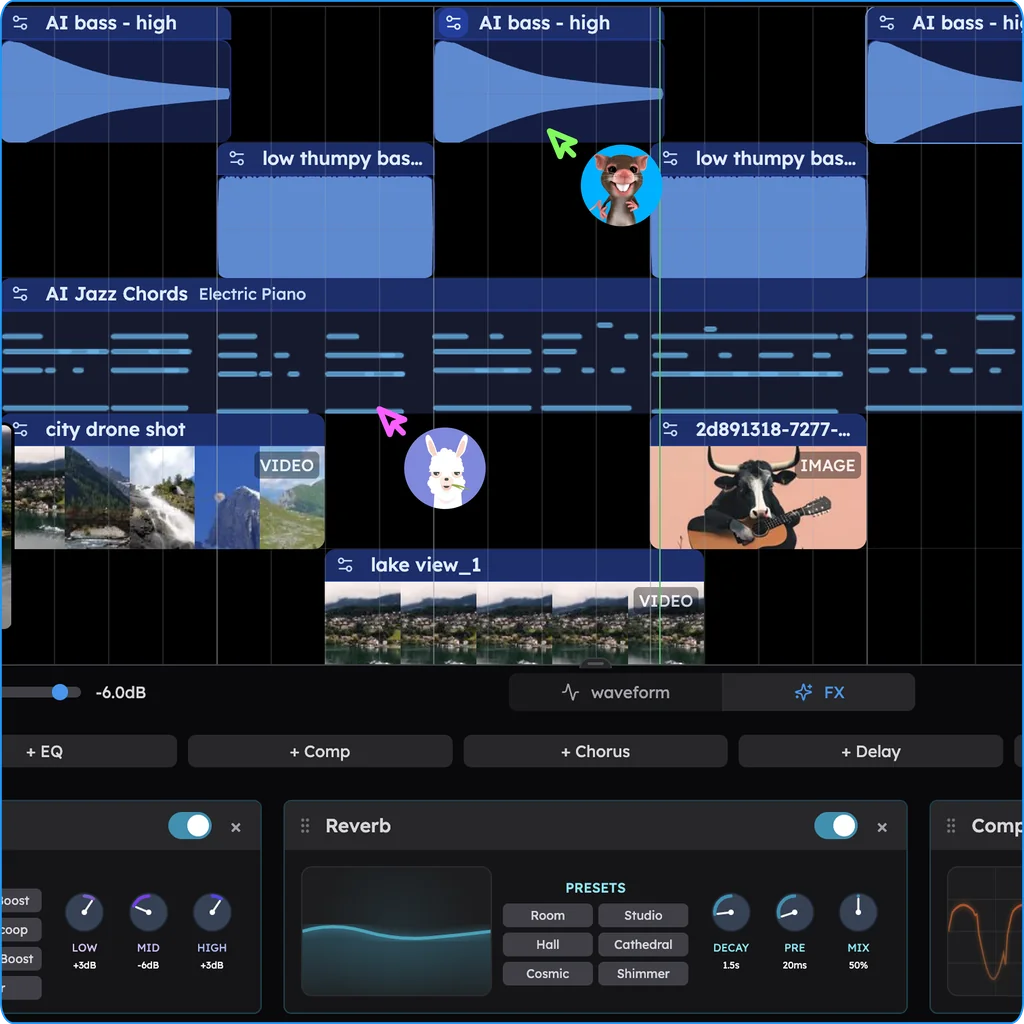
Make a song on your Chromebook in Veena
- Open Chrome. Go to daw.veena.studio and sign in with Google. Nothing to install.
- Describe the song. Paste the nu-disco prompt below into CoProducer.
- Pick your parts. Drums, bass, chords and lead each arrive as 3 options. Keep what you like.
- Record and edit. Plug in a USB mic or MIDI keyboard, record over the track, or move notes in the piano roll.
- Export. WAV 24-bit/48 kHz, MP3 320 kbps, MIDI and stems, free, with no watermark.
Each step above is on the free plan, which has no project limit and a daily CoProducer allowance. Veena Pro, $20 a month, removes the daily request cap and unlocks the premium models.
Make a 124 BPM nu-disco track in F minor: a four-on-the-floor kick with an open hat on every offbeat and a clap on 2 and 4, an octave-jumping disco bass on Fm7, Bbm7, Eb and Ab, funky muted guitar sixteenths, lush string stabs on the chorus and a filtered synth lead that opens across the drop. Intro 8 bars, groove 16, break 8, build 8, drop 16, outro 8.
Related reading: Veena help centre · Veena on Chromebook and Linux · Free DAW · Is Ardour free? · Is Mixcraft free? · Does Mixcraft work on Mac? · Can you use Cakewalk on a Chromebook? · Can you use LMMS on a Chromebook?
Try this in Veena
Make a 124 BPM nu-disco track in F minor: a four-on-the-floor kick with an open hat on every offbeat and a clap on 2 and 4, an octave-jumping disco bass on Fm7, Bbm7, Eb and Ab, funky muted guitar sixteenths, lush string stabs on the chorus and a filtered synth lead that opens across the drop. Intro 8 bars, groove 16, break 8, build 8, drop 16, outro 8.
Opens a new project in Veena, and CoProducer starts building from this prompt.
Frequently asked questions
Can you use Ardour on a Chromebook?
Not as a ChromeOS app. Ardour's download page offers ready-to-run builds for Linux, Windows and macOS, and ardour.org names no ChromeOS, Android or browser version (read 18 Nov 2026). Veena is an AI DAW with a personal music producer built in. Describe the song you want and CoProducer builds it with you — beats, chords, melody, arrangement and mix — as real tracks you can edit, mix and export. Free, in your browser.
Can Ardour run in a Chromebook's Linux environment?
Ardour does not say. Its Linux build is listed as "Compatible with any 64 bit Intel/AMD or ARM GNU/Linux releases since circa 2009 (except NixOS)" and "Requires X11 support", with no mention of ChromeOS or its Linux container (read 18 Nov 2026). Veena needs no Linux setup: it opens in Chrome on your Chromebook, free.
Is there a free DAW for Chromebook like Ardour?
Veena. It is a full DAW in Chrome: a multitrack timeline, piano roll, step sequencer, mixer, 17 built-in effects and recording from a USB mic or MIDI keyboard. CoProducer builds the song with you on the free plan, and you export WAV, MP3, MIDI and stems with no watermark.
Does Ardour cost money on a Chromebook?
Ardour's ready-to-run Linux download costs from US$1, the free demo goes silent every 10 minutes, and building it from source is free but unsupported (ardour.org, read 18 Nov 2026). On a Chromebook, Veena's whole studio is free in Chrome, with a daily CoProducer allowance and no project limit.
Can a Chromebook handle a DAW?
Veena's can: its audio engine runs in Chrome, and CoProducer's models, stem separation and re-voicing run on Veena's servers, so no graphics card is needed. A Chromebook with a recent version of Chrome opens the full studio in a window at least 1000 pixels wide.
Can I collaborate from a Chromebook?
In Veena, yes: share an invite link and a collaborator on a Chromebook, Mac, Windows PC or phone joins the same project, with live cursors and edits that sync instantly, free on every plan. Ardour's pages describe no real-time collaboration (read 18 Nov 2026).
Meet your personal music producer
Free, in your browser. Describe the song you want and CoProducer builds it with you.
Make music free