Does Mixcraft work on Mac?
Does Mixcraft work on Mac? No. Acoustica builds Mixcraft 10.6 for 64-bit Windows only, and none of its pages list a macOS version, a browser version or a Mac workaround. Veena is a free studio that runs in your Mac's browser, with a personal music producer who builds the song with you.
Veena is an AI DAW with a personal music producer built in. Describe the song you want and CoProducer builds it with you — beats, chords, melody, arrangement and mix — as real tracks you can edit, mix and export. Free, in your browser.
Does Mixcraft work on Mac? Acoustica's system requirements
Read on acoustica.com and store.acoustica.com on 18 November 2026:
- What Acoustica calls it: "Mixcraft is digital audio workstation (DAW) software for Windows" and "Acoustica's highly acclaimed DAW software for Windows".
- Minimum: "64-bit Windows 7 SP1, 8, 10 or 11", 4 GB of RAM and a 1.8 GHz dual-core CPU.
- Recommended: "64-bit Windows 10 or above", 8 GB of RAM, a 3.0 GHz quad-core CPU and an ASIO audio interface.
- Every version: Home Studio, Recording Studio, Pro Studio and the two-week trial list the same Windows requirements.
- The phone app: Mixcraft Remote, free for iOS and Android, controls "your Mixcraft recording software" on the PC: record, play, the master volume and saving.
No macOS, Linux, ChromeOS or browser version appears on any of these pages.
On a Mac: Veena vs Mixcraft
| Read 18 Nov 2026 | Veena | Mixcraft 10.6 |
|---|---|---|
| Runs on a Mac | Yes, in Chrome or any modern browser | No macOS version listed |
| Also runs on | Windows, Linux, Chromebook, phone | 64-bit Windows |
| Price | Free studio | $19 to $69 in the sale until 31 December; $39 to $149 regular |
| Your own plug-ins on a Mac | Audio Units and VST3, through Veena Bridge | Not on a Mac |
| A producer that builds the song | CoProducer, on the free plan | None described |
| Real-time collaboration | Free, by invite link | None described |
| Your phone | Pocket Studio opens the same song | A remote control for the PC |
Mixcraft's real strength is value on a Windows PC: a large loop library, a live Performance Panel and video editing in one inexpensive app. On a Mac, Veena is the studio that runs with nothing to install. What Mixcraft costs on Windows is on is Mixcraft free?, and Cakewalk, the other Windows favourite, is on does Cakewalk work on Mac?
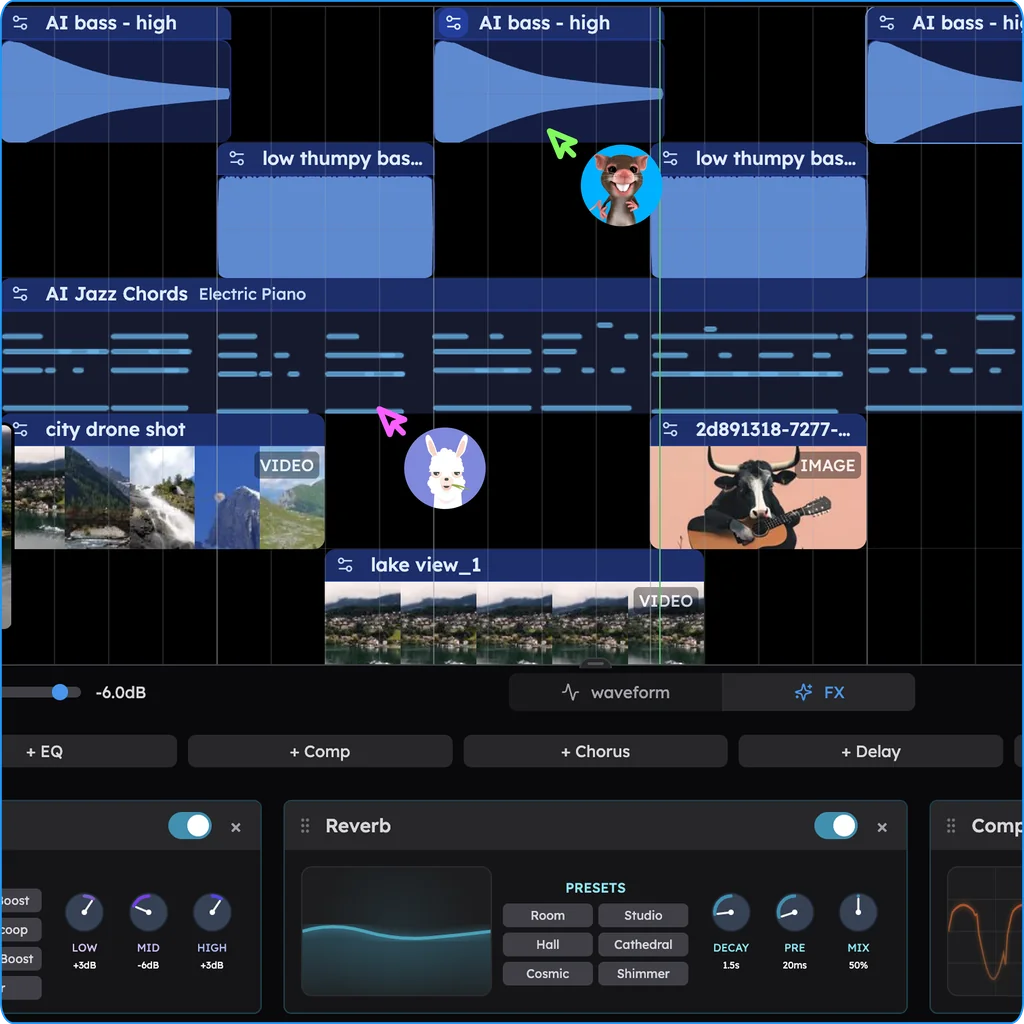
Make music on your Mac in Veena
- Open your browser. Go to daw.veena.studio and sign in with Google. Nothing to install.
- Describe the song. Paste the funk-pop prompt below into CoProducer and keep one of 3 options for each part.
- Plug in your gear. Record from your Mac's mic or an audio interface, and play a MIDI keyboard into the piano roll.
- Load your plug-ins. Install Veena Bridge once and your Audio Units and VST3 plug-ins open in Veena: VST and AU plugins in Veena.
- Export. WAV 24-bit/48 kHz, MP3 320 kbps, MIDI and stems, free, with no watermark.
The free plan has no project limit and a daily CoProducer allowance; Veena Pro, $20 a month, removes the daily request cap and unlocks the premium models.
Make a 100 BPM funk-pop song in A minor: a tight kit with a ghost-note snare and sixteenth-note hats, a slap bass riffing on Am7 and D9, choppy clean guitar on the offbeats, a brass stab on the chorus downbeats and a warm Rhodes holding the chords under the verse. Intro 4 bars, verse 16, chorus 8, verse 16, chorus 8, bridge 8, chorus 8, outro 4.
Related reading: Veena help centre · Free DAW · Free DAWs compared · Is Mixcraft free? · Is Ardour free? · Can you use Ardour on a Chromebook? · Does Cakewalk work on Mac? · Veena vs GarageBand
Try this in Veena
Make a 100 BPM funk-pop song in A minor: a tight kit with a ghost-note snare and sixteenth-note hats, a slap bass riffing on Am7 and D9, choppy clean guitar on the offbeats, a brass stab on the chorus downbeats and a warm Rhodes holding the chords under the verse. Intro 4 bars, verse 16, chorus 8, verse 16, chorus 8, bridge 8, chorus 8, outro 4.
Opens a new project in Veena, and CoProducer starts building from this prompt.
Frequently asked questions
Does Mixcraft work on Mac?
No. Acoustica calls Mixcraft "DAW software for Windows", and every version of Mixcraft 10.6 lists "64-bit Windows 7 SP1, 8, 10 or 11" as its system requirement, with no macOS version (acoustica.com, read 18 Nov 2026). Veena is an AI DAW with a personal music producer built in. Describe the song you want and CoProducer builds it with you — beats, chords, melody, arrangement and mix — as real tracks you can edit, mix and export. Free, in your browser.
Is there a Mixcraft for macOS?
Not on Acoustica's pages: the Mixcraft product page, the trial download and all three store pages list Windows requirements only (read 18 Nov 2026). On a Mac, Veena opens in Chrome or any modern browser with the whole studio, and your own Audio Unit and VST3 plug-ins load through Veena Bridge.
Can I run Mixcraft on a Mac some other way?
Acoustica's pages describe no Mac route: no macOS build, no browser version and no Mac instructions (read 18 Nov 2026). Its free Mixcraft Remote app for iOS and Android controls Mixcraft running on a Windows PC. Veena needs no workaround: it runs natively in your Mac's browser, free, with CoProducer building the song with you.
What is the Mac version of Mixcraft?
Acoustica makes none. A Mac owner who wants Mixcraft's mix of easy recording, loops and instruments can have it free in Veena: record from your mic, play a MIDI keyboard, pick from 61 instrument presets and 8 drum kits, and let CoProducer write any part you ask for, in your browser.
Can I open my Mixcraft songs on a Mac?
Not as Mixcraft projects. On your Windows PC, export each track as a WAV file and your MIDI, then drag them onto Veena's timeline on the Mac: each lands on its own track and the first clip sets the tempo. CoProducer then builds new parts around them, and you export free.
What is the best free DAW for Mac besides GarageBand?
Veena. It is a free DAW in your Mac's browser, with nothing to install, and it goes where GarageBand stops: CoProducer builds the song with you, collaborators join live by invite link, your Audio Unit plug-ins load through Veena Bridge, and the same song opens on your phone.
Meet your personal music producer
Free, in your browser. Describe the song you want and CoProducer builds it with you.
Make music free