Veena vs Moises
Which is better for stems, Veena or Moises?
In Veena vs Moises, Veena is the better choice for anyone who wants to do something with the stems. Moises takes a song apart and hands you files: free accounts get "5 uploads per month, with files up to 5 minutes long", and WAV is "Only available for Premium/Pro" (Moises help centre, September 2026). Veena splits any track into 4 stems on the free plan, and they land as tracks in a full studio with a personal music producer ready to build around them.
Veena is an AI DAW with a personal music producer built in. Describe the song you want and CoProducer builds it with you — beats, chords, melody, arrangement and mix — as real tracks you can edit, mix and export. Free, in your browser.
Every Moises fact below comes from Moises' own help centre and Acceptable Use and Fair Usage Policy as they read in September 2026. This page compares the Moises app, Moises' stem separation and practice tool; its browser studio for building tracks is covered in our Moises Studio alternative.
Veena vs Moises, row by row (September 2026)
| Veena | Moises | |
|---|---|---|
| What you get from a split | Vocals, drums, bass and other as tracks on a DAW timeline | Audio files to download |
| Free separation | 4 stems on every plan | "5 uploads per month, with files up to 5 minutes long" |
| Choosing which instruments to separate | Vocals, drums, bass and other, every time | "You need a Premium or Pro plan" |
| WAV export | WAV 24-bit/48 kHz on the free plan | "Only available for Premium/Pro" |
| Your edits on export | Every edit, every track, in one zip | "Exporting the separate tracks will not include changes made to the audio" |
| Into a DAW | The stems are already in one | A VST plug-in, "available in the Pro Subscription" |
| An AI producer | CoProducer writes, arranges and mixes new parts around your stems, or a whole song from a sentence | None |
| After you stop paying | Your stems stay on your timeline | Plan-exclusive separations "locked starting the day after your subscription ends" |
| Ownership | You own the Output you generate | "Normal, reasonable personal use does not include bulk processing or commercial uses" |
Moises has practice tools built for learning songs: a smart metronome, chord detection and lyrics transcription sit next to the separation, and for a musician working out a part by ear that is a real strength. For making music with the stems, the table above is the comparison that matters.
Who shipped what, and when
| Date | Who | What shipped | Source |
|---|---|---|---|
| 20 June 2025 | Veena | Public launch: the first agentic DAW | Launch post |
| 25 March 2026 | Veena | Agentic CoProducer: brief, plan, parts, arrange, mix and verify, inside the project | Launch post |
| 12 September 2026 | Veena | Real-time collaboration, with CoProducer in the session | Changelog |
| 13 September 2026 | Veena | Your own VST3 and AU plug-ins through Veena Bridge | Changelog |
| 23 September 2026 | Veena | Mix & Master, free on every plan | Changelog |
| 4 October 2026 | Veena | Pocket Studio: Veena on your phone | Changelog |
Veena has put separation inside a studio with an AI producer since June 2025, and every release since has landed on the free plan. The full record is on our story.
What Moises' own pages say about Moises
- The free plan is metered at the song. "5 uploads per month, with files up to 5 minutes long", deleting a file doesn't give the slot back, and free files are deleted after two months without a login. Smart Metronome and Chord Detection are "limited to the first minute" on free.
- Lossless is a paid tier. Export is "MP3, M4A, or WAV", with WAV "Only available for Premium/Pro".
- Your edits stay behind. "Exporting the separate tracks will not include changes made to the audio."
- The DAW bridge is the top tier. "VST Plugins are available in the Pro Subscription. If you are a free or Premium subscriber, you must upgrade your account to Pro to use the plugin."
- "Unlimited" has a ceiling. Moises' fair-usage policy defines abnormal use at "14 tracks per day or more, or four hundred twenty (420) tracks per month", and says normal use "does not include bulk processing or commercial uses".
- Stop paying and the work locks. "Track separations and edits made using the exclusive tools available in your subscription plan will no longer be accessible. These features will be locked starting the day after your subscription ends."
- Full pricing hides behind a login. Moises' site says "Log in to see our full pricing and features table".
What it costs you: a folder of stems, and a second application to do anything with them.
In Veena, the split is the start of the session
Here is the flow on Veena's free plan:
- Open Veena in your browser and sign in with Google. Nothing to install and no graphics card needed: separation and CoProducer run on Veena's servers.
- Bring your own recording. Drag in a demo, a rehearsal take, an old bounce or any song you have the right to work on, in any of 13 audio formats. The first clip you import sets the project tempo.
- Split it. Right-click the clip and choose "Separate into Stems". Vocals, drums, bass and other land on new tracks, time-aligned with the original, each with a fader and an effects chain. On the free plan, the right-click route doesn't touch your daily CoProducer allowance.
- Produce around the stems. "Keep the vocal and bass, rebuild the drums with a tighter funk groove and add a clavinet riff." CoProducer measures the tempo and where the phrases land, then writes new parts as editable MIDI. Every new part arrives as three options.
- Mix, master and export. CoProducer sets levels, pan and effects and masters the result for streaming. Export the mix or every track as stems, as often as you like.
Try a split first with the free stem splitter, and read the full walk-through in stem separation in Veena.
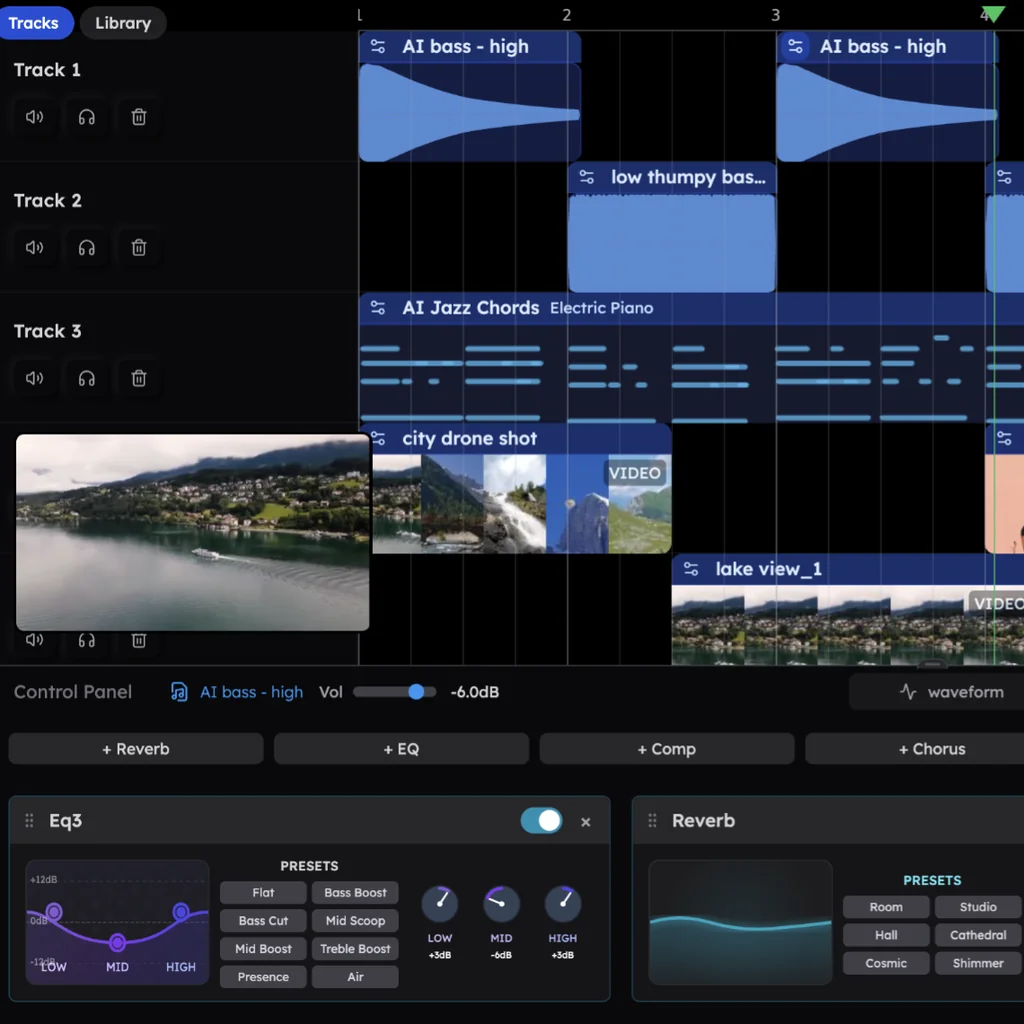
And you don't need a song to start
Veena is a complete studio, so stems are one door of several. Start from an empty project and one sentence, like the funk prompt at the bottom of this page, and CoProducer sets the tempo and key, plans the sections and builds the drums, bass, chords and melody as real tracks. In Veena's own data, 3 in 4 new users (75.7%) whose first request asks for a new song get a finished first result on day one.
- Edit every note in the piano roll, or ask in plain words: "half-time drums in the break", "swap the clav for a Rhodes".
- Hum a part and CoProducer turns it into an editable MIDI line or any instrument, through voice to instrument.
- Play your own plug-ins. The Veena Bridge helper app hosts VST3 and AU plug-ins on a Mac and VST3 on Windows, free.
- Sing your own cover. Import the original for reference, split its stems, change the key and record your own voice over the accompaniment.
- Produce together. Real-time collaboration, live since 12 September 2026 on every plan, brings a bandmate and CoProducer into the same session.
Who owns the result
Moises' fair-usage policy says its "Unlimited" plans are for personal use and exclude "commercial uses". Veena's terms say "you own the Output you generate through your use of the Service", on the free plan as on Veena Pro, with no watermark on your exports. The free plan has a daily CoProducer allowance; Veena Pro, at $20 a month, removes the daily request cap and unlocks the premium models.
Veena vs Moises: who each is for
- Veena is for anyone who wants to make something with the stems, or start a song from nothing: 4-stem separation on a real timeline, a personal music producer who writes around them, your plug-ins, 24-bit WAV and ownership of what you make, on the free plan.
- Moises suits musicians learning songs by ear, who want a metronome, chord detection and a muted guitar part to practise against.
- If you produce, keep the practice habit and do the music in Veena.
Moving from Moises to Veena
- Download what you want to keep while your Moises plan still allows it, in the best format your plan offers.
- Open Veena and sign in with Google. Nothing to install.
- Drag the stems or the original song onto the timeline. Veena reads WAV, MP3, M4A, AAC, FLAC, AIFF, OGG and more. Bring the original and split it again in Veena if you want every stem lined up from bar one.
- Ask CoProducer to build on it, then mix and export with no cap.
Weighing the field first? The best stem separation tools compares every option, and the rest of our head-to-heads are on every Veena comparison.
The verdict: Veena
Moises separates a song well and leaves you with files: a 5-upload free plan, WAV and the DAW plug-in on paid tiers, edits that stay behind on export and separations that lock when you stop paying. Veena splits any track into 4 stems on the free plan, puts them on a real timeline, and brings a producer who writes, mixes and masters around them, or builds a whole song from one sentence. Paste the funk prompt below into CoProducer and hear what Veena builds tonight.
Try this in Veena
Make a 96 BPM funk track in E minor: a tight syncopated kick and snare with ghost notes, a slap bass that locks to the kick, choppy clean guitar chords on the offbeats, a clavinet riff and a horn-section stab at the end of every fourth bar. Intro 4 bars, groove 16, break 8, groove 16, outro 4.
Frequently asked questions
Is Veena better than Moises?
Veena is an AI DAW with a personal music producer built in. Describe the song you want and CoProducer builds it with you — beats, chords, melody, arrangement and mix — as real tracks you can edit, mix and export. Free, in your browser. Moises separates songs and hands you files, with 5 free uploads a month of up to 5 minutes each (Moises help centre, September 2026).
Is Moises free?
Moises has a free plan with a cap: '5 uploads per month, with files up to 5 minutes long', and choosing which instruments to separate needs a Premium or Pro plan (Moises help centre, September 2026). Veena splits any track into vocals, drums, bass and other on the free plan, and the stems land on a timeline in a full studio.
Can I export WAV stems from Moises for free?
No. Moises' export offers 'MP3, M4A, or WAV', and WAV is 'Only available for Premium/Pro' (Moises help centre, September 2026). Veena exports WAV at 24-bit/48 kHz, MP3 320 kbps and MIDI on the free plan: the full mix or every track as stems in one zip, with no watermark.
What happens to my Moises stems if I cancel?
Moises' help centre says separations made with your plan's exclusive tools 'will no longer be accessible' and are 'locked starting the day after your subscription ends' (September 2026). In Veena, the stems sit on your own timeline, you export them whenever you like, and Veena's terms say you own the Output you generate.
What can I do with stems in Veena?
Produce the song. In Veena the stems land as tracks in a full browser DAW: CoProducer writes new drums, bass or chords around them as editable MIDI, mixes and masters the result, and your own VST3 and AU plug-ins load through Veena Bridge. Moises' own export note says separated tracks 'will not include changes made to the audio'.
Do I need a song to start in Veena?
No. Veena starts from an empty project and one sentence: describe the song and CoProducer builds the drums, bass, chords, melody, arrangement and mix as real tracks. Bringing your own recordings, demos and old bounces is a second door, and stem separation is one right-click away whenever you need it.
Meet your personal music producer
Free, in your browser. Describe the song you want and CoProducer builds it with you.
Make music free