MP3 to MIDI: a free audio to MIDI converter with a studio attached
How do I convert an MP3 to MIDI?
MP3 to MIDI, free, in Veena: drop in the song, split it into stems, and turn each part into MIDI notes you can play on any instrument, edit in a piano roll and export as a .mid file. Most audio to MIDI converters hand you one file and leave; Veena keeps going, because the converter sits inside a full studio.
Veena is an AI DAW with a personal music producer built in. Describe the song you want and CoProducer builds it with you — beats, chords, melody, arrangement and mix — as real tracks you can edit, mix and export. Free, in your browser.
Your audio is transcribed in your browser, on your own computer or phone, and the notes are polyphonic, so chords come through as chords.
Convert MP3 to MIDI in Veena, step by step
- Open daw.veena.studio and sign in with Google. A new project opens. It runs in Chrome, Edge, Brave, Arc, Firefox and Safari, with nothing to install.
- Drop in your MP3 or WAV. Drag the file onto the arrangement, or press Upload. It lands as an audio clip on its own track.
- Split it, if it is a full song. Right-click the clip and choose Separate into Stems. Vocals, drums, bass and other arrive on their own tracks, lined up with the original, which is muted.
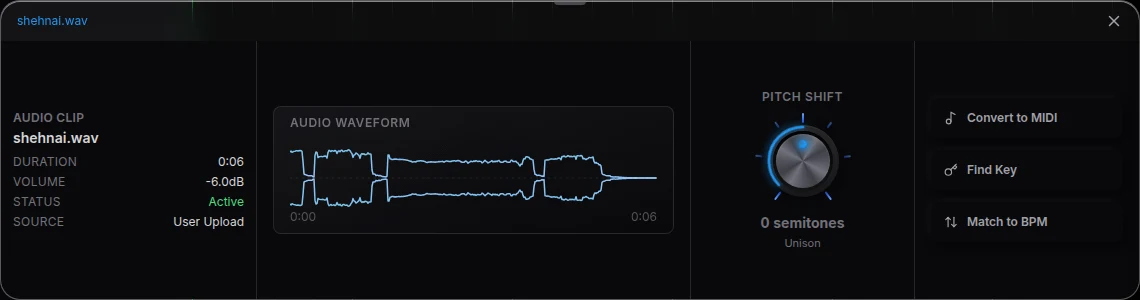
- Convert to MIDI. Double-click the clip or stem you want as notes. Its Waveform panel opens; press Convert to MIDI. The notes land on a MIDI clip and the audio is muted, so you hear the new part on its own.
- Or ask CoProducer. Drag the clip into the CoProducer panel and ask "transcribe the bass and the other stem to MIDI". It reads every stem you name, at once, and places each one as its own MIDI track.
- Edit the notes. Double-click the MIDI clip to open the piano roll. Fix a pitch, shorten a held note, set velocities, then quantize if the groove needs it.
- Pick the sound. In the clip's Instrument panel, move the part to piano, strings, a synth or a bass without converting again.
- Download the MIDI. Download MIDI file, at the top of the clip's panel, saves that clip as a .mid. For the whole project, click your avatar at the bottom of the left sidebar, choose Export and pick MIDI: every MIDI track goes into one .mid file.

Why split the song before you convert audio to MIDI
A finished mix is many instruments sounding at once. Convert it whole and every part lands in one clip: the bass, the chords, the vocal and the hi-hats tangled together. Splitting first gives each part its own track, so the bass becomes a bass line, the vocal becomes a melody and the keys become chords. In Veena that is two clicks on the same timeline, not a trip between three websites.
Vocal to MIDI: singing and humming
Vocal to MIDI works the same way. Record your voice with Record, drop in a voice memo, or take the vocals stem from a song, then press Convert to MIDI. Veena's vocal settings were tuned on real sung and hummed takes, so short notes come through as notes you can edit. Play the melody back on strings, a lead synth or piano, or ask CoProducer to build the song underneath it. More on humming an idea into a full track: voice to MIDI.
Audio to MIDI converter or a studio?
| Veena | A one-file online converter | |
|---|---|---|
| MP3 and WAV to MIDI | Free, transcribed in your browser | Upload, wait, download |
| A full song | Separate into Stems, then one MIDI track per part | One .mid file for the whole mix |
| Chords | Polyphonic, editable in the piano roll | Notes in a file, edited elsewhere |
| Hearing the notes | Any instrument in Veena, instantly | Open another app |
| Building on it | CoProducer writes the drums, bass and chords around your part | The page ends at the download |
| Export | .mid per clip or whole project, no cap, no watermark | A .mid file |
A converter's job ends when the file downloads. In Veena the notes are a part of a song: change the instrument, re-harmonise the chords, transpose the melody, then mix and export the track as WAV, MP3 or MIDI.
What you can do with the MIDI
- Learn a part. Solo the converted bass or melody and read the notes off the piano roll.
- Re-voice a recording. Your guitar riff becomes a synth lead; a hummed hook becomes a string line.
- Remix your own track. Pull the chords out of an old bounce of yours and rebuild them with new sounds.
- Take it to another DAW. The .mid opens in any DAW, one track per part.
What's free
- Audio to MIDI: Convert to MIDI on any clip, on the free plan. Asking CoProducer to do it uses the free daily allowance.
- The studio: stem separation, the piano roll, every instrument, recording and mixing, with up to 5 projects.
- Export: MIDI, WAV 24-bit/48 kHz, MP3 320 kbps and stems, with no cap and no watermark.
Veena Pro, $20 a month, removes the daily request cap and unlocks the premium models.
Ready to hear your song as notes? Convert your MP3 to MIDI free, or start from the stem splitter if you want the parts first.
Related reading: Audio to MIDI in Veena · How do I convert audio to MIDI? · What is audio to MIDI? · Voice to MIDI
Try this in Veena
Write a 16-bar lo-fi hip hop idea at 82 BPM in D minor as editable MIDI: warm Electric Piano chords, a Round Bass line that follows the roots, and a simple piano melody on top, each on its own track so I can edit the notes and download the MIDI.
Opens a new project in Veena, and CoProducer starts building from this prompt.
Frequently asked questions
How do I convert an MP3 to MIDI for free?
Open Veena in your browser, drag the MP3 onto the arrangement and double-click the clip. In its Waveform panel, press Convert to MIDI: the notes land on a MIDI clip and the original is muted. Edit them in the piano roll, then press Download MIDI file. Veena is free, the transcription runs in your browser, and the .mid exports with no cap and no watermark.
Is Veena's audio to MIDI converter really free?
Yes. Convert to MIDI is on Veena's free plan, along with the piano roll, every instrument, stem separation and MIDI export. Your audio is transcribed in your browser, on your own device. Asking CoProducer to do the conversion for you uses the free daily allowance, and Veena Pro, $20 a month, removes the daily request cap and unlocks the premium models.
Does Veena convert chords and polyphonic audio to MIDI?
Yes. Veena's audio to MIDI is polyphonic: it hears several notes at once, so a piano or guitar part becomes chords in the piano roll, not a single line. For the cleanest chords, split the song first, then convert the stem that carries the harmony. Every note is ordinary MIDI you can move, shorten, delete or re-voice on another instrument.
Can I convert a full song to MIDI, not just one instrument?
Yes. Right-click the song in Veena and choose Separate into Stems: vocals, drums, bass and other land on their own tracks, time-aligned. Convert each stem you want, or ask CoProducer to transcribe every stem at once, and each part becomes its own MIDI track. That is the difference between one tangled .mid file and a song you can arrange.
Can I turn vocals, singing or humming into MIDI?
Yes. Veena converts vocal to MIDI with settings tuned on real sung and hummed takes. Record yourself or split the vocal stem from a song, press Convert to MIDI, and the melody lands as notes you can play on piano, strings or a synth. Or ask CoProducer to turn your humming into a melody and it places the part for you.
What files can Veena convert to MIDI, and what does it export?
Veena converts MP3, WAV, M4A, AAC, OGG, Opus, FLAC and AIFF, so WAV to MIDI works the same way as MP3 to MIDI. Download MIDI file saves one clip as a .mid, and Export with MIDI writes every MIDI track of the project into one .mid file that opens in any DAW. Both are free, with no cap and no watermark.
Meet your personal music producer
Free, in your browser. Describe the song you want and CoProducer builds it with you.
Make music free