Make a Pop Song Online
Make a pop song online with your own personal music producer. Free in your browser: you bring the hook, and Veena's CoProducer builds everything around it — chords, drums, bass, pads and a synth answer to your vocal — as real tracks you can edit, mix and export. Most pop runs at 100–125 BPM, lands its chorus inside 45 seconds and ends before 3 minutes 30.
Start with the chorus
Write your chorus first: pop songs live or die by their hook, and everything else exists to lead there. A verse is a runway; a pre-chorus is the climb; the chorus is the moment the listener was waiting for, and the post-chorus repeats it so they can't forget it.
That order changes how you work. Before any drums, get eight bars of chorus melody over four chords, sung or hummed, and make it survive this test: could someone who heard it once hum it back? If not, no production will save it.
Hook-writing that works
- Rhythm before pitch. Tap the rhythm of the title line on a table. A hook with a memorable rhythm will carry almost any melody; a clever melody on a flat rhythm disappears.
- Repeat the title. Two to four times in the chorus, often starting or ending each line.
- Save the high notes. Keep the verse low and narrow, around the singer's speaking range, then lift the chorus a third to a fifth. In C major: a verse circling E, D and C, and a chorus that jumps to G and peaks on A over the F chord, right on the title word.
- Contrast the phrasing. Busy, conversational verse; long, open chorus notes. The change in rhythm tells the listener the chorus has arrived before the words do.
- Leave gaps. A two-beat rest between chorus lines is where a synth answer, a vocal chop or a drum fill lives.
The fastest way from idea to part: hum the hook into your mic and ask CoProducer to turn it into MIDI. The notes land on a new track, ready to fix in the piano roll, and you can play them back on Bright Pluck, piano or any other sound. That's voice to instrument. No hook yet? The melody generator writes three options over your chords to start from.
Pop by the numbers
- Tempo: 100–125 BPM for most pop; 118–128 for dance-pop; 60–80 for ballads, often with half-time drums.
- Meter: 4/4, almost always.
- Key: whatever puts the chorus peak at the top of the singer's comfortable range. Pick the singer first, then the key.
- Sections: 4 or 8 bars each, so every change lands at the start of a phrase.
- Length: about 2:30–3:30, chorus by 0:45.
- Layers: fewer than you think. The verse often has three things playing; the final chorus has everything.
Four chords, four moods
The famous four-chord song is really four songs. Take the chords of G major's I, V, vi and IV and start in a different place, and the same notes change their mood:
| Start on | Numerals | In G | How it feels |
|---|---|---|---|
| The tonic | I – V – vi – IV | G – D – Em – C | Confident, anthemic |
| The minor | vi – IV – I – V | Em – C – G – D | Wistful, emotional, then lifting |
| The '50s turn | I – vi – IV – V | G – Em – C – D | Warm, nostalgic, doo-wop |
| The subdominant | IV – I – V – vi | C – G – D – Em | Floating, unresolved, modern |
Two moves make these sound written rather than looped. For the pre-chorus, rock between IV and V (C–D–C–D) so the ear leans hard toward home; then land the chorus on I and the payoff is automatic. For the bridge, borrow a chord you haven't used yet, such as ii (Am), or go to the minor rotation for 8 bars before the final chorus. CoProducer writes any row by its numerals, and the chord progression generator gives you three voicings to choose from.
The pop energy curve
Pop is an arrangement of energy. Each section adds or removes layers so the chorus always feels biggest. A map at 120 BPM, where every bar is two seconds:
| Section | Bars | Starts at | Layers |
|---|---|---|---|
| Intro | 4 | 0:00 | The hook on its own, or piano with a soft closed hat |
| Verse 1 | 8 | 0:08 | Half-time drums, muted guitar, bass on the roots |
| Pre-chorus | 4 | 0:24 | Pads enter, a riser climbs, the kick drops out for the last bar |
| Chorus | 8 | 0:32 | Kick on every beat, piano, pad, bass, synth hook: everything |
| Post-chorus | 4 | 0:48 | The hook alone over drums and bass |
| Verse 2 | 8 | 0:56 | Verse 1 plus one new element, such as a counter-melody |
| Pre-chorus | 4 | 1:12 | As before |
| Chorus | 8 | 1:20 | Chorus 1 plus doubles and harmonies |
| Post-chorus | 4 | 1:36 | The hook again |
| Bridge | 8 | 1:44 | Strip to piano and voice, a new chord, a big build in the last bar |
| Final chorus | 16 | 2:00 | Everything, twice; the second half with ad-libs |
| Outro | 4 | 2:32 | The hook once more, ending on the downbeat |
That's 80 bars and 2 minutes 40 seconds. The one-bar kick drop before each chorus is the cheapest trick in pop and still the best: silence right before the downbeat makes the chorus hit twice as hard.
Sounds that read as pop
Pop sounds are clean, bright and a little larger than life. In Veena:
- Drums: kick, snare and hats that punch without grit. The Pop kit is clean and balanced; the Electronic kit is more synthetic. Layer a clap from the sample library on the chorus snare for width.
- Bass: Synth Bass for a steady, even low end; Pluck Bass for short, bouncy verse lines; Electric Bass (finger) for band pop.
- Chords: Acoustic Grand Piano for ballads and choruses; Acoustic Guitar (steel) for strummed pop; Electric Guitar (muted) for tight 16th-note chord chops in the verse.
- Hooks and air: Bright Pluck for a hook that lands and gets out of the way; Supersaw Lead for a dance-pop drop; Warm Pad or String Pad underneath; Bell Pluck for a music-box sparkle.
- Transitions: the Riser preset climbs into a chorus on one held note; the sample library adds impacts, downlifters and sweeps.
Write it with someone
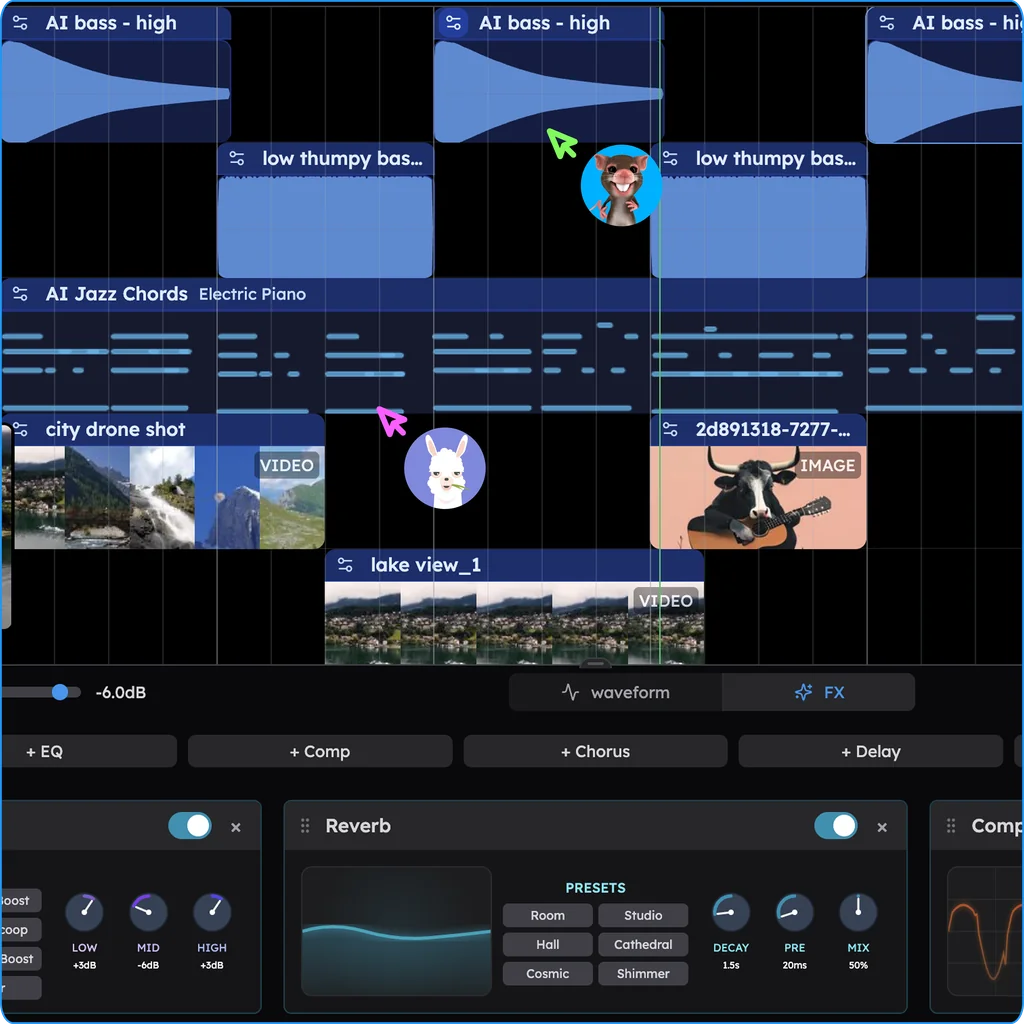
Pop is a co-writing genre, and Veena's real-time collaboration lets two writers sit in the same session from different cities. Send an invite link and your co-writer's cursor appears on the timeline: one of you edits the chorus chords while the other records a topline, and CoProducer's shared chat lets either of you steer the production.
Build it with CoProducer
Open daw.veena.studio, sign in with Google and paste this into CoProducer:
Make a 120 BPM pop song in G major, built to sit under my vocal. Verses on Em–C–G–D with half-time drums, muted electric guitar playing 16th-note chords and Pluck Bass on the roots; a pre-chorus on C–D–C–D that builds with a Riser and drops the kick for its last bar; a chorus on G–D–Em–C with the kick on every beat, snare on 2 and 4, open hi-hats, Acoustic Grand Piano chords, Warm Pad underneath, Synth Bass on the roots and a Bright Pluck hook answering each vocal line; a post-chorus with just the Bright Pluck hook, bass and drums. Intro 4 bars, verse 8, pre-chorus 4, chorus 8, post-chorus 4, verse 8, pre-chorus 4, chorus 8, post-chorus 4, bridge 8 on Am–C–Em–D, final chorus 16, outro 4.
CoProducer sets the tempo and key, plans the 12 sections and builds each part on its own track, offering three options for each new part so you choose the chorus piano or the hook you like best. Pop is one of its strongest styles: in Veena's own data, 87.3% of new users whose first request asks for pop get a first result on day one. And writing your own request beats clicking a suggestion: in the same data, users who type their first request get a first result on day one 64% of the time, against 56% for those who click one.
Then record, and refine in plain words:
- "Here's my chorus vocal. Move the Bright Pluck answers into the gaps between my lines."
- "Make verse 2 different: add a counter-melody on String Pad."
- "Drop everything but piano for the first half of the bridge."
- "Push the final chorus up a whole step to A major."
- "The chorus hook is too busy. Halve the notes and hold the last one."
Every change is a single undo. Export a 24-bit WAV or a 320 kbps MP3 of the mix, or every track as stems for a mix engineer, with no watermark. You own the song.
Mix it like a single
Pop mixes are built around the vocal: it is the loudest, clearest thing, and everything else is arranged around it. With Veena's per-clip effects:
- Vocal: 8-Band EQ to cut rumble with the low shelf and add presence around 3–5 kHz; a Compressor at 4:1 to keep every word level; Auto-Tune set to the key, Natural for polish; a short Reverb and a synced 1/8 Delay low in the mix.
- Drums: a Compressor with a slower attack on the kick and snare so the transient punches; the chorus hats a little brighter than the verse hats.
- Bass: mono with Utility, and out of the kick's way. CoProducer can duck the bass under the kick for you.
- Chords and pads: dip 200–400 Hz so they don't muddy the vocal; widen pads with Chorus.
- The hook: in the gaps, not on top of the vocal. If it fights the words, lower it or move it.
Then ask CoProducer for "a bright, loud pop mix with the vocal on top, mastered for streaming" and it sets levels, pans and effects across every track.
Pop mistakes that stall a song
- Producing before writing. Two hours of sound design on a verse with no chorus. Write the hook first.
- A chorus the same size as the verse. Add layers, lift the melody, change the drums; the chorus should feel like a door opening.
- Too many hooks. One main hook and one answer. Five competing earworms cancel each other out.
- A late chorus. If the chorus arrives after a minute, most listeners have already skipped.
- Wrong key for the singer. A chorus that strains or sits too low sounds amateur whatever the production. Transpose until it's comfortable at the peak.
Pop words worth knowing
Topline: the vocal melody and lyric, written over the track. Hook: the phrase you remember, vocal or instrumental. Pre-chorus: the short climb that sets up the chorus. Post-chorus: a section after the chorus that repeats a hook, often without lyrics. Double: the same vocal line recorded twice and layered. Drop: the moment the full beat returns after a build. Key change: moving the final chorus up a half or whole step for lift.
Pop styles to try next
- Dance-pop: 118–128 BPM, four-on-the-floor, supersaw hooks; see how to make EDM.
- Pop ballad: 60–80 BPM, piano and strings, half-time drums that arrive late.
- Synth-pop: 100–120 BPM, Synth Bass, Bright Pluck and big pads.
- Pop-rock: guitars up front and a live-feel kit; see how to make rock music.
- K-pop: section changes every 8 bars and a rap break; see how to make K-pop.
Pop borrows from every other style; for the rest, make music by genre, or make a song with AI in any style at all.
Try this in Veena
Make a 120 BPM pop song in G major, built to sit under my vocal. Verses on Em–C–G–D with half-time drums, muted electric guitar playing 16th-note chords and Pluck Bass on the roots; a pre-chorus on C–D–C–D that builds with a Riser and drops the kick for its last bar; a chorus on G–D–Em–C with the kick on every beat, snare on 2 and 4, open hi-hats, Acoustic Grand Piano chords, Warm Pad underneath, Synth Bass on the roots and a Bright Pluck hook answering each vocal line; a post-chorus with just the Bright Pluck hook, bass and drums. Intro 4 bars, verse 8, pre-chorus 4, chorus 8, post-chorus 4, verse 8, pre-chorus 4, chorus 8, post-chorus 4, bridge 8 on Am–C–Em–D, final chorus 16, outro 4.
Frequently asked questions
Can I make a pop song online for free?
Yes. Veena is an AI DAW with a personal music producer built in. Describe the song you want and CoProducer builds it with you — beats, chords, melody, arrangement and mix — as real tracks you can edit, mix and export. Free, in your browser. For pop, that means drums, bass, chords, pads and a synth hook, arranged verse to chorus around the vocal you record.
How do I write a catchy pop hook?
Write the rhythm before the notes, repeat the title two to four times, and put the chorus a third to a fifth higher than the verse, with the highest note on the title word. Then hum it into Veena: CoProducer turns the recording into MIDI you can edit note by note, or plays it back on any instrument, so the idea in your head becomes a part on the timeline.
What chords are used in pop songs?
Mostly four chords from the major key, rotated: I–V–vi–IV (G–D–Em–C in G), vi–IV–I–V, I–vi–IV–V and IV–I–V–vi. Starting on a different chord changes the mood without changing the notes. Ask Veena's CoProducer for any of them by numerals and it writes them as MIDI on piano, guitar or synth, ready to re-voice in the piano roll.
How long should a pop song be?
Most pop singles run between about 2 minutes 30 seconds and 3 minutes 30 seconds, and the chorus usually arrives within the first 45 seconds. At 120 BPM each bar is two seconds, so an 80-bar map lasts 2 minutes 40 seconds. Give Veena's CoProducer the section lengths in bars and it arranges the whole song to them.
Can Veena make a pop song with vocals?
CoProducer builds every instrumental part around your own voice: drums, bass, chords, pads and hooks, arranged into verses and choruses. You record the vocal straight into Veena from your microphone, stack doubles and harmonies on new tracks, and add Auto-Tune set to the song's key. Already have the melody on a voice memo? Drop it in and CoProducer builds the song around it.
Meet your personal music producer
Free, in your browser. Describe the song you want and CoProducer builds it with you.
Make music free