How do I master a song to match a reference track?
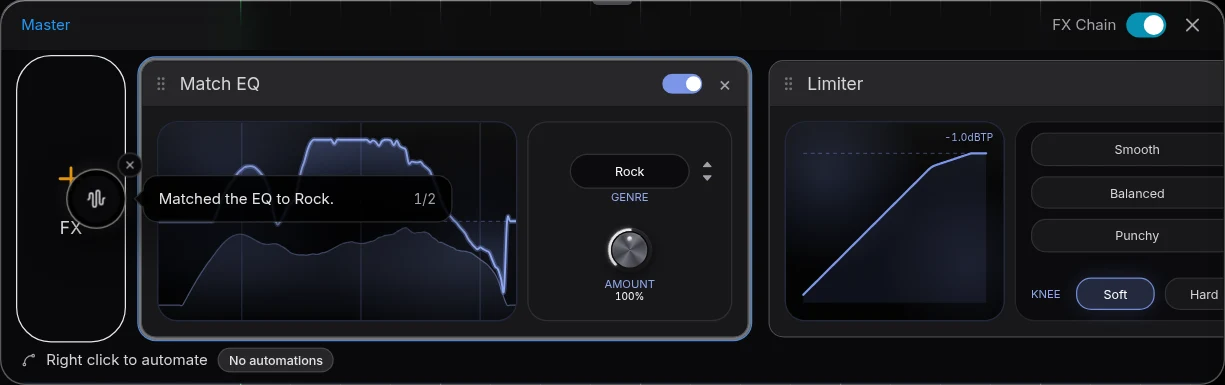
How do I master a song to match a reference track? Bring in a finished song in your genre, turn it down to your mix's loudness, master your song, and compare the two on the same section until yours sits beside it. In Veena, an AI DAW with a personal music producer, CoProducer, built in, Master project installs editable Match EQ and Limiter cards on the master bus, and CoProducer measures your master against the reference so you know exactly what differs. It is free and runs in your browser.
Veena is an AI DAW with a personal music producer built in. Describe the song you want and CoProducer builds it with you — beats, chords, melody, arrangement and mix — as real tracks you can edit, mix and export. Free, in your browser.
Master a song to a reference track in Veena, step by step
1. Pick the reference. A finished song in your genre and near your tempo, with the sound you want. A trap master held against a folk record chases the wrong things.
2. Import it onto its own track. Open your project at daw.veena.studio, press Upload or drag the file onto an empty track, and name the track Reference. Keep effects off it.
3. Level-match it. Pull the reference track's fader down until it feels as loud as your mix. A released master is usually several dB louder than a mix in progress, and louder always sounds better.
4. Mute the reference and master your song. Pause playback, open Mix & Master, choose the Master stage, pick the genre closest to the reference and press Master project. Veena installs Match EQ then Limiter at the end of the master FX chain.
5. Loop the same section. Drag across the ruler over the chorus. Solo the reference to hear it, un-solo to hear your master, at a steady, low volume.
6. Shape the master by ear. Raise or lower Match EQ's Amount for tonal balance. On the Limiter, try Smooth, Balanced or Punchy, then set Drive and Output for loudness. Compare one thing at a time: low end, brightness, loudness, punch.
7. Check the before and after. The FX Chain switch bypasses the whole master for playback and export. Switch it off and on at a matched level.
8. Export without the reference. Mute or delete the Reference track, choose Export, then WAV (24-bit/48 kHz) or MP3 (320 kbps) and Full mix.
Or ask CoProducer to measure and adjust
My reference song is on the track called Reference. Measure its loudness and tonal balance against my master with the reference muted, tell me the three biggest differences in the low end, brightness and loudness, then adjust my master toward it without touching the reference.
CoProducer measures both in the same terms: integrated loudness, true peak, crest factor and six bands from sub (20 to 100 Hz) to high (6.5 to 16 kHz). A follow-up such as "make it a bit louder" adjusts the Limiter card rather than rendering another file, and one Ctrl+Z undoes the change.
What to compare, and where to fix it
| Listen for | What to hear in the reference | Where to fix it in Veena |
|---|---|---|
| Overall tone | How dark or bright the whole song sits | Match EQ's genre and Amount |
| Loudness | How hard the song hits at a matched level | Limiter Drive and Output |
| Punch | Whether the drums still cut through | Limiter preset: Punchy or Balanced |
| Low end | Whether kick or bass leads | The track mix first: bass and kick faders, the 8-Band EQ |
| Vocal level | How far the vocal sits above the music | The track mix first: the vocal fader |
The master moves the whole song at once. A buried vocal or a loud bass is fixed in the track mix before the master, then Master project runs again and updates the same cards in place.
What's free
- Mastering: Master project, Match EQ and Limiter, on every plan.
- Mixing: Mix & Master with AutoMix and 17 built-in effects.
- CoProducer: a daily allowance of requests, with up to 5 projects at a time.
- Export: WAV 24-bit/48 kHz, MP3 320 kbps, MIDI and stems, with no cap and no watermark.
Veena Pro, $20 a month, removes the daily request cap and unlocks the premium models.
The full method for mixing against a reference is how to use a reference track. Mastering without one is how do I master a song for free, the card-by-card guide is mastering in Veena, and the feature is AI mastering. Every other answer is in the Veena help centre.
Related reading: How to use a reference track · How do I master a song for free? · Mastering in Veena
Try this in Veena
My reference song is on the track called Reference. Measure its loudness and tonal balance against my master with the reference muted, tell me the three biggest differences in the low end, brightness and loudness, then adjust my master toward it without touching the reference.
Frequently asked questions
How do I master a song to match a reference track?
Put the reference on its own track, turn it down to your mix's loudness and mute it. In Veena, run Master project with the genre closest to the reference, then loop the chorus and switch between the two, adjusting Match EQ's Amount and the Limiter's Drive and Output until your master sits beside it. Veena is an AI DAW with a personal music producer built in, free in your browser.
Can Veena compare my master to a reference track?
Yes. Import the reference and ask CoProducer to measure both. It reads integrated loudness, true peak, crest factor and the balance across six bands, from sub to high, so "mine sounds dull" becomes "your high-mid sits under the reference". Then ask it to adjust your master toward the reference, and every mastering card stays editable.
Should my master be as loud as the reference?
Close to it in your genre, but never at the cost of the chorus's punch. Level-match first, because louder always sounds better on a first listen. In Veena, raise the Limiter's Drive in small steps, compare on the same loop with the FX Chain switch, and stop when the master holds its dynamics beside the reference.
Will the reference track end up in my export?
Not if you mute or delete it. In Veena, the full mix renders only what you can hear and stems export one file per audible track, so a muted reference stays out. Export the master as a 24-bit/48 kHz WAV or a 320 kbps MP3, with no watermark and no cap, on the free plan.
Meet your personal music producer
Free, in your browser. Describe the song you want and CoProducer builds it with you.
Make music free