How do I master a song for free?
How do I master a song for free? In Veena, finish the mix, open Mix & Master and press Master project. Veena measures your mix and installs editable Match EQ and Limiter cards at the end of the master bus, shaped for the genre you choose; you refine them by ear and export a mastered WAV. Veena is an AI DAW with a personal music producer, CoProducer, built in, and mixing and mastering are free on every plan, in your browser, with no watermark and no export cap.
Veena is an AI DAW with a personal music producer built in. Describe the song you want and CoProducer builds it with you — beats, chords, melody, arrangement and mix — as real tracks you can edit, mix and export. Free, in your browser.
Master a song for free in Veena, step by step
- Open your song. Go to daw.veena.studio and sign in with Google. Open the project, or upload a finished mix of your own onto a track.
- Finish the balance first. Play the verse and chorus with every track. Fix a buried vocal or a loud bass in the track mix, or press AutoMix in Mix & Master to balance the parts.
- Pause playback. Master project measures the mix with the transport stopped.
- Open the Master stage. In Mix & Master, choose Master. Its Genre starts from the project genre; pick the genre you want the master to target.
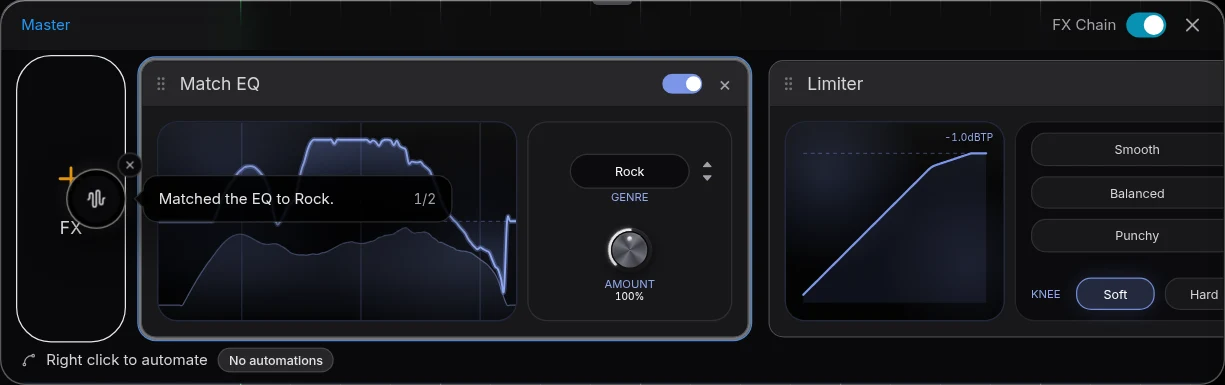
- Press Master project. The flow minimises into a progress bubble, installs Match EQ then Limiter on the master FX chain, and shows Done with mastering.
- Refine by ear. Open Master FX. Set Match EQ's Amount; on the Limiter, try Smooth, Balanced or Punchy, then adjust Drive and Output.
- Compare. The FX Chain switch bypasses the whole master for playback and export. Loop the last chorus and switch it off and on at a matched level.
- Export the master. Choose Export, then WAV (24-bit/48 kHz) or MP3 (320 kbps) and Full mix.
Or ask CoProducer
Mix this pop song with the lead vocal forward, the bass centred and a room around the backing vocals, then master it for a warm, punchy pop sound for streaming.
CoProducer works the same Mix & Master controls. A follow-up such as "make it a bit louder" adjusts the Limiter card instead of rendering another file.
What's free
- Mastering: Master project, Match EQ and Limiter, on every plan.
- Mixing: Mix & Master with AutoMix, vocal Clean and Character stages and 17 built-in effects.
- CoProducer: a daily allowance of requests, with up to 5 projects at a time.
- Export: WAV 24-bit/48 kHz, MP3 320 kbps, MIDI and stems, with no cap and no watermark.
Veena Pro, $20 a month, removes the daily request cap and unlocks the premium models.
Free mastering compared
| As of October 2026 | Veena | BandLab | FL Studio | Ableton Live |
|---|---|---|---|---|
| Free mastering | Master project, any genre | "Mastering 4 presets" | FL Cloud Free: "Default" genre preset only | Trial stops saving and exporting after 30 days |
| Editable master | Match EQ and Limiter cards you adjust | 4 presets | Every genre preset on paid FL Cloud | Within the 30-day trial |
| Mastered WAV on the free version | 24-bit/48 kHz, no cap | 16-bit WAV mixdown | Inside FL Studio; the trial won't reopen saved projects | Not after the trial |
BandLab's free plan masters with 4 presets and exports a 16-bit WAV mixdown. FL Studio's free FL Cloud tier gives "AI-powered Mastering with the 'Default' Genre preset", with every genre preset on a subscription, inside an FL Studio licence from $99. Ableton Live's trial stops saving and exporting after 30 days. Veena masters to your genre, leaves every setting editable, and exports the 24-bit master free.
The feature in full is AI mastering. The card-by-card guide is mastering in Veena, the whole flow is Mix & Master in Veena, and the bigger question is can AI mix and master a song. Every other answer is in the Veena help centre.
Related reading: AI mastering · Mastering in Veena · Can AI mix and master a song?
Try this in Veena
Mix this pop song with the lead vocal forward, the bass centred and a room around the backing vocals, then master it for a warm, punchy pop sound for streaming.
Frequently asked questions
How do I master a song for free?
In Veena, open Mix & Master, choose the Master stage, pick a genre and press Master project. Veena measures your mix and adds editable Match EQ and Limiter cards to the master bus. Export a 24-bit WAV with no watermark. Veena is an AI DAW with a personal music producer built in, and mixing and mastering are free on every plan.
Is AI mastering free in Veena?
Yes. Master project and AutoMix are part of the free studio, and CoProducer reaches the same controls from a request such as "master this song for a warm pop sound", using your daily allowance. FL Studio's free FL Cloud tier masters with only its "Default" genre preset (as of October 2026); Veena masters to the genre you choose.
Can I master a song I recorded somewhere else?
Yes. Upload your finished mix to Veena as a WAV, MP3, FLAC or AIFF, place it on a track and run Master project. The Match EQ and Limiter cards stay editable, so you refine the master by ear and compare it with the FX Chain switch before you export the mastered WAV.
How loud should my master be?
Loud enough to sit with released songs in your genre without flattening the chorus. In Veena, the Limiter's Smooth, Balanced and Punchy presets set Ceiling and Release, and you adjust Drive and Output by ear. Compare the loudest and quietest sections with the FX Chain switch at a matched listening level.
Meet your personal music producer
Free, in your browser. Describe the song you want and CoProducer builds it with you.
Make music free