Is there GarageBand for Android?
Is there GarageBand for Android? No: Apple makes GarageBand for the iPhone, iPad and Mac, and lists it only on its own App Store (read 17 Nov 2026). On an Android phone, Veena is the free studio to open instead. It runs in Chrome with nothing to install, and it brings a personal music producer, CoProducer, who builds the song with you as real tracks.
Veena is an AI DAW with a personal music producer built in. Describe the song you want and CoProducer builds it with you — beats, chords, melody, arrangement and mix — as real tracks you can edit, mix and export. Free, in your browser.
GarageBand for Android: what Apple's own pages say
Read from apple.com and the App Store on 17 Nov 2026:
- iPhone and iPad. The App Store lists GarageBand as "Free", 1.9 GB, for iPhone and iPad: it "Requires iOS 27.0 or later" on iPhone and "Requires iPadOS 27.0 or later" on iPad.
- Mac. The Mac App Store version is "Only for Mac" and "Requires macOS 15.6 or later."
- An Apple Account. "Downloading apps requires an Apple Account."
- No Android version. Apple's GarageBand pages and listings name the iPhone, iPad and Mac only. A "GarageBand APK" isn't Apple's.
GarageBand's real strength on an iPhone is Apple's Touch Instruments and Live Loops. On Android they don't exist, and your phone needs a studio that runs in the browser.
On Android: Veena vs GarageBand
| Read 17 Nov 2026 | Veena | GarageBand |
|---|---|---|
| Runs on Android | Yes, in Chrome | No |
| Price | Free | Free, on iPhone, iPad and Mac |
| Install | None; optional home-screen shortcut | App Store, with an Apple Account |
| A producer who builds the song | CoProducer, 3 options per part | — |
| The same song on your laptop | Yes, saved to your account | On a Mac |
| Record with your phone's mic | Free | Yes; multitrack needs an audio interface |
"—" means Apple's GarageBand for iOS page and App Store listing don't list it (read 17 Nov 2026).
Make a song on your Android phone, in Veena
- Open Chrome. Go to daw.veena.studio and sign in with Google. To keep Veena on your home screen, tap More, then Install and create shortcut.
- Start a song. Tap New Project, then Open, and paste the prompt at the bottom of this page into CoProducer's box.
- Tap through the options. Each part arrives as 3 chips. Tap one to hear it in the mix, then Select and Continue.
- Record over it. Tap record and rap, sing or play over the beat with your phone's mic.
- Export it. Tap the song's title, then Export: WAV 24-bit/48 kHz, MP3, MIDI or every track as stems, free, with no watermark.
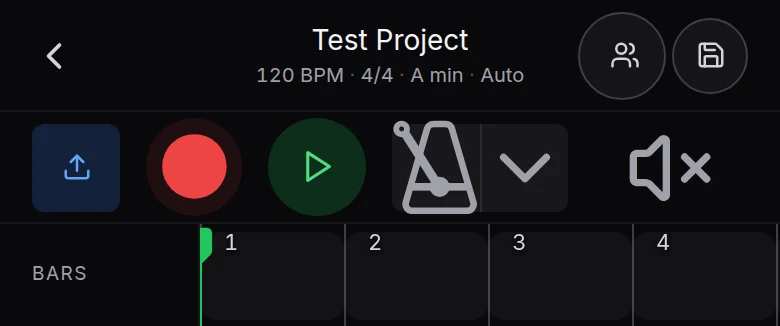
Open the same song later on a laptop or Chromebook and every part is a real track in the full studio. Veena on phones and tablets walks through Pocket Studio screen by screen, GarageBand online covers every other device GarageBand doesn't reach, and can you get GarageBand on a Chromebook? answers the laptop question. The Veena help centre covers every tool.
Make a 90 BPM lo-fi hip hop beat in A minor, 16 bars: a dusty Jazz kit with swung hats and a soft kick, mellow Electric Piano seventh chords, a round sub bass under them and a short vinyl-warm guitar lick I can rap over.
Related reading: GarageBand online · Can you get GarageBand on a Chromebook? · Veena on phones and tablets · Make music on your phone · Veena vs GarageBand
Try this in Veena
Make a 90 BPM lo-fi hip hop beat in A minor, 16 bars: a dusty Jazz kit with swung hats and a soft kick, mellow Electric Piano seventh chords, a round sub bass under them and a short vinyl-warm guitar lick I can rap over.
Opens a new project in Veena, and CoProducer starts building from this prompt.
Frequently asked questions
Is there GarageBand for Android?
No. Apple lists GarageBand on the App Store for iPhone and iPad, where it "Requires iOS 27.0 or later", and on the Mac, with no Android version (read 17 Nov 2026). Veena is an AI DAW with a personal music producer built in. Describe the song you want and CoProducer builds it with you — beats, chords, melody, arrangement and mix — as real tracks you can edit, mix and export. Free, in your browser.
Is a GarageBand APK for Android safe?
Apple publishes GarageBand only through its App Store for iPhone, iPad and Mac, so a file sold or shared as a "GarageBand APK" isn't Apple's app. On an Android phone, Veena is the free studio to open instead: go to daw.veena.studio in Chrome, sign in with Google, and CoProducer starts building your song, with nothing to install.
What is the best GarageBand alternative for Android?
Veena. On an Android phone it opens Pocket Studio in Chrome, the same studio as on a laptop laid out for your thumb: describe the song, tap through CoProducer's 3 options for each part, record with your phone's mic and export WAV, MP3, MIDI or stems with no watermark. The AI runs on Veena's servers, so an older phone builds the same song as a new one.
Can I install Veena like an app on Android?
Yes. Open daw.veena.studio in Chrome on your Android phone, tap More, then Install and create shortcut. Veena then opens from your home screen like any app, with nothing to download from Google Play, and every song saves to the same Veena account your laptop or Chromebook opens.
Can I move a song from my Android phone to a computer in Veena?
There is nothing to move. Veena saves every song to your account, so sign in at daw.veena.studio on a Windows PC, a Mac or a Chromebook and the song is waiting in Your Projects, every part a real track in the full studio, with the piano roll, the mixer and your own plug-ins through Veena Bridge on Windows and Mac.
Meet your personal music producer
Free, in your browser. Describe the song you want and CoProducer builds it with you.
Make music free