How to use Cymatics samples in Veena
How to use Cymatics samples in Veena: drag a loop onto the timeline and ask CoProducer for the song. Veena's timeline reads "Drop audio, MIDI, video, or image files anywhere in the playlist", so a Cymatics melody, drum loop or MIDI file lands as a clip on its own track, Veena reads the loop's tempo, and CoProducer, your personal music producer, writes the drums, 808s, chords and arrangement around it. The studio is free in your browser, so a free Cymatics pack becomes a finished song at $0.
Veena is an AI DAW with a personal music producer built in. Describe the song you want and CoProducer builds it with you — beats, chords, melody, arrangement and mix — as real tracks you can edit, mix and export. Free, in your browser.
How to use Cymatics samples, step by step
- Download and unzip the pack from your Cymatics account, the Cymatics Hub app or its Free Downloads vault.
- Open Veena at daw.veena.studio and sign in with Google. No install, no card.
- Drag the loops onto the timeline. Drop one file or a whole selection: every file imports, in order, and each lands as an audio clip, on a new track when the rows are full.
- Let Veena read the tempo. A loop's tempo is read as it lands; for songs and long stems, choose Extract metadata and Veena reads the tempo and finds the sections.
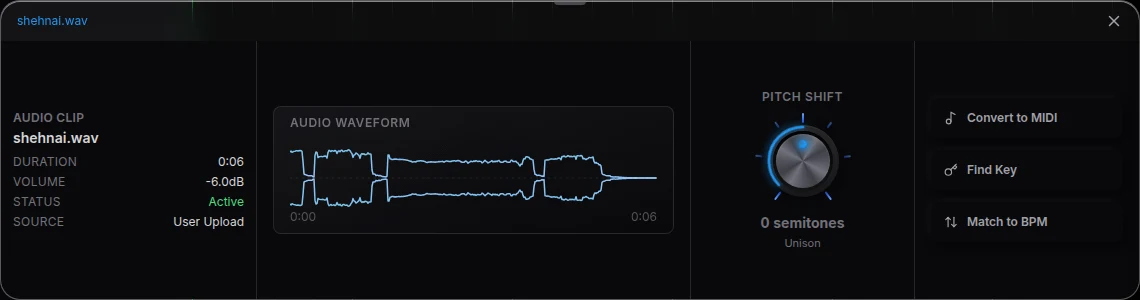
- Fit the loop to the song. Open the clip's Waveform panel for Find Key, Match to BPM and Pitch Shift.
- Load one-shots on the sampler. On a MIDI clip's Instrument card choose MPC, then drag kicks, snares and 808s onto its 16 pads.
- Ask CoProducer for the song. Paste the drill prompt below; it keeps your loop and builds the parts around it, each as a real track you edit.
- Export WAV 24-bit/48 kHz, MP3 320 kbps, MIDI or stems, free, with no watermark.
What each part of a Cymatics pack becomes in Veena
| In the pack | Drop it on | What Veena does |
|---|---|---|
| Melody, guitar and vocal loops | The timeline | An audio clip on its own track, tempo read, ready for Match to BPM |
| Drum loops and stems | The timeline | Clips side by side; for several stems of one song, one tempo for all |
| One-shots: kicks, snares, 808s | MPC sampler pads | 16 pads played by a MIDI part you or CoProducer write |
| MIDI files | The timeline | One clip and track per MIDI track, an instrument from its General MIDI program, channel 10 as drums |
| Serum presets | Serum, through Veena Bridge | The preset in your own Serum on a Veena track |
Veena imports WAV, AIFF, MP3, M4A, AAC, FLAC, OGG, Opus and CAF, plus MIDI, so every format a sample pack ships in drops straight in. Fixes for a file that will not load are on audio import problems in Veena.
Veena or a desktop DAW for Cymatics samples
| Read 19 Nov 2026 | Veena | A desktop DAW |
|---|---|---|
| Price | $0, every month | A licence or a subscription |
| Install | None; the studio is a browser tab | The full DAW |
| Drag-and-drop loops and MIDI | Yes | Yes |
| Builds the song around your loop | Yes, CoProducer writes the drums, bass, chords and arrangement | No |
| Works on a phone | Yes | No |
| Export | WAV, MP3, MIDI and stems, no watermark | Yes |
Cymatics says "Every sample is ready to drag straight into your DAW", and a desktop DAW takes them well. Veena takes them the same way, then builds the song with you, free and in the browser.
Where to get Cymatics samples
Free packs, from the vault to the shop's Free collections, are on are Cymatics sample packs free? The 50 free packs from Cymatics' Black Friday livestreams, 25 November to 2 December, are on does Cymatics have Black Friday deals?, and its free plug-ins on can you use Cymatics plugins in a browser DAW? Pads in depth: use the MPC sampler in Veena. Finding sounds inside the studio: sample search in Veena.
Build a 144 BPM UK drill beat in C minor around my Cymatics melody loop: keep the loop as the lead, add sliding 808s that follow its root notes, a drill hi-hat pattern with triplet rolls, a snare on 3 with ghost notes, a dark pad under the hook and a reverse cymbal into each section. Intro 4 bars, verse 16, hook 8, verse 16, hook 8, outro 4. Then mix it.
Related reading: Veena help centre · Are Cymatics sample packs free? · Does Cymatics have Black Friday deals? · Can you use Cymatics plugins in a browser DAW? · Use the MPC sampler in Veena · Audio import problems in Veena · Sample search in Veena · Black Friday DAW deals 2026
Try this in Veena
Build a 144 BPM UK drill beat in C minor around my Cymatics melody loop: keep the loop as the lead, add sliding 808s that follow its root notes, a drill hi-hat pattern with triplet rolls, a snare on 3 with ghost notes, a dark pad under the hook and a reverse cymbal into each section. Intro 4 bars, verse 16, hook 8, verse 16, hook 8, outro 4. Then mix it.
Opens a new project in Veena, and CoProducer starts building from this prompt.
Frequently asked questions
How do you use Cymatics samples in Veena?
Drag them in. Veena's timeline reads "Drop audio, MIDI, video, or image files anywhere in the playlist", so a Cymatics loop lands as a clip, its tempo is read, and CoProducer builds the drums, bass and arrangement around it. Veena is an AI DAW with a personal music producer built in. Describe the song you want and CoProducer builds it with you — beats, chords, melody, arrangement and mix — as real tracks you can edit, mix and export. Free, in your browser.
Can I drop a whole Cymatics folder into Veena at once?
Yes. Select several files and drop them together: Veena imports every file, in order, and one that fails does not stop the rest. The Upload button's picker takes several files at once too. Each loop lands as an audio clip on the timeline, ready for CoProducer to build around.
Does Veena match a Cymatics loop to my song's tempo?
Veena reads a loop's tempo when it lands, and a song or long stem's tempo once you choose Extract metadata. For a loop that should follow your project instead, the Waveform panel has Match to BPM, Find Key and Pitch Shift, so a 140 BPM Cymatics melody sits in a 144 BPM drill beat.
How do I use Cymatics one-shots and drum kits in Veena?
On the MPC sampler. Create a MIDI clip, choose MPC on its Instrument card, and drag kicks, snares and 808s onto its 16 pads; each pad plays from a MIDI note you write or record. Ask CoProducer to write the pattern and it uses the pads you loaded, all in Veena's free browser studio.
Can I import Cymatics MIDI packs into Veena?
Yes. Drop a .mid file and Veena makes one clip and track per MIDI track, each with an instrument picked from the file's General MIDI program, channel 10 as drums. Change the instrument, edit the notes in the piano roll, or load a VST3 or AU synth through Veena Bridge.
Can I sell songs made with Cymatics samples in Veena?
Cymatics says its samples are "100% Royalty Free for Placements, Song Releases & Sync Licensing" (cymatics.fm, read 19 Nov 2026). What you make in Veena is yours, and it exports as WAV 24-bit/48 kHz, MP3, MIDI and stems with no watermark, free.
Meet your personal music producer
Free, in your browser. Describe the song you want and CoProducer builds it with you.
Make music free