How to remove background noise in Audacity
How to remove background noise in Audacity comes down to two passes and a light touch: profile a few seconds of pure noise, then apply Noise Reduction to the whole take, starting at the 6 dB default. Push it harder and Audacity's own manual warns of "metallic, watery" artefacts. Veena's Noise Removal skips the profile: pick a preset like Gentle Hiss or Room Tone and it pulls the hiss out of the gaps between your words, free in your browser.
Veena is an AI DAW with a personal music producer built in. Describe the song you want and CoProducer builds it with you — beats, chords, melody, arrangement and mix — as real tracks you can edit, mix and export. Free, in your browser.
How to remove background noise in Audacity, step by step
Read in the Audacity 4 manual on audacityteam.org and on support.audacityteam.org (noise reduction and removal) on 20 November 2026.
- Find the noise alone. "Locate a section of your recording that's just your background noise, preferably a few seconds long, and select it."
- Get the noise profile. Open Effect → Noise removal and repair → Noise reduction and press Get noise profile.
- Select everything you want cleaned. "Select all the audio you want filtered, set the sliders, and apply."
- Set the sliders. Noise reduction runs 0 to 48 dB, default 6 dB. Sensitivity runs 0.01 to 24, default 6. Frequency smoothing runs 0 to 12 bands, default 6.
- Check, then apply. Set Output to Noise only to hear what will be removed: the manual calls it "a checking tool rather than a result". Switch back to Audio with noise removed and apply.
Audacity's tips, from the same pages:
- "The profile has to come from noise alone." If your profile includes wanted sound, that sound gets treated as noise.
- "A modest reduction that leaves some noise behind usually sounds better than a total kill."
- "Use the noise gate after applying noise reduction."
- For mains hum, a Notch Filter at 60 Hz in North and Middle America or 50 Hz in most other countries, plus its multiples.
Remove background noise free: Veena vs Audacity
| Read 20 Nov 2026 | Veena | Audacity |
|---|---|---|
| Noise profile needed | No: set a Floor or pick a preset | Yes: a few seconds of noise alone |
| Presets | Gentle Hiss, Room Tone, Noisy Preamp, Heavy Hiss, Safety Net | Defaults of 6 |
| Before and after | Amount at 0 plays the untouched take | Noise only preview, then undo |
| Rest of the vocal chain | De-Esser, Auto-Tune, Harmonizer, EQ, Compressor | Effects menu |
| A producer to build the song | CoProducer | None |
| Install | None: a browser tab | Desktop app |
| Price | Free | Free |
Audacity's strength is a deep set of repair tools built for spoken word, with click removal, clip fix and a noise gate beside Noise Reduction. For a musician cleaning a take and finishing a song, every other row goes to Veena. The guide to clean vocals in Veena walks through De-Esser, Noise Removal and Harmonizer together, and autotune online, free adds pitch correction to the same chain.
Remove background noise in Veena, free
Start from a blank canvas: paste the ballad prompt at the bottom of this page into CoProducer and a full arrangement arrives for you to sing and play over. Or bring your own recordings, a phone voice memo, a bedroom vocal, a rehearsal take, and clean them:
- Open daw.veena.studio and sign in with Google. Record straight in, or drag your file onto the timeline.
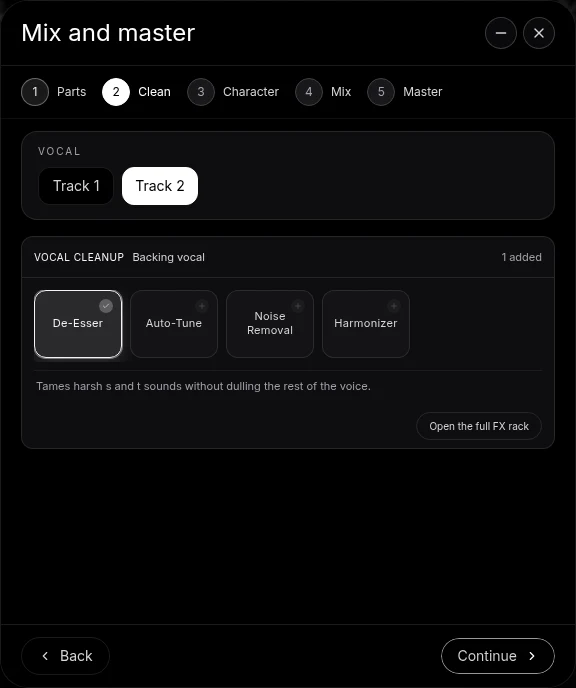
- Open the track's FX and add Noise Removal. On a vocal, the Clean stage of Mix & Master offers it too, beside De-Esser, Auto-Tune and Harmonizer.
- Pick a preset. Gentle Hiss for a light bed, Room Tone for an ambient room, Noisy Preamp or Heavy Hiss for louder noise, Safety Net for a half-strength pass.
- Fine-tune four knobs. Floor sets how quiet a sound must be to count as noise, Reduce sets how far it is pushed down, Release sets how fast the cleanup closes after each word, and Amount blends it in.
- Export. A 24-bit/48 kHz WAV or 320 kbps MP3, the mix or every track as stems, with no watermark.
Noise Removal splits the sound into eight frequency bands and turns down only what falls under the Floor in each one, so the hiss between words drops while the words keep their tone. Veena's free plan includes every effect and gives CoProducer a daily allowance; Veena Pro, $20 a month, removes the daily request cap and unlocks the premium models.
Make a 76 BPM acoustic pop ballad in G major for me to record my voice and guitar over: a soft brushed drum kit, a warm fingerpicked acoustic guitar on G, Em, C and D, a gentle upright bass, a felt piano doubling the chords in the chorus and a quiet string pad in the last chorus. Intro 4 bars, verse 16, chorus 8, verse 16, chorus 8, outro 4.
Related reading: Veena help centre · Clean vocals in Veena · Autotune online, free · How to remove vocals in Audacity · How to autotune in Audacity · Does Audacity have AI? · Is Audacity a DAW?
Try this in Veena
Make a 76 BPM acoustic pop ballad in G major for me to record my voice and guitar over: a soft brushed drum kit, a warm fingerpicked acoustic guitar on G, Em, C and D, a gentle upright bass, a felt piano doubling the chords in the chorus and a quiet string pad in the last chorus. Intro 4 bars, verse 16, chorus 8, verse 16, chorus 8, outro 4.
Opens a new project in Veena, and CoProducer starts building from this prompt.
Frequently asked questions
How do I remove background noise in Audacity?
Two passes. Audacity's manual says: select a few seconds of noise alone, open Effect → Noise removal and repair → Noise reduction and press Get noise profile; then select all the audio, set the sliders and apply (read 20 Nov 2026). Veena is an AI DAW with a personal music producer built in. Describe the song you want and CoProducer builds it with you — beats, chords, melody, arrangement and mix — as real tracks you can edit, mix and export. Free, in your browser.
What are the best Noise Reduction settings in Audacity?
Start at the defaults: 6 dB of noise reduction, sensitivity 6 and frequency smoothing 6 bands. Audacity's manual warns that pushing reduction too high causes "metallic, watery" artefacts and that "A modest reduction that leaves some noise behind usually sounds better than a total kill" (read 20 Nov 2026). Veena's Noise Removal starts from presets such as Gentle Hiss and Room Tone.
Why does Audacity's Noise Reduction need a noise profile?
It learns what to remove from the selection you profile, and its manual says "The profile has to come from noise alone" (read 20 Nov 2026). Veena's Noise Removal works from a level instead: set the Floor just above the hiss between your words and it pulls everything quieter than that down, across eight frequency bands, so the words keep their tone.
Can I remove background noise from a recording online for free?
Yes, in Veena. Drop the recording into a project at daw.veena.studio, open the track's FX and add Noise Removal, then pick Gentle Hiss, Room Tone, Noisy Preamp, Heavy Hiss or Safety Net. It runs in your browser on the free plan, and you export the cleaned take as a 24-bit WAV or 320 kbps MP3 with no watermark.
Is Veena's Noise Removal destructive?
No. Noise Removal is a track effect, so your original recording stays as it was and every setting stays editable. Turn Amount to 0 and you hear the untouched take, which makes before-and-after comparison one knob. Clean the vocal, then let CoProducer build the song around it.
Meet your personal music producer
Free, in your browser. Describe the song you want and CoProducer builds it with you.
Make music free