Can you use Softube plugins in a browser DAW?
Can you use Softube plugins in a browser DAW? Yes: in Veena, Softube's plug-ins run on your tracks and on the master inside the studio in your browser. Softube ships its plug-ins as VST3 and Audio Units, and Veena Bridge, a free helper app on your computer, hosts VST3 on Mac and Windows and Audio Units on a Mac. Put Weiss DS1-MK3 on Master FX and it masters the song, in playback and in the WAV you export, while CoProducer, your personal music producer, builds the song itself.
Veena is an AI DAW with a personal music producer built in. Describe the song you want and CoProducer builds it with you — beats, chords, melody, arrangement and mix — as real tracks you can edit, mix and export. Free, in your browser.
Softube's formats, from Softube's own pages
Read on softube.com, the Weiss DS1-MK3 page, the free plug-ins page and the Flow Complete Suite page, on 19 November 2026:
- Host: "Computer with AU, VST, VST3 and/or AAX compatible DAW host software."
- Mac: "macOS Sequoia 15, Tahoe 26, Golden Gate 27."
- Windows: "Windows 10 (64-bit), Windows 11."
- Licence: a Softube account and an "iLok account (no physical iLok required)", with "Three activations" and a "20-day trial".
- Free plug-ins: "all of them are available as VST, VST3, AAX, and AU".
- Flow suites: the plug-ins "can be loaded individually as VST, AU, or AAX plug-ins in your DAW".
How Softube's formats meet Veena Bridge
| Your computer | Softube ships as | Veena Bridge hosts | In Veena |
|---|---|---|---|
| Mac | AU, VST3, VST, AAX | AU and VST3, one universal helper | Softube on any track, the master or a MIDI clip |
| Windows 10 or 11 | VST3, VST, AAX | VST3 | Softube on any track, the master or a MIDI clip |
| Chromebook or phone | Not installed there | Built-in effects | Veena's 8-Band EQ, Compressor and Limiter, or a collaborator's Softube render |
Veena Bridge scans Audio Units and the standard VST3 folders, plus any folder you add, routes the audio through the plug-in in playback and export, and opens the plug-in's own window. Softube's AU and VST3 builds are the formats it hosts. Setup and troubleshooting are on VST and AU plugins in Veena, and the full picture is your own VST plug-ins in the browser.
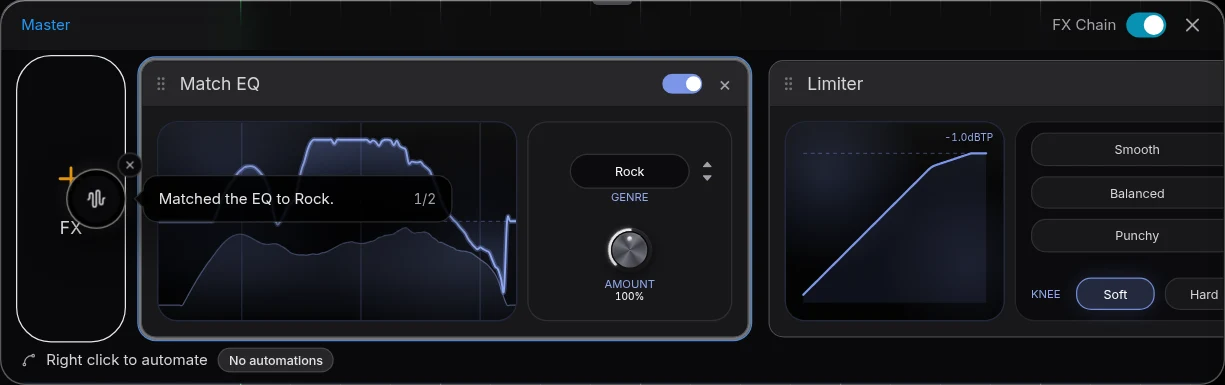
Use Softube in Veena, step by step
- Install the plug-in through Softube Central, the 20-day trial or your licence, in its VST3 build, or as an Audio Unit on a Mac.
- Open Veena at daw.veena.studio and open your song, or paste the melodic techno prompt below into CoProducer.
- Install Veena Bridge when Veena asks: press Download, install, then Launch and allow local network access.
- Open a track's FX or Master FX and press VST. Pick Weiss DS1-MK3, Layers, OPTO Compressor or any Softube effect.
- Open plugin window to work in Softube's own interface on the playing song. The settings save with the project.
- Export. WAV 24-bit/48 kHz or MP3 320 kbps, processed through Softube, free.
| Read 19 Nov 2026 | Veena with Softube | Softube in a desktop DAW |
|---|---|---|
| The DAW's price | $0 | A host DAW bought separately |
| Writes and arranges the song | Yes, CoProducer builds it with you | No |
| Built-in mixing when Softube is not installed | 8-Band EQ, Compressor, Limiter, De-Esser, Reverb | Depends on the host |
| Collaboration | Real-time, the owner's computer renders Softube for the session | Depends on the host |
Softube's strength is the depth of its hardware models, from Weiss and Tube-Tech to Empirical Labs; its Console 1 hardware is a separate controller. Veena is the free studio that plays the plug-ins, makes the song and shares the session.
A Softube plug-in bought this Black Friday plays in a free studio
Softube's Week 3 deals run to 22 November 2026, with Weiss DS1-MK3 at €219 instead of €549: details in does Softube go on sale for Black Friday?, and every maker's dated sale in Black Friday DAW deals 2026. Synths and creative effects work the same way: can you use Minimal Audio plugins in a browser DAW?, and mixing plug-ins too: can you use FabFilter in a browser DAW?
Make a 128 BPM melodic techno track in A minor: a deep rolling kick, an offbeat hi-hat and a clap on 2 and 4, a pulsing sub bass, a hypnotic arpeggio on Am, F, C and G, a wide pad that swells into each drop and a vocoder lead on the break. Intro 16 bars, build 8, drop 16, break 8, drop 16, outro 8. Leave headroom on the master for a mastering limiter.
Related reading: Veena help centre · VST and AU plugins in Veena · VST plugins in your browser · Does Softube go on sale for Black Friday? · Can you use Minimal Audio plugins in a browser DAW? · Does Minimal Audio go on sale for Black Friday? · Can you use FabFilter in a browser DAW? · Black Friday DAW deals 2026
Try this in Veena
Make a 128 BPM melodic techno track in A minor: a deep rolling kick, an offbeat hi-hat and a clap on 2 and 4, a pulsing sub bass, a hypnotic arpeggio on Am, F, C and G, a wide pad that swells into each drop and a vocoder lead on the break. Intro 16 bars, build 8, drop 16, break 8, drop 16, outro 8. Leave headroom on the master for a mastering limiter.
Opens a new project in Veena, and CoProducer starts building from this prompt.
Frequently asked questions
Can you use Softube plugins in a browser DAW?
Yes, in Veena. Softube lists "Computer with AU, VST, VST3 and/or AAX compatible DAW host software" for its plug-ins (read 19 Nov 2026), and the free Veena Bridge helper hosts VST3 on Mac and Windows and Audio Units on a Mac, so Weiss DS1-MK3, Layers and the rest run on Veena's tracks. Veena is an AI DAW with a personal music producer built in. Describe the song you want and CoProducer builds it with you — beats, chords, melody, arrangement and mix — as real tracks you can edit, mix and export. Free, in your browser.
Where do Softube plug-ins go in Veena?
Effects such as Weiss DS1-MK3, OPTO Compressor and Spring Reverb go on a track's FX rack or on Master FX: press VST and pick the plug-in once Veena Bridge is running. Softube's synths load from a MIDI clip's Instrument card. Open plugin window shows Softube's own interface, and the settings save with the project.
Do Softube's free plugins work in Veena?
Yes. Softube says its free plug-ins, Saturation Knob, Wasted Space, Fix Phaser and Bad Speaker, "are available as VST, VST3, AAX, and AU" (read 19 Nov 2026). Veena Bridge hosts the VST3 builds on Mac and Windows and the AU builds on a Mac, so Saturation Knob runs on your tracks in Veena at no cost.
Does Softube need an iLok to work in Veena?
Softube lists a Softube account and an "iLok account (no physical iLok required)", with three activations per licence and a 20-day trial (read 19 Nov 2026). Activate in Softube Central as you would for any host; Veena Bridge then loads the licensed plug-in inside Veena's studio in your browser.
Do Flow suite plug-ins work in Veena?
Yes. Softube says the plug-ins in its Flow suites "can be loaded individually" in your DAW (read 19 Nov 2026), so each one loads in Veena through Veena Bridge like any Softube plug-in. Flow Complete Suite is €24.99 a month after a 14-day free trial; Veena's own studio costs nothing.
Can collaborators hear my Softube plug-ins?
Yes. In a shared Veena song, the computer that has the plug-in renders its part for everyone in the session, so a collaborator without Softube hears your DS1-MK3 or Layers processing while editing the rest of the project. On a Chromebook or phone, Veena's built-in EQ, compressor and limiter mix the song.
Meet your personal music producer
Free, in your browser. Describe the song you want and CoProducer builds it with you.
Make music free