Can you use Ozone in a browser DAW?
Can you use Ozone in a browser DAW? Yes: in Veena, iZotope Ozone runs on the master inside the studio in your browser. Ozone 12 ships as VST3 and AU, and Veena Bridge, a free helper app on your computer, hosts VST3 on Mac and Windows and Audio Units on a Mac. Put Ozone on Master FX and it processes the whole song, in playback and in the WAV you export.
Veena is an AI DAW with a personal music producer built in. Describe the song you want and CoProducer builds it with you — beats, chords, melody, arrangement and mix — as real tracks you can edit, mix and export. Free, in your browser.
Ozone's formats, from iZotope's own page
Read on izotope.com, the Ozone 12 Advanced page, on 17 November 2026:
- System compatibility: "macOS (Native Apple Silicon) & Windows 10/11".
- Supported formats: "AU, AAX, VST3 (64-bit only)".
- The suite: "an all-in-one suite of 20 pro plugins designed for modern mastering".
- Trial: "Start Your 10-Day Free Trial".
Native Instruments' Komplete 26 Standard page, read the same day, lists "Ozone 12 Elements for intelligent mastering" among its iZotope additions.
How Ozone's formats meet Veena Bridge
| Your computer | Ozone 12 ships as | Veena Bridge hosts | In Veena |
|---|---|---|---|
| Mac, Apple Silicon | AU, AAX, VST3 | AU and VST3, one universal helper | Ozone on Master FX or any track |
| Windows 10 or 11 | AAX, VST3 | VST3 | Ozone on Master FX or any track |
| Chromebook or phone | Not installed there | Built-in effects | Veena's Mix & Master |
Veena Bridge was read in Veena's own code on 17 November 2026: it scans Audio Units and the standard VST3 folders, plus any folder you add, routes the master's audio through the plug-in in playback and export, and opens the plug-in's native window. Ozone's AU and VST3 builds are the formats it hosts.
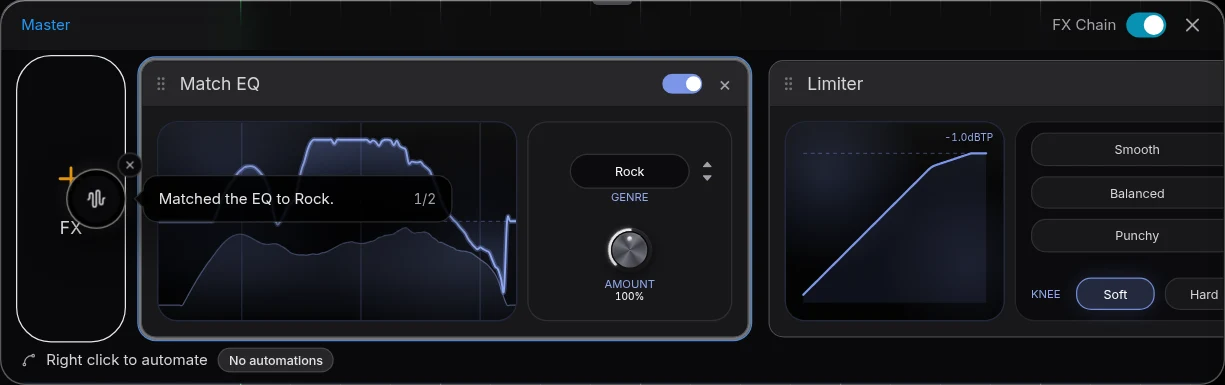
Master with Ozone in Veena, step by step
- Install Ozone 12 from iZotope or Native Access, in its VST3 or AU build.
- Open Veena at daw.veena.studio and open your song, or paste the R&B prompt below into CoProducer.
- Install Veena Bridge when Veena asks: press Download, install, then Launch and allow local network access.
- Open Master FX and press VST. Pick Ozone in the picker.
- Open plugin window to run Ozone's own tools on the playing mix. The settings save with the project.
- Export. WAV 24-bit/48 kHz or MP3 320 kbps, mastered through Ozone, free.
Veena's own Mix & Master is on every plan too, so a song can be mixed by AutoMix and finished with Ozone on the master. Setup details are on VST and AU plugins in Veena.
Mastering bought this Black Friday plays in a free studio
Mastering suites are among the plug-ins producers buy in a sale, and Veena's whole studio, CoProducer, collaboration and exports cost nothing to pair with one. Dated sales from each maker's own page are in Black Friday DAW deals 2026.
Make a 96 BPM R&B pop song in Bb major ready for mastering: a crisp kick and snap, swung hi-hats, a round sub bass, warm Rhodes chords on Bbmaj7, Gm7, Cm7 and F7sus, a vocal-chop hook and a soft pad. Intro 4 bars, verse 16, chorus 8, verse 16, chorus 8, bridge 8, chorus 8, outro 4. Leave headroom on the master for Ozone.
Related reading: Veena help centre · VST and AU plugins in Veena · Black Friday DAW deals 2026 · Mastering in Veena · Native Instruments plugins online · Can you use Kontakt in a browser DAW?
Try this in Veena
Make a 96 BPM R&B pop song in Bb major ready for mastering: a crisp kick and snap, swung hi-hats, a round sub bass, warm Rhodes chords on Bbmaj7, Gm7, Cm7 and F7sus, a vocal-chop hook and a soft pad. Intro 4 bars, verse 16, chorus 8, verse 16, chorus 8, bridge 8, chorus 8, outro 4. Leave headroom on the master for Ozone.
Opens a new project in Veena, and CoProducer starts building from this prompt.
Frequently asked questions
Can you use Ozone in a browser DAW?
Yes, in Veena. iZotope lists Ozone 12 for "macOS (Native Apple Silicon) & Windows 10/11" in "AU, AAX, VST3 (64-bit only)" (read 17 Nov 2026), and the free Veena Bridge helper hosts VST3 on Mac and Windows and Audio Units on a Mac, so Ozone runs on Veena's Master FX. Veena is an AI DAW with a personal music producer built in. Describe the song you want and CoProducer builds it with you — beats, chords, melody, arrangement and mix — as real tracks you can edit, mix and export. Free, in your browser.
Where does Ozone go in Veena?
On the master. Open Master FX, press VST, and pick Ozone in the picker once Veena Bridge is running; it then processes the whole mix, in playback and in your exported WAV or MP3. Ozone also loads on any single track's FX rack, and Open plugin window shows its own interface.
Does Ozone Elements work in Veena too?
Ozone 12 Elements comes in Native Instruments' Komplete 26 Standard bundle, NI's page says (read 17 Nov 2026). Install it through Native Access like any iZotope plug-in; its VST3 build, plus AU on a Mac, is the format Veena Bridge hosts, and it appears in the Master FX picker alongside your other effects.
Do I need Ozone to master in Veena?
No. Veena's Mix & Master is free on every plan: AutoMix balances the tracks, and mastering sets the final loudness and tone, with reference-matched mastering to a track you like. CoProducer can master the song when you ask, and Ozone on the master is there when you want its own tools.
Can I try Ozone in Veena before buying?
iZotope offers a "10-Day Free Trial" of Ozone 12 on its product page (read 17 Nov 2026). Install the trial on your Mac or Windows computer, launch Veena Bridge, and put it on Veena's Master FX to hear it on your own song in the browser, then export the mastered WAV.
Meet your personal music producer
Free, in your browser. Describe the song you want and CoProducer builds it with you.
Make music free