Shared rooms and sidechain in Veena
Shared rooms and sidechain in Veena let several parts share a space, or let one part duck when another plays, through editable track effects and CoProducer.
Veena is an AI DAW with a personal music producer built in. Describe the song you want and CoProducer builds it with you — beats, chords, melody, arrangement and mix — as real tracks you can edit, mix and export. Free, in your browser.
Shared rooms and sidechain in Veena, step by step
- Ask for the room in CoProducer. Try "put the lead and backing vocals in the same short room, with the lead drier." CoProducer creates the shared space and its routing.
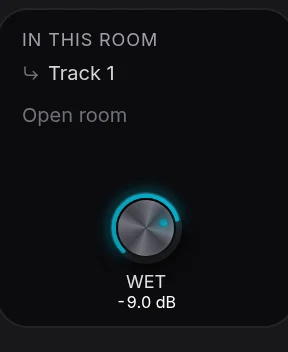
- Open a feeding track’s FX. Its shared room appears after its own inserts, marked Shared. In this room names the other tracks feeding that space.
- Adjust Wet for this track. The room card’s Wet control changes how much of the selected track goes into the room. It does not change the send amount of the other tracks.
- Edit the room’s effect. Its reverb controls shape the common space. Those settings affect everyone feeding it, so listen with those parts playing together.
- Press Open room for its whole chain. The room becomes the selected carrier and its effects open in the ordinary FX rack.
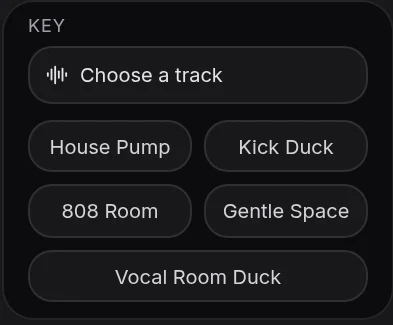
- For ducking, open the receiving track’s FX and add Sidechain. Choose the driving part in the card’s key selector, such as the kick for a bass track.
- Set the duck. Adjust Thresh (threshold), Amount, Atk (attack) and Rel (release), then compare the card switched on and off while both parts play.
One room, separate amounts
A shared room differs from separate reverb inserts because the room’s character is common while each part’s contribution is its own. Bring down Wet on a lead to keep it close, and raise Wet on backing vocals to push them into the same space. The feed list follows the tracks’ names, so a renamed part stays identifiable.
A sidechain key is another musical part
The key tells the Sidechain effect when to reduce the receiving track. A short Attack lets a kick make room quickly; Release determines how the bass returns between hits. Ask CoProducer to "duck the bass under the kick, with a gentle return" when you want it to set the relationship for you. A key source drives detection, while a shared room carries audible audio into an effect.
See the AI mixing assistant page for this capability in the full Veena studio.
Release history: Reverb tails in Veena explains the change introduced on 2026-10-09.
Related reading: Veena help centre, Mix & Master, CoProducer edits, Release note.
Try this in Veena
Put the lead and backing vocals in the same short room, with the lead drier, and duck the bass gently under the kick.
Frequently asked questions
How do I put several tracks in one shared room in Veena?
Use a shared room in Veena’s mix to place several parts in the same space. Each feeding track’s FX rack shows a Shared card, its Wet contribution and the In this room list. Adjust one track’s amount while the whole song plays, so the space supports the vocal and rhythm rather than masking them.
What does Wet change on a shared room in Veena?
Wet on a shared-room card changes the selected track’s send into that room in Veena. The room’s effect settings are shared by everyone feeding it, and In this room shows those parts. This lets you keep a lead vocal close while placing backing vocals further into the same reverb without building separate spaces.
Can CoProducer set up sidechain or shared rooms in Veena?
Yes. Ask CoProducer for the musical relationship in Veena, such as the bass ducking under the kick or the vocals sharing a short room. It creates the routing in the project. You can then open the visible Sidechain or Shared card to adjust the amount and the effect controls while hearing the arrangement.
Meet your personal music producer
Free, in your browser. Describe the song you want and CoProducer builds it with you.
Make music free