What is MixingGPT?
What is MixingGPT? It is a chat plug-in that sits inside another DAW and tells you how to mix, and by its own FAQ "It won't mix or process your audio" (mixinggpt.com, read 20 Nov 2026). Veena's CoProducer does the part MixingGPT leaves to you: it measures the mix and sets the levels, pan and effects itself, inside a free DAW.
Veena is an AI DAW with a personal music producer built in. Describe the song you want and CoProducer builds it with you — beats, chords, melody, arrangement and mix — as real tracks you can edit, mix and export. Free, in your browser.
What is MixingGPT? MixingGPT's own words
Read on mixinggpt.com, mixinggpt.com/faq and mixinggpt.com/pricing on 20 Nov 2026:
- The pitch: an "AI Mixing Assistant" plug-in: "Get industry‑standard guidance right inside your DAW."
- The definition: "MixingGPT is an AI-powered plugin that loads directly into your DAW."
- What it does: "Specialized for Mixing", "Audio Analysis" (Beta), "Image Analysis" of screenshots, and genre models for hip-hop, electronic, rock, jazz, classical and pop. "Upload your audio files (up to 4 minutes)".
- What it does not do: "It won't mix or process your audio" and "it never touches the audio itself — no EQ, compression, or rendered files come back."
- Where it runs: "Available as AU and VST3 for Mac and PC", inside Logic Pro, Ableton Live, FL Studio, Studio One, Cubase, Nuendo, Reaper, Bitwig and GarageBand. "Pro Tools is not supported."
- What it costs: a free tier of "A 3-minute mix check + 4 questions, every month", then Starter $9, Pro $19 and Studio $49 a month, paid in credits. The full breakdown is on is MixingGPT free?
MixingGPT's strength is narrow and real: it reads a screenshot of a plug-in window and talks you through the settings. What it costs you is the work itself. You still own a DAW to host it, you still move every fader, and the song is written and arranged somewhere it never sees.
Veena CoProducer vs MixingGPT
| Read 20 Nov 2026 | Veena CoProducer | MixingGPT |
|---|---|---|
| What it is | A producer built into a full DAW | A chat plug-in inside another DAW |
| Who changes the mix | CoProducer sets levels, pan and effects, and you | You, after its answers: "It won't mix or process your audio" |
| Builds the song | Yes, drums, bass, chords and melody as editable tracks | No |
| Where it runs | Your browser, on a laptop, Chromebook or phone | AU and VST3 on Mac and PC, in a supported DAW |
| Pro Tools needed or supported | Not needed | "Pro Tools is not supported" |
| Your own VST3 and AU plug-ins | Yes, through Veena Bridge, free | It runs as one |
| Reads a screenshot of a plug-in window | CoProducer reads the plug-ins in your project directly | Yes, "Image Analysis" |
| Price to start | Free studio, a daily CoProducer allowance | 3 minutes of audio and 4 questions a month |
How Veena's CoProducer mixes a song
- It builds the tracks. Describe the song and CoProducer writes drums, bass, chords and melody as MIDI on their own tracks, with 3 options for each part.
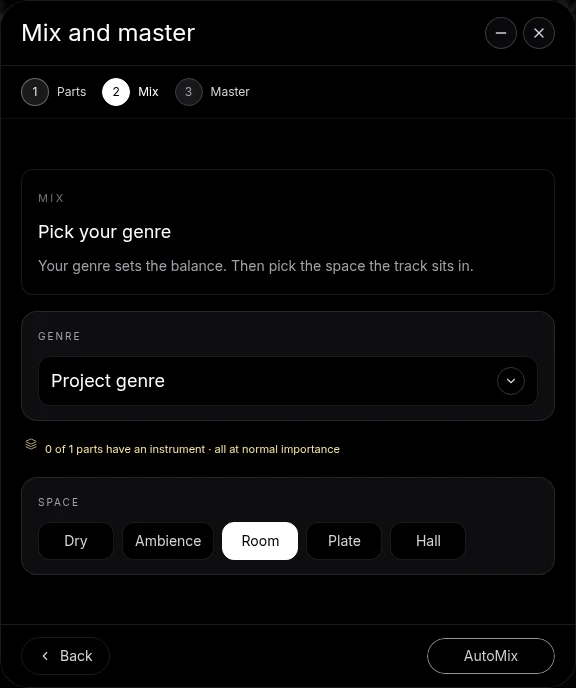
- It measures the mix. Before it touches anything, CoProducer measures the loudness and spectrum of the whole mix.
- It mixes. Ask for "more room for the vocal" or "a punchier kick" and CoProducer sets levels, pan and effects on the tracks, including your own plug-ins through Veena Bridge.
- You take over any time. Move any fader, open any effect, undo any step.
- You export it. WAV 24-bit/48 kHz, MP3 320 kbps, MIDI or stems, free, with no cap and no watermark. You own the Output you generate.
For the ranked list of tools that do this job, read MixingGPT alternatives and the best AI mixing assistants. What the free plan gives you is on the Veena free plan page; new to Veena's producer, start with what is CoProducer? or the Veena help centre.
Make a 96 BPM boom-bap beat in A minor: dusty drums with a swung kick and snare, a deep upright-style bass, warm Rhodes chords and a muted guitar riff. 4-bar intro, 16-bar verse, 8-bar hook, 16-bar verse, 4-bar outro. Then mix it: let the kick and bass share the low end, pan the guitar and Rhodes apart, and leave space in the middle for a rap vocal.
Related reading: Is MixingGPT free? · MixingGPT alternatives · The best AI mixing assistants · Plug-ins in Veena · What is CoProducer?
Try this in Veena
Make a 96 BPM boom-bap beat in A minor: dusty drums with a swung kick and snare, a deep upright-style bass, warm Rhodes chords and a muted guitar riff. 4-bar intro, 16-bar verse, 8-bar hook, 16-bar verse, 4-bar outro. Then mix it: let the kick and bass share the low end, pan the guitar and Rhodes apart, and leave space in the middle for a rap vocal.
Opens a new project in Veena, and CoProducer starts building from this prompt.
Frequently asked questions
What is MixingGPT?
MixingGPT calls itself an "AI mixing assistant inside your DAW—available as a VST/AU plugin": you ask it mix questions and it answers with "industry‑standard guidance" (mixinggpt.com, read 20 Nov 2026). Veena is an AI DAW with a personal music producer built in. Describe the song you want and CoProducer builds it with you — beats, chords, melody, arrangement and mix — as real tracks you can edit, mix and export. Free, in your browser.
Does MixingGPT mix my song for me?
No. MixingGPT's FAQ says "It won't mix or process your audio" and "it never touches the audio itself — no EQ, compression, or rendered files come back"; you make every change (read 20 Nov 2026). Veena's CoProducer measures the whole mix, then sets levels, pan and effects on your tracks itself, and you hear the change straight away.
Which DAWs does MixingGPT work with?
MixingGPT's FAQ lists Logic Pro, Ableton Live, FL Studio, Studio One, Cubase, Nuendo, Reaper, Bitwig and GarageBand, as AU and VST3 on Mac and PC, and its homepage says "Pro Tools is not supported" (read 20 Nov 2026). Veena needs no host DAW: it is the DAW, free in your browser, and it loads your own VST3 and AU plug-ins through Veena Bridge.
How much does MixingGPT cost?
MixingGPT's pricing page lists a free tier of "A 3-minute mix check + 4 questions, every month", then Starter at $9, Pro at $19 and Studio at $49 a month, sold as credits (read 20 Nov 2026). Veena's whole studio is free, CoProducer runs on a free daily allowance, and Veena Pro at $20 a month removes the daily cap.
Is MixingGPT a DAW?
No. MixingGPT's FAQ calls it "an AI-powered plugin that loads directly into your DAW", so you need a DAW to host it first (read 20 Nov 2026). Veena is the DAW and the producer in one place: CoProducer writes, arranges and mixes on the same timeline and mixer you use, and the studio is free.
What is the difference between MixingGPT and Veena?
MixingGPT answers questions about a mix you built somewhere else; Veena's CoProducer builds the song as editable tracks and mixes it with you, in a free browser DAW. You keep every fader, undo any step, and export WAV, MP3, MIDI or stems with no cap and no watermark.
Meet your personal music producer
Free, in your browser. Describe the song you want and CoProducer builds it with you.
Make music free