How do you edit your song on Suno?
How do you edit your song on Suno? With a paid plan and one of three tools: the Song Editor and Replace Section on Pro, and Suno Studio, a timeline editor, from Premier at $30 a month (suno.com, read 28 Nov 2026). Each Suno edit makes new versions of a finished mix. Veena is the free studio where your song becomes real tracks: split it into stems, and change any note, part or mix yourself or with CoProducer, your personal music producer.
Veena is an AI DAW with a personal music producer built in. Describe the song you want and CoProducer builds it with you — beats, chords, melody, arrangement and mix — as real tracks you can edit, mix and export. Free, in your browser.
How do you edit your song on Suno? What Suno's own pages say
Read on suno.com/pricing, suno.com/studio and help.suno.com ("How to Use: Song Editor", "Can I replace a section of a song?", "Using MIDI files in Create" and "Getting started with Suno Bridge") on 28 November 2026:
- The free plan doesn't edit. Basic editing "(crop, fade)" and advanced editing "(replace or add section)" are not included on Free, nor are stems or Studio, and Free has "No monthly song downloads".
- Song Editor (Pro and Premier). Drag a section "to move the section to another part of the song", choose "Replace", "Update the lyrics in the Replace Lyrics box", "Click Remove in the toolbar or press the Delete key", or "Click the + icon" to extend.
- Replace Section. "Pro and Premier subscribers now have access to Replace Section." You highlight a part, and "two new versions are created".
- MIDI upload. "MIDI upload is available on desktop web on Pro and Premier plans", as the structure of a new song in Create.
- Suno Studio. Studio starts on Premier, $30 a month: "Arrange, layer and refine with precision", split audio into stems and "convert audio to MIDI". Suno adds: "Suno Studio does not support VST, AU or AAX plugins."
- Suno Bridge. A beta app that puts generated audio on your DAW timeline, "compatible with Ableton Live", on "A Mac running macOS", with "A Suno account with a Premier subscription".
So editing in Suno means a subscription, and outside Studio every edit is a new generation of the whole mix. BandLab, the other name that comes up, is a free browser studio with a 16-track limit on its free plan (bandlab.com, read 28 Nov 2026); it opens your audio but has no producer that rebuilds the parts with you.
Editing a song: Veena vs Suno
| Read 28 Nov 2026 | Veena | Suno Free | Suno Pro, $10 a month | Suno Premier, $30 a month |
|---|---|---|---|---|
| Edit sections and lyrics | Cut, move and rewrite any bar | Not included | Song Editor, Replace Section | Song Editor, Replace Section |
| Change one instrument | Its own track, one request | No stems | Stems, Auto and Split from mix | Stems, plus Advanced split |
| A timeline editor | The whole studio, free | Not included | Not included | Suno Studio |
| MIDI | Import, edit and export, free | Not included | Upload in Create | Studio, with MIDI |
| Your own plug-ins | VST3 and AU through Veena Bridge | None | None | "does not support VST, AU or AAX plugins" |
| Downloads | No cap, no watermark | "No monthly song downloads" | 20 a month | 60 a month |
Suno's strength is the one-click song with an AI-sung vocal. For editing the song you have, every row above is free in Veena.
Edit your song in Veena, step by step
- Download your song from Suno. Use Suno's own Download button while your plan includes downloads; stems come with the song on Pro and Premier.
- Open Veena. Go to daw.veena.studio and sign in with Google, in any browser. Nothing to install.
- Drag the file onto the timeline. WAV, MP3, M4A, FLAC and AIFF import, and the first clip sets the project tempo.
- Split the stems. Right-click the clip and choose Separate into Stems. Vocals, drums, bass and other land on four tracks, lined up with the original.
- Change any note, part or mix. Press C to cut and move a section, pitch-shift or Auto-Tune the vocal, set levels in the mixer, or ask CoProducer: "rebuild the drums as a tight pop kit", "add Electric Piano chords that follow the bass". New parts arrive as MIDI on their own tracks, 3 options each, so you edit them note by note in the piano roll.
- Export. Click Export at the right of the transport bar: WAV 24-bit/48 kHz, MP3 320 kbps, MIDI or every track as stems, with no cap and no watermark.
Your next song can start in Veena from one sentence, as tracks from the first bar.
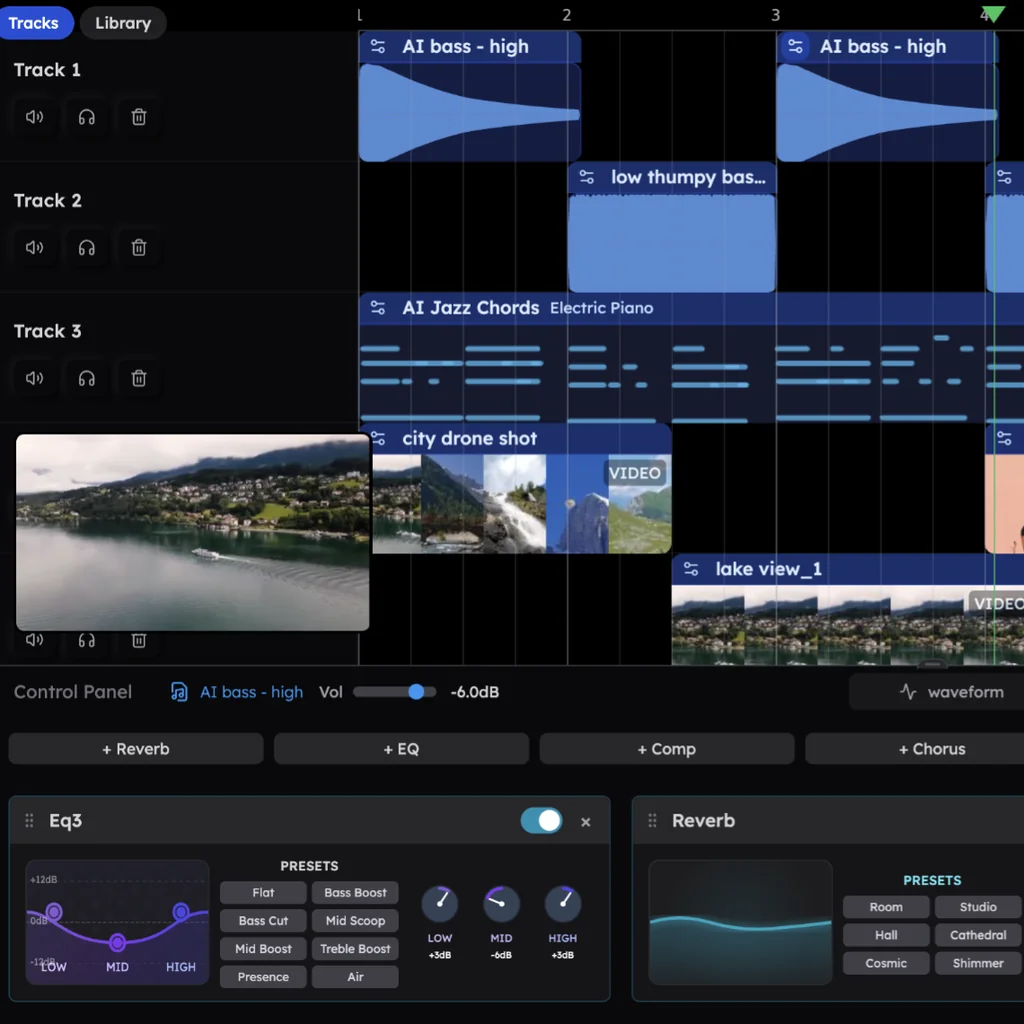
What's free in Veena
- The studio: timeline, piano roll, Beat Maker, mixer and recording, with no project limit.
- Stems: a right-click split into vocals, drums, bass and other.
- CoProducer: a daily allowance of requests. Picking or skipping options does not use it.
- Export: WAV, MP3, MIDI and stems, with no cap and no watermark.
- Ownership: you own the Output you generate, on every plan.
Veena Pro, $20 a month, removes the daily request cap and unlocks the premium models.
The full guide is edit a Suno song in a DAW. Swapping one part is covered in can I change one instrument in a Suno song?, and the split itself in stem separation in Veena. Paste this into CoProducer once your stems are on the timeline:
Build on my song: keep the vocal stem as the lead, rebuild the drums as a tight 96 BPM pop kit with a clap on 2 and 4, write a Round Bass line that follows the chords, add warm Electric Piano chords in the verses and a bright synth pad in the choruses, then make the last chorus 16 bars. Keep each part on its own track.
Related reading: Veena help centre · Edit a Suno song in a DAW · Can I change one instrument in a Suno song? · How does Suno Replace Section work? · Is Suno Studio free? · Veena vs Suno
Try this in Veena
Build on my song: keep the vocal stem as the lead, rebuild the drums as a tight 96 BPM pop kit with a clap on 2 and 4, write a Round Bass line that follows the chords, add warm Electric Piano chords in the verses and a bright synth pad in the choruses, then make the last chorus 16 bars. Keep each part on its own track.
Opens a new project in Veena, and CoProducer starts building from this prompt.
Frequently asked questions
How do you edit your song on Suno?
On a paid plan. Suno's pricing page lists basic editing (crop, fade) and advanced editing (replace or add section) on Pro and Premier, not on Free, and Suno Studio, its timeline editor, starts on Premier at $30 a month (suno.com, read 28 Nov 2026). Veena is an AI DAW with a personal music producer built in. Describe the song you want and CoProducer builds it with you — beats, chords, melody, arrangement and mix — as real tracks you can edit, mix and export. Free, in your browser.
Can you edit a Suno song on the free plan?
Not with Suno's editors. Suno's Free column marks basic editing, advanced editing, stem extraction and Studio as not included, and lists "No monthly song downloads" (suno.com/pricing, read 28 Nov 2026). Veena's studio is free: every part CoProducer writes is its own track you edit in the piano roll, the Beat Maker and the mixer, and exports have no watermark.
What does Suno's Replace Section do?
It regenerates a highlighted part of a song: you mark the section, change its lyrics if you like, and Suno creates "two new versions" to choose from. Suno's help centre says "Pro and Premier subscribers now have access to Replace Section" (read 28 Nov 2026). In Veena you change one bar, one note or one instrument directly, and every CoProducer change is one Ctrl+Z.
Can you upload MIDI to Suno to edit a song?
Suno's help centre says "MIDI upload is available on desktop web on Pro and Premier plans", and the MIDI file sets the structure of a new song in Create (read 28 Nov 2026). In Veena, MIDI imports on the free plan straight onto a track, and CoProducer writes drums, bass and chords around it that you edit note by note.
Can I edit a Suno song in Ableton with Suno Bridge?
Suno Bridge is a beta app that generates new audio onto your DAW timeline. Suno's help centre says it works with Ableton Live, needs "A Mac running macOS" and "A Suno account with a Premier subscription" (read 28 Nov 2026). Veena runs in any browser on Windows, Mac, Linux, Chromebook or your phone, and its studio is free.
What is the best way to edit a song from Suno?
Bring it into Veena. Download the song from Suno, drag it onto Veena's timeline, right-click and choose Separate into Stems, and vocals, drums, bass and other land on four tracks, free. From there it is a project: rebuild any part with CoProducer, mix it, and export WAV, MP3, MIDI and stems.
Meet your personal music producer
Free, in your browser. Describe the song you want and CoProducer builds it with you.
Make music free