Does Soundverse have collaboration?
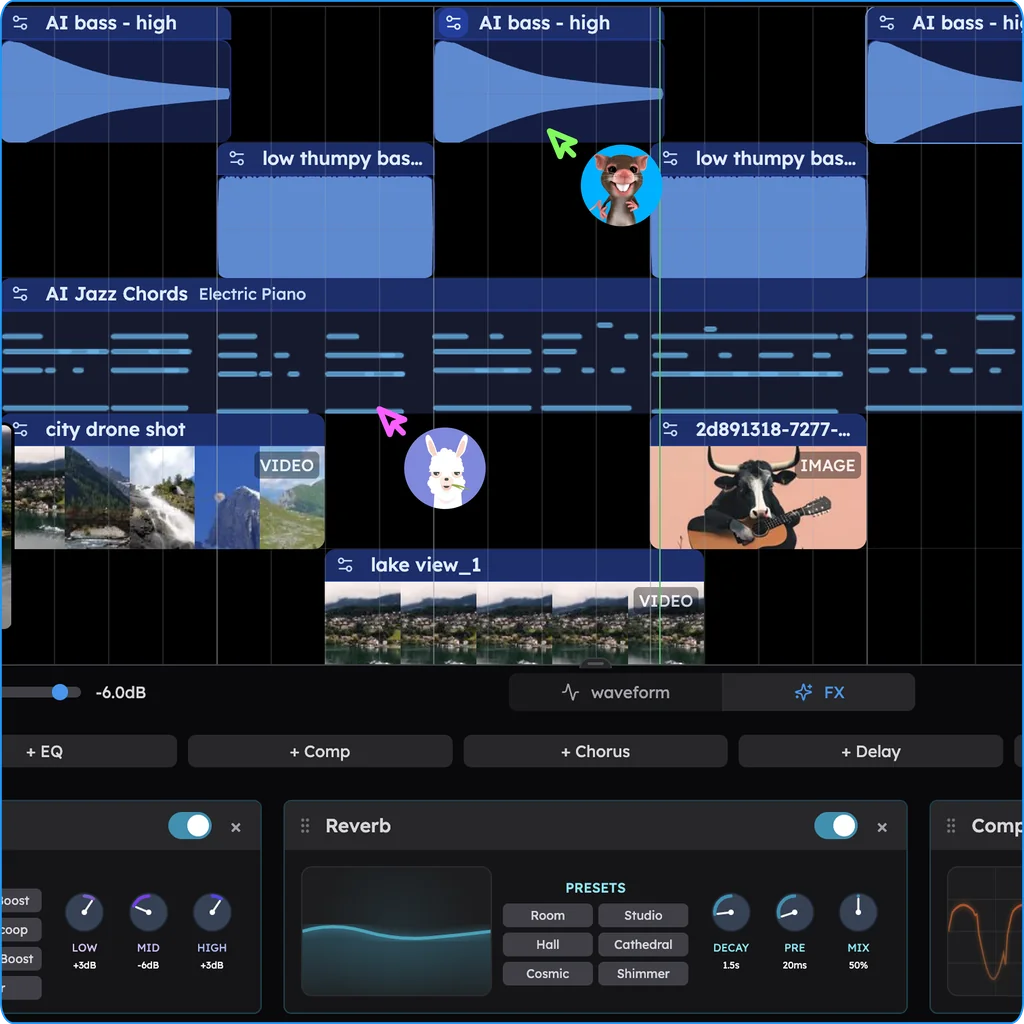
Does Soundverse have collaboration? Yes: its AI Studio guide says "Everyone works on the same timeline at once, with named cursors", with comments, chat and calls (read 15 Nov 2026). A free Soundverse session holds 3 tracks and each person exports MP3. Veena puts your co-writers and a personal music producer in the same song in real time, free on every plan, and exports WAV and every stem free.
Veena is an AI DAW with a personal music producer built in. Describe the song you want and CoProducer builds it with you — beats, chords, melody, arrangement and mix — as real tracks you can edit, mix and export. Free, in your browser.
Does Soundverse have collaboration? What Soundverse's own pages say
Read from help.soundverse.ai/create/ai-studio and soundverse.ai/features/ai-studio on 15 Nov 2026:
- Live editing: "Everyone works on the same timeline at once, with named cursors." Agent One can join "as a collaborator with its own AI-marked avatar".
- Invites: "Type the email of someone who already uses Soundverse and pick a role (Admin, Editor or Viewer), or set General Access to Anyone with link".
- Viewers can edit: "The Viewer role and Can view links don't make the timeline read-only, so only invite people you'd trust to edit. Roles can't be changed after an invite".
- Chat and calls: comments pinned to a bar, a session chat, and "an audio or video call with up to three people who are online".
- Plans decide the session: "A shared project's track limit follows the owner's plan. Each collaborator's AI tools and export options follow their own plan." Free is 3 tracks a project and MP3 export.
What Soundverse's session costs you is the size and the file: 3 tracks on a free owner's project, MP3 for a free collaborator, and WAV and stems from Creator, $9.99 a month billed yearly. Every plan is on how much does Soundverse cost?
Making music together: Veena vs Soundverse
| Read 15 Nov 2026 | Veena | Soundverse |
|---|---|---|
| Edit the same song in real time | Yes, free on every plan | Yes |
| An AI producer in the session | CoProducer, Shared chat and private My chat | Agent One |
| Invite someone new | Link opens with their Google account | Email for existing Soundverse users, or a link |
| What a free collaborator exports | WAV 24-bit/48 kHz, MP3, MIDI and stems | MP3 |
| Your own VST3 and AU plug-ins | Yes, shared with the whole session | No third-party plug-ins |
Collaborate in real time, in Veena
- Sign in. Open daw.veena.studio and sign in with Google. No download, no install.
- Start blank. Create a new project and paste the prompt at the bottom of this page into CoProducer.
- Share it. Press the Share button in the transport bar, type a co-writer's email and press Invite, then send the link.
- Build it together. In Shared chat, ask CoProducer for the bridge, listen to the 3 options together and pick one.
- Record and export. Each of you records a vocal on its own track, then export the WAV mix or every track as stems.
What's free in Veena
- Real-time collaboration: email-locked or open invite links, live cursors and synced sections, on every plan.
- CoProducer: a daily allowance of requests, in shared and private chats. Picking or skipping options does not use it.
- Your plug-ins: the computer that has a VST3 or AU plug-in renders it and shares the sound with the session.
- Export: WAV 24-bit/48 kHz, MP3 320 kbps, MIDI and stems, with no cap and no watermark.
- Ownership: a shared project stays the owner's, and you own the Output you generate.
Veena Pro, $20 a month, removes the daily request cap and unlocks the premium models.
Real-time collaboration in Veena walks through every control, make music online together covers sessions with a band, and our Soundverse alternative guide compares every way out of Soundverse.
Make a 96 BPM neo-soul song in B flat major for a co-writing session: 4-bar intro, 16-bar verse, 8-bar pre-chorus, 16-bar chorus, 16-bar verse, 16-bar chorus, 8-bar bridge, 16-bar chorus. Laid-back drums with ghost notes, a round finger bass, Rhodes extended chords, a clean guitar answering the vocal and soft strings in the bridge. Leave space for two vocals.
Related reading: Soundverse alternative · Veena vs Soundverse · Real-time collaboration in Veena · Make music online together
Try this in Veena
Make a 96 BPM neo-soul song in B flat major for a co-writing session: 4-bar intro, 16-bar verse, 8-bar pre-chorus, 16-bar chorus, 16-bar verse, 16-bar chorus, 8-bar bridge, 16-bar chorus. Laid-back drums with ghost notes, a round finger bass, Rhodes extended chords, a clean guitar answering the vocal and soft strings in the bridge. Leave space for two vocals.
Opens a new project in Veena, and CoProducer starts building from this prompt.
Frequently asked questions
Does Soundverse have collaboration?
Yes. Soundverse's AI Studio guide says everyone works on the same timeline at once, with named cursors, after an invite by email to someone who already uses Soundverse or by link, plus comments, chat and calls (read 15 Nov 2026). Veena is an AI DAW with a personal music producer built in. Describe the song you want and CoProducer builds it with you — beats, chords, melody, arrangement and mix — as real tracks you can edit, mix and export. Free, in your browser.
How many tracks can a free Soundverse session have?
Three. Soundverse's AI Studio guide gives Free 3 projects of 3 tracks each and says a shared project's track limit follows the owner's plan, while each collaborator's export options follow their own plan, MP3 on Free (read 15 Nov 2026). A free Veena session exports WAV, MIDI and every track as stems, with no cap.
Can a Soundverse viewer edit my project?
Yes. Soundverse's AI Studio guide warns that "The Viewer role and Can view links don't make the timeline read-only", and that roles can't be changed after an invite (read 15 Nov 2026). In Veena the owner invites editors, keeps the project and removes anyone's access from the Share button at any time.
How does real-time collaboration work in Veena?
Veena works like a Google Doc for music. Share an invite link, your collaborator signs in with Google, and you both edit the same song live, with named cursors, synced sections and indicators on clips someone is editing. It has been live since 12 September 2026 and is free on every plan.
Can CoProducer join a collaboration session in Veena?
Yes. Every shared Veena project has a Shared chat with CoProducer that the whole session steers, plus a private My chat for each person. Ask for a bridge while you listen together, pick one of its 3 options as a group, and every pick shows the name of whoever chose it.
Meet your personal music producer
Free, in your browser. Describe the song you want and CoProducer builds it with you.
Make music free