Does Musicfy have voice to instrument?
Does Musicfy have voice to instrument? Yes, as audio conversion. Musicfy's home page lists "Voice-to-Instrument/Voice", and its app's Instrumentals shelf offers instrument models, electric guitar, piano, violin, saxophone, brass and more, that turn a recording of your voice into instrument audio (read 17 Nov 2026). In Veena, CoProducer turns a hummed line into editable MIDI notes on any instrument, inside a song it builds with you, free.
Veena is an AI DAW with a personal music producer built in. Describe the song you want and CoProducer builds it with you — beats, chords, melody, arrangement and mix — as real tracks you can edit, mix and export. Free, in your browser.
Does Musicfy have voice to instrument? What Musicfy's own pages say
Read from musicfy.lol's home page and pricing page and from create.musicfy.lol's home page on 17 Nov 2026:
- On the home page: "Use Text-to-Music or Voice-to-Instrument/Voice to make new songs." One quote on the page reads "I can turn my voice into an electric guitar."
- In the app: an Instrumentals shelf, "Explore copyright-free instrumentals you can use without licensing worries", with models including Electric Guitar, Acoustic Guitar, Piano, Breakbeats, Violin, Saxophone, Brass, Bass Guitar, Slap Bass, Banjo, Duduk and Shehnai, made by Team Musicfy and by community members.
- How it runs: instrument models sit in the same Convert Voice flow as Musicfy's voice models, and the output is converted audio.
- Plans: the pricing page lists Starter at $9.99 a month, Professional at $24.99 and Studio at $69.99, marked "SUMMER SALE · 60% OFF", with "Commercial License" on Professional and Studio.
Musicfy's strength is voice conversion: one recording, many voices and instruments. What it costs you is the note: a converted take is audio, so the notes are the ones you sang, and changing one means another take. The whole comparison is on Veena vs Musicfy.
Voice to instrument: Veena vs Musicfy
| Read 17 Nov 2026 | Veena | Musicfy |
|---|---|---|
| What you get | Editable MIDI notes, or the take re-voiced as audio | Converted instrument audio |
| Fix one note | Drag it in the piano roll | Note editing not listed |
| Instruments | 61 presets on Veena's own instruments, plus your own plug-ins | A shelf of instrument models |
| A song around it | CoProducer writes drums, bass and chords that fit your line | Separate tools: Create a Song, Text to Music |
| Commercial use | Every plan, free included | Professional and Studio |
Hum it and hear it played, in Veena
- Sign in. Open daw.veena.studio and sign in with Google. No download, no install.
- Build the groove. Paste the funk prompt at the bottom of this page into CoProducer. It leaves a 4-bar gap in groove B.
- Record your hum. Arm a track and hum the melody into the gap.
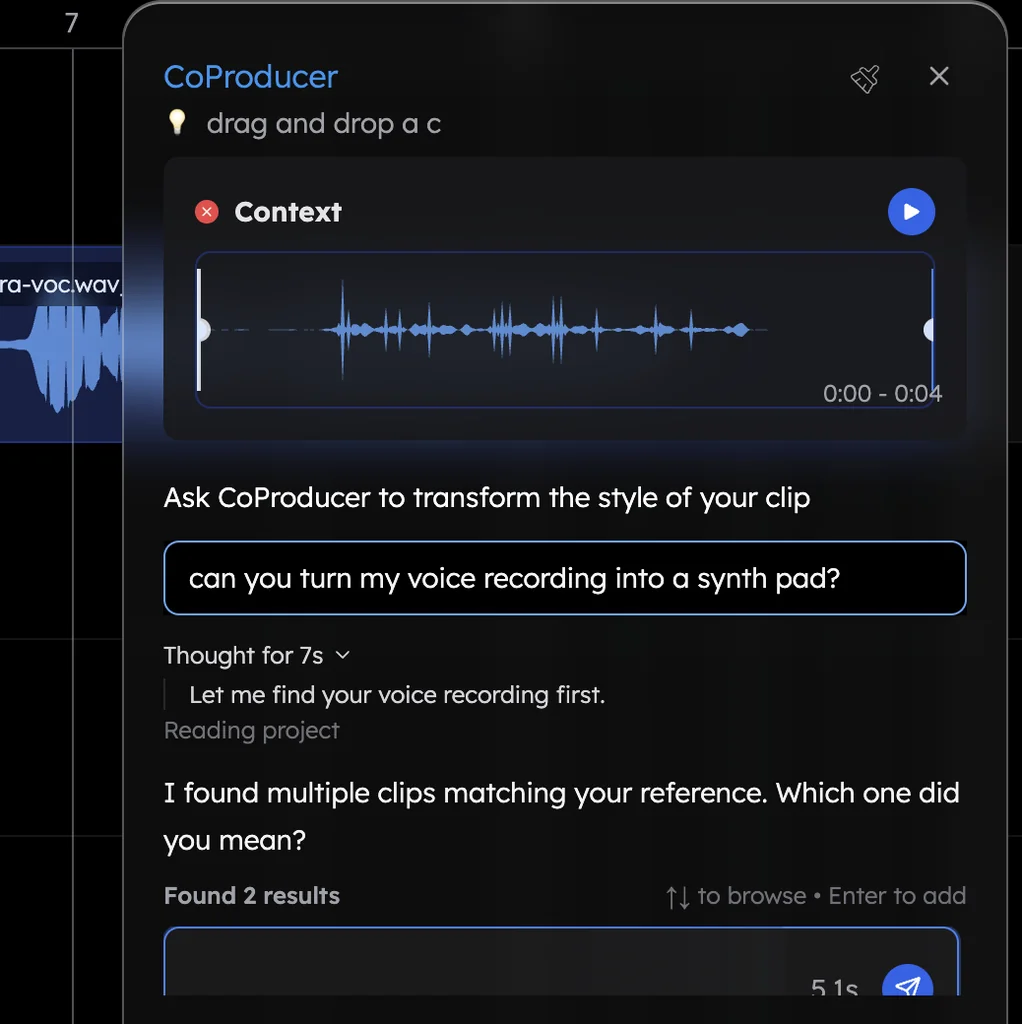
- Name the instrument. Drag the clip into the CoProducer panel and ask for "a muted trumpet line, as editable MIDI, keeping my melody."
- Edit and export. Open the piano roll to fix any note, then export the mix or every track, free, with no watermark.
More than a conversion
Voice to instrument in Veena is a door into the whole song. CoProducer reads the notes of your hummed line before it writes the bass under it, and every part lands on its own track you can mix, swap or export as a stem. The full walk-through is voice to instrument in Veena, and the feature page is voice to instrument. For the other big AI voice tool, see Veena vs Kits AI.
Make a 110 BPM funk track in E minor: 4-bar intro, 16-bar groove A, 8-bar break, 16-bar groove B, 8-bar outro. A tight ghost-note kit, a slap bass, choppy clavinet chords, a horn section stab on the one and a wah guitar in the break. Leave a 4-bar gap in groove B for a melody I will hum.
Related reading: Veena vs Musicfy · Is Musicfy free? · Can you use Musicfy commercially? · Voice to instrument in Veena
Try this in Veena
Make a 110 BPM funk track in E minor: 4-bar intro, 16-bar groove A, 8-bar break, 16-bar groove B, 8-bar outro. A tight ghost-note kit, a slap bass, choppy clavinet chords, a horn section stab on the one and a wah guitar in the break. Leave a 4-bar gap in groove B for a melody I will hum.
Opens a new project in Veena, and CoProducer starts building from this prompt.
Frequently asked questions
Does Musicfy have voice to instrument?
Yes, as audio conversion. Musicfy's home page lists "Voice-to-Instrument/Voice", and its app offers instrument models such as electric guitar, piano, violin, saxophone and brass that convert a recording into instrument audio (read 17 Nov 2026). Veena is an AI DAW with a personal music producer built in. Describe the song you want and CoProducer builds it with you — beats, chords, melody, arrangement and mix — as real tracks you can edit, mix and export. Free, in your browser.
What instruments does Musicfy have?
Musicfy's app lists royalty-free instrument models including Electric Guitar, Acoustic Guitar, Piano, Breakbeats, Violin, Saxophone, Brass, Bass Guitar, Slap Bass and Banjo, made by Team Musicfy and by its community (read 17 Nov 2026). In Veena, CoProducer turns your hum into editable MIDI and plays it on any of 61 instrument presets or your own plug-ins.
Can I edit the notes after voice to instrument?
In Veena, yes: ask CoProducer for the line "as editable MIDI" and it writes the notes on a new track, which you open in the piano roll to fix a note, change the rhythm or swap the sound. Musicfy's pages describe its conversions as audio and do not list note editing (read 17 Nov 2026).
Is voice to instrument free on Musicfy?
Musicfy's home page says "Get Started - Its Free" with "no credit card required", and its pricing page lists the commercial licence from Professional at $24.99 a month (read 17 Nov 2026). Veena's voice to instrument is part of the free plan, and you own the Output you generate on every plan.
Can I build a whole song around a hummed melody?
In Veena, yes. Record your hum, turn it into an instrument line, then ask CoProducer for drums, bass and chords that fit it: it reads the actual notes of your part before it writes. Every part lands on its own track, and you export the mix or every track free.
Meet your personal music producer
Free, in your browser. Describe the song you want and CoProducer builds it with you.
Make music free