Can you use Pro Tools on a Chromebook?
Can you use Pro Tools on a Chromebook? No: Avid builds Pro Tools only for qualified Mac and Windows computers, with 16 GB of RAM and an iLok licence, and there is no ChromeOS, Android or browser version. Veena runs the whole studio in Chrome on your Chromebook, free, with a personal music producer who builds the song with you.
Veena is an AI DAW with a personal music producer built in. Describe the song you want and CoProducer builds it with you — beats, chords, melody, arrangement and mix — as real tracks you can edit, mix and export. Free, in your browser.
Can you use Pro Tools on a Chromebook? Avid's requirements
Read on Avid's "Pro Tools System Requirements and Compatibility" page (kb.avid.com, last updated 3 November 2026) and avid.com/pro-tools on 16 November 2026:
- Which editions: the page covers "Pro Tools Intro, Artist, Studio and Ultimate".
- On a Mac: "macOS Tahoe 26.6.x, macOS Sequoia 15.7.x, or macOS Sonoma 14.8.x", on Apple M1 to M5 or an Intel Core i5.
- On Windows: "Windows 11 (25H2 or 24H2)" with a 64-bit Intel Core processor.
- Every computer: "16GB RAM", "15GB of free space for installation" and an "Internet connection (needed for installation, activation)".
- The licence: "iLok account/access (iLok 2, iLok 3 (USB A or USB C), or iLok Cloud".
- Avid's summary: "Pro Tools runs on qualified Mac and Windows systems."
No ChromeOS, Linux, Android or web version appears on either page. A Chromebook can't meet the first line of the list.
On a Chromebook: Veena vs Pro Tools
| Read 16 Nov 2026 | Veena | Pro Tools |
|---|---|---|
| Runs on a Chromebook | Yes, in Chrome | No |
| Install | None: open a tab | 15 GB, plus iLok activation |
| Memory | The AI runs on Veena's servers | 16 GB of RAM |
| Price | Free studio | Intro free at eight tracks of each type; paid plans from $9.99 a month |
| A producer that builds the song | CoProducer, on the free plan | None described |
| Real-time collaboration | Free, by invite link | Avid Cloud Collaboration; Intro users can only join |
Pro Tools' strength is the industry-standard studio and post workflow on a big Mac or PC rig. On a Chromebook, Veena is the studio that runs at all; Veena on Chromebook and Linux covers the setup, and Veena vs Pro Tools is the full head-to-head.
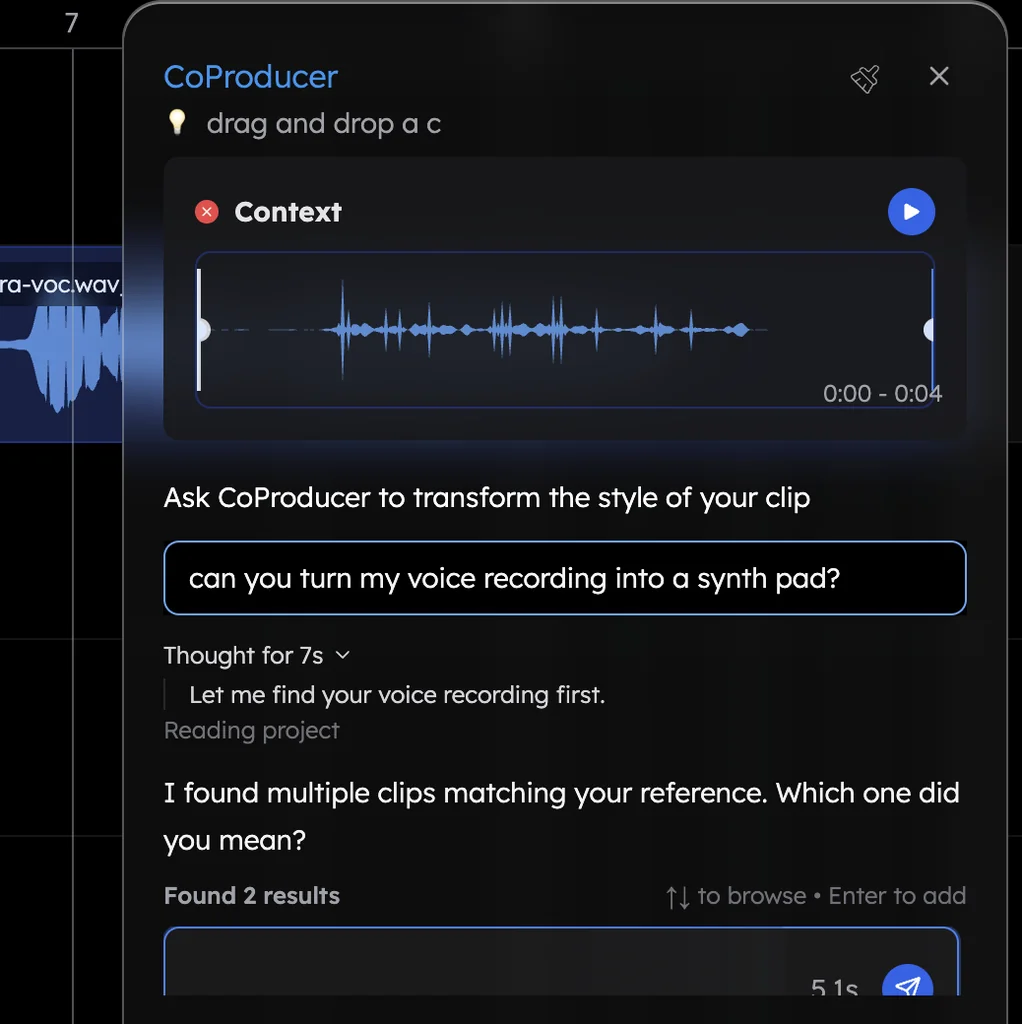
Make a track on your Chromebook in Veena
- Open Chrome. Go to daw.veena.studio and sign in with Google. Nothing to install.
- Describe the track. Paste the future house prompt at the bottom of this page into CoProducer.
- Pick your parts. Drums, bass, the vocal-chop hook and the lead each arrive as 3 options. Keep what you like.
- Record and edit. Plug in a USB mic or MIDI keyboard, record over the track, or move notes in the piano roll.
- Export. WAV 24-bit/48 kHz, MP3 320 kbps, MIDI and stems, free, with no watermark.
Everything above runs on the free plan: up to 5 projects and a daily CoProducer allowance. Veena Pro, $20 a month, removes the daily request cap and unlocks the premium models.
Make a 128 BPM future house track in A minor: a punchy kick with an offbeat open hat and a clap on 2 and 4, a bouncy metallic bass on Am, F, C and G, a short vocal-chop hook, a bright pluck lead in the drop and a riser into each drop. Intro 8 bars, build 8, drop 16, break 8, build 8, drop 16, outro 8. Keep each part on its own track.
Related reading: Veena help centre · Veena on Chromebook and Linux · Veena vs Pro Tools · Is Pro Tools free? · Is Pro Tools good for beginners? · Does FL Studio work on Chromebook?
Try this in Veena
Make a 128 BPM future house track in A minor: a punchy kick with an offbeat open hat and a clap on 2 and 4, a bouncy metallic bass on Am, F, C and G, a short vocal-chop hook, a bright pluck lead in the drop and a riser into each drop. Intro 8 bars, build 8, drop 16, break 8, build 8, drop 16, outro 8. Keep each part on its own track.
Opens a new project in Veena, and CoProducer starts building from this prompt.
Frequently asked questions
Can you use Pro Tools on a Chromebook?
No. Avid says "Pro Tools runs on qualified Mac and Windows systems", and its system requirements list only macOS 14.8, 15.7 and 26.6 and Windows 11, with 16 GB of RAM (Avid, read 16 Nov 2026). Veena is an AI DAW with a personal music producer built in. Describe the song you want and CoProducer builds it with you — beats, chords, melody, arrangement and mix — as real tracks you can edit, mix and export. Free, in your browser.
Is there a browser version of Pro Tools?
Not on Avid's pages: Pro Tools is a Mac and Windows install that needs "an internet connection for installation and activation" and an iLok account (read 16 Nov 2026). Veena is a full DAW in the browser, so a Chromebook opens it in Chrome with nothing to install, CoProducer included.
Can a Chromebook run Pro Tools Intro, the free version?
No. Avid's requirements page covers "Pro Tools Intro, Artist, Studio and Ultimate" together, so Intro needs the same Mac or Windows 11 computer with 16 GB of RAM (read 16 Nov 2026). Veena's free plan runs in Chrome on a Chromebook, with recording, the piano roll, the mixer and free exports.
Can I open my Pro Tools sessions on a Chromebook?
Not as Pro Tools sessions. Bounce each track to WAV from the session start and export the MIDI on your Mac or PC, then drag the files onto Veena's timeline in Chrome. Each lands on its own track, and CoProducer can write new parts around them.
What is the best Pro Tools alternative for a Chromebook?
Veena. It runs in Chrome and gives a Chromebook the full studio: recording, timeline, piano roll, mixer, 4-stem separation and your collaborators, plus CoProducer, who builds the song with you. The AI runs on Veena's servers, so a modest Chromebook builds the same songs as a studio desktop.
Meet your personal music producer
Free, in your browser. Describe the song you want and CoProducer builds it with you.
Make music free