Can you edit AIVA songs?
Can you edit AIVA songs? Yes: AIVA opens a generated track in its own editor, where you move notes, insert or delete sections, change the tempo and swap its virtual instruments (aiva.crisp.help, read 22 Nov 2026). Veena starts from the other end. It is a full studio with a personal music producer inside it: CoProducer builds the song as real tracks, and you edit those tracks the way a producer would, by hand or in words, record over them, mix them with your own plug-ins and export them, free.
Veena is an AI DAW with a personal music producer built in. Describe the song you want and CoProducer builds it with you — beats, chords, melody, arrangement and mix — as real tracks you can edit, mix and export. Free, in your browser.
Can you edit AIVA songs? What AIVA's own pages say
Read on AIVA's help centre, aiva.crisp.help, in its General User Manual on 22 November 2026, and on aiva.ai:
- Open in Editor. "Open your track in Editor by clicking on the More Options icon and then scrolling down to Open in Editor."
- Notes. "Using the Pointer mode you can click the notes and drag them around", and "Add new notes by switching to the Pencil mode".
- Sections and tempo. Click a section header to "Insert a section before", "Insert a section after" or "Delete a section"; change the BPM from the Tempo field.
- Layers and instruments. Add a pitched or percussion layer and "Click on the Magic button to generate notes for your layer"; change or add instruments, mute or solo them, and change their octave and dynamics.
- Sound. Per instrument: Low Frequency Cut, High Frequency Cut, Reverb, Delay and Auto Staccato. For the song: "Bass Boost" and "Vinyl Effects".
- Imported MIDI. "Import your own MIDI files into AIVA, and be able to edit them in our piano roll editor, with our built-in virtual instruments."
- Downloads after editing. Free and Standard list "Download MP3 & MIDI formats"; Pro lists "Download ALL file formats" (aiva.ai).
Editing a song: Veena vs AIVA
| Read 22 Nov 2026 | Veena | AIVA |
|---|---|---|
| Edit notes in a piano roll | Yes | Yes |
| Edit by describing the change | CoProducer edits the real tracks | Magic button regenerates a layer's notes |
| Record your voice or an instrument | Yes, on any track | Not in AIVA's user manual |
| Your own plug-ins | VST3 and AU through Veena Bridge, free | Built-in virtual instruments |
| Effects | 17 built-in, plus track and master insert chains | Per-instrument cut, reverb, delay; Bass Boost, Vinyl Effects |
| Work on it together | Real-time collaboration, free | Share a track |
| Export after editing, free | WAV, MP3, MIDI and stems, no cap | MP3 and MIDI, 3 downloads a month |
AIVA's strength is orchestral and cinematic scoring across a long list of preset styles, and its editor is built around those scores. Veena puts the score inside a studio: the same strings and piano arrive as separate tracks you play, record over, mix and finish in one place.
Edit a song the way a producer would, in Veena
- Sign in. Open daw.veena.studio and sign in with Google. No download, no card.
- Start blank. Create a new project and paste the prompt at the bottom of this page into CoProducer.
- Pick your parts. Piano, strings, bass and drums each arrive as 3 options. Hover to hear, press Enter to keep one.
- Edit by hand or in words. Drag notes in the piano roll, cut and move clips, or ask CoProducer to lift the last chorus or thin out the bridge.
- Make it yours and export. Record a part of your own, set the mix, then export the WAV, MP3, MIDI or stems with no watermark.
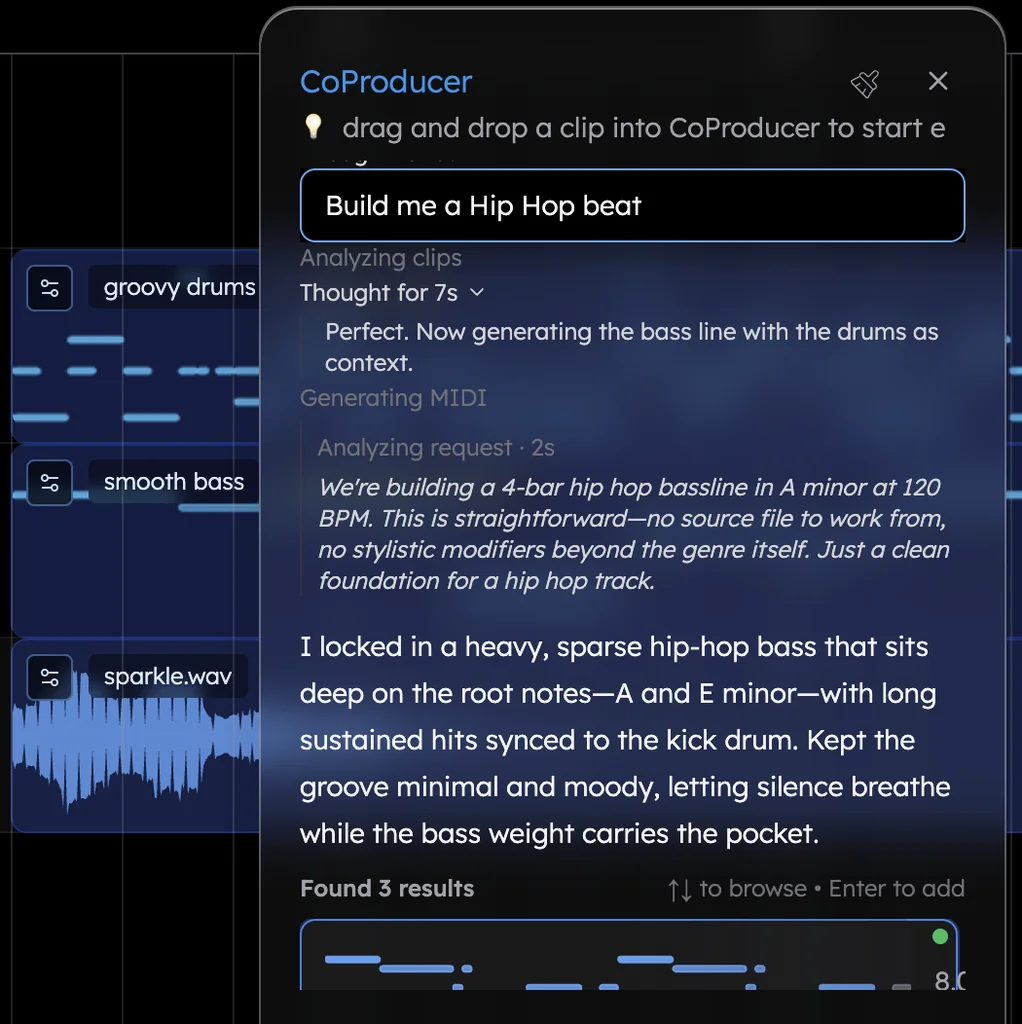
Editing with CoProducer shows every kind of change you can ask for, MIDI editing in Veena covers the piano roll, and every other answer is in the Veena help centre. More on AIVA: is AIVA free?, can you export MIDI from AIVA? and our AIVA alternative guide.
Make an 84 BPM emotional piano and strings piece in E minor: 8-bar intro, 16-bar verse, 16-bar chorus, 8-bar bridge, 16-bar chorus, 8-bar outro. Soft felt piano chords, a simple piano melody, legato strings that swell into each chorus, a warm bass and light brushed drums from the bridge on. Keep every part on its own track.
Related reading: Can you export MIDI from AIVA? · Can you export stems from AIVA? · Is AIVA free? · Can you use AIVA music commercially? · AIVA alternative
Try this in Veena
Make an 84 BPM emotional piano and strings piece in E minor: 8-bar intro, 16-bar verse, 16-bar chorus, 8-bar bridge, 16-bar chorus, 8-bar outro. Soft felt piano chords, a simple piano melody, legato strings that swell into each chorus, a warm bass and light brushed drums from the bridge on. Keep every part on its own track.
Opens a new project in Veena, and CoProducer starts building from this prompt.
Frequently asked questions
Can you edit AIVA songs?
Yes, in AIVA's editor. Its user manual covers note editing in a piano roll, inserting and deleting sections, changing the BPM, swapping and adding instruments, dynamics and per-instrument reverb and delay, and a Magic button that regenerates notes (aiva.crisp.help, read 22 Nov 2026). Veena is an AI DAW with a personal music producer built in. Describe the song you want and CoProducer builds it with you — beats, chords, melody, arrangement and mix — as real tracks you can edit, mix and export. Free, in your browser.
Can I edit an AIVA song by describing the change?
AIVA's manual describes a Magic button that generates or regenerates the notes of a layer (read 22 Nov 2026). In Veena, you ask CoProducer in plain English: "make the second chorus bigger", "humanize the drums" or "swap the piano for an electric piano", and it edits the real tracks, each change undone with one Ctrl or Cmd+Z.
Can I record my own instrument or voice over an AIVA song?
AIVA's user manual covers its generated layers, imported MIDI and its built-in virtual instruments (read 22 Nov 2026). Veena is a full studio: record your voice, guitar or keys on any track with a live waveform and count-in, then CoProducer builds the next part around your take.
Can I mix an AIVA song in its editor?
AIVA's editor has mute and solo per instrument, a dynamics curve, low and high frequency cut, reverb, delay and two song effects, Bass Boost and Vinyl Effects (read 22 Nov 2026). Veena's mixer adds faders, pan, an insert chain on every track and the master, 17 built-in effects and your own VST3 and AU plug-ins, free.
Can I keep editing a song after I export it from Veena?
Yes. The project stays in your Veena account with every track, note and effect, saved automatically, so you reopen it, change the bridge and export again as often as you like. Exports are free on every plan, with no cap and no watermark, and you own what you make.
Meet your personal music producer
Free, in your browser. Describe the song you want and CoProducer builds it with you.
Make music free